

Zero Trust Dashboard has a brand new, AI-powered search functionality. You can search your account by resources (applications, policies, device profiles, settings, etc.), pages, products, and more.
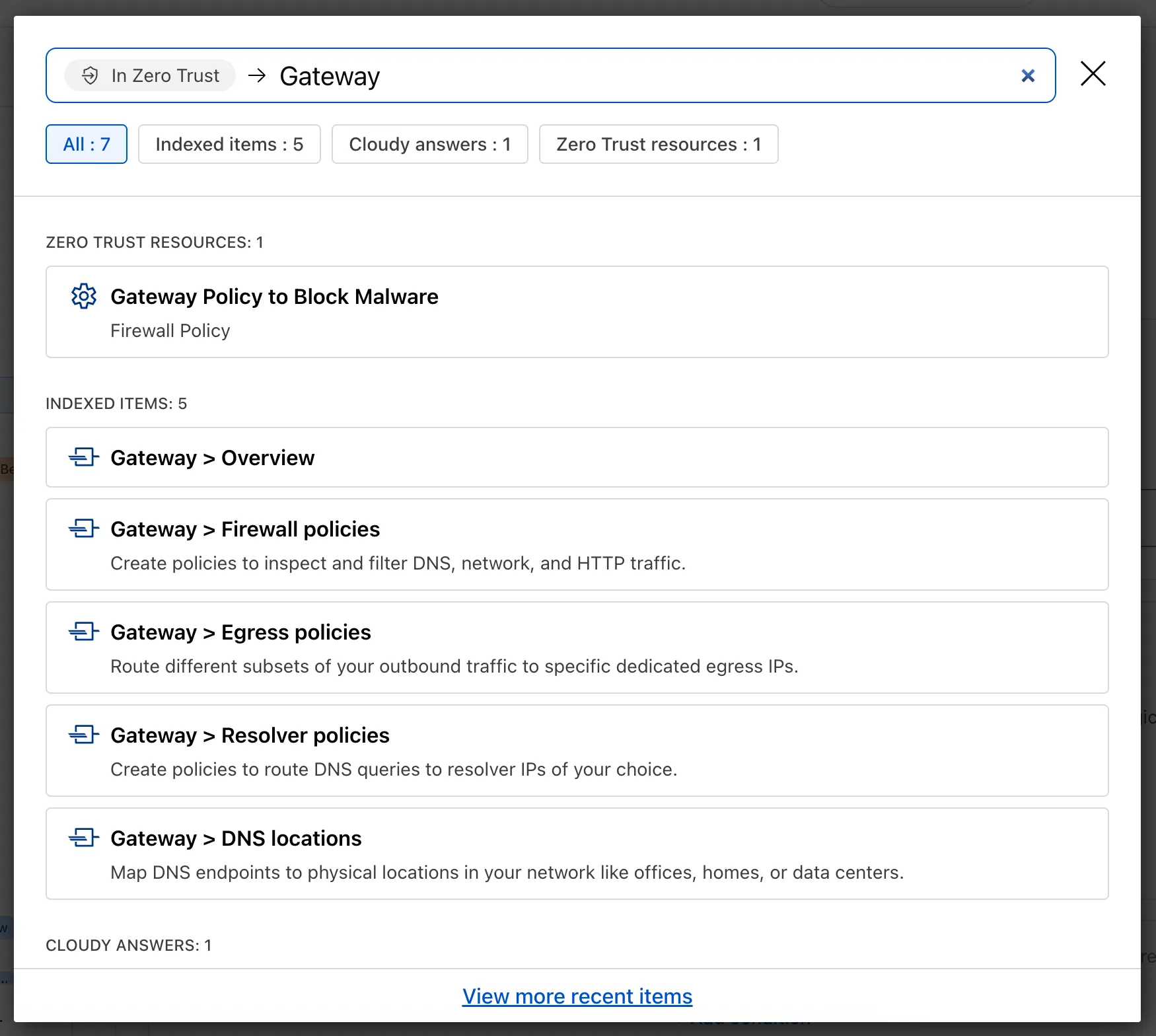
Ask Cloudy — You can also ask Cloudy, our AI agent, questions about Cloudflare Zero Trust. Cloudy is trained on our developer documentation and implementation guides, so it can tell you how to configure functionality, best practices, and can make recommendations.
Cloudy can then stay open with you as you move between pages to build configuration or answer more questions.
Find Recents — Recent searches and Cloudy questions also have a new tab under Zero Trust Overview.
-
Access GraphQL-powered DNS Firewall analytics directly in the Cloudflare dashboard.
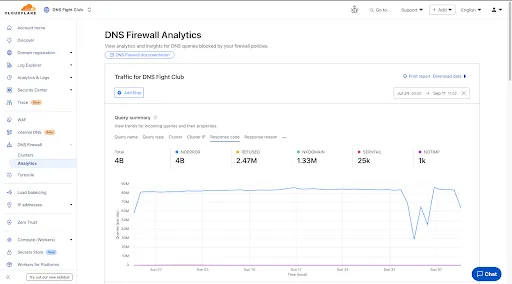
- Query summary: Describes trends over time, segmented by dimensions.
- Query statistics: Describes totals, cached/uncached queries, and processing/response times.
- DNS queries by data center: Describes global view and the top 10 data centers.
- Top query statistics: Shows a breakdown by key dimensions, with search and expand options (up to top 100 items).
Additional features:
- Apply filters and time ranges once. Changes reflect across all panels.
- Filter by dimensions like query name, query type, cluster, data center, protocol (UDP/TCP), IP version, response code/reason, and more.
- Access up to 62 days of historical data with flexible intervals.
Available to all DNS Firewall customers as part of their existing subscription.
-
In the Cloudflare dashboard, go to the DNS Firewall page.
Go to Analytics -
Refer to the DNS Firewall Analytics to learn more.
Three months ago we announced the public beta of remote bindings for local development. Now, we're excited to say that it's available for everyone in Wrangler, Vite, and Vitest without using an experimental flag!
With remote bindings, you can now connect to deployed resources like R2 buckets and D1 databases while running Worker code on your local machine. This means you can test your local code changes against real data and services, without the overhead of deploying for each iteration.
To enable remote bindings, add
"remote" : trueto each binding that you want to rely on a remote resource running on Cloudflare:{"name": "my-worker",// Set this to today's date"compatibility_date": "2026-03-12","r2_buckets": [{"bucket_name": "screenshots-bucket","binding": "screenshots_bucket","remote": true,},],}name = "my-worker"# Set this to today's datecompatibility_date = "2026-03-12"[[r2_buckets]]bucket_name = "screenshots-bucket"binding = "screenshots_bucket"remote = trueWhen remote bindings are configured, your Worker still executes locally, but all binding calls are proxied to the deployed resource that runs on Cloudflare's network.
You can try out remote bindings for local development today with:
This week's update
This week's focus highlights newly disclosed vulnerabilities in DevOps tooling, data visualization platforms, and enterprise CMS solutions. These issues include sensitive information disclosure and remote code execution, putting organizations at risk of credential leakage, unauthorized access, and full system compromise.
Key Findings
-
Argo CD (CVE-2025-55190): Exposure of sensitive information could allow attackers to access credential data stored in configurations, potentially leading to compromise of Kubernetes workloads and secrets.
-
DataEase (CVE-2025-57773): Insufficient input validation enables JNDI injection and insecure deserialization, resulting in remote code execution (RCE). Successful exploitation grants attackers control over the application server.
-
Sitecore (CVE-2025-53694): A sensitive information disclosure flaw allows unauthorized access to confidential information stored in Sitecore deployments, raising the risk of data breaches and privilege escalation.
Impact
These vulnerabilities expose organizations to serious risks, including credential theft, unauthorized access, and full system compromise. Argo CD's flaw may expose Kubernetes secrets, DataEase exploitation could give attackers remote execution capabilities, and Sitecore's disclosure issue increases the likelihood of sensitive data leakage and business impact.
Administrators are strongly advised to apply vendor patches immediately, rotate exposed credentials, and review access controls to mitigate these risks.
Ruleset Rule ID Legacy Rule ID Description Previous Action New Action Comments Cloudflare Managed Ruleset 100646 Argo CD - Information Disclosure - CVE:CVE-2025-55190s Log Disabled This is a New Detection Cloudflare Managed Ruleset 100874 DataEase - JNDI injection - CVE:CVE-2025-57773 Log Disabled This is a New Detection Cloudflare Managed Ruleset 100880 Sitecore - Information Disclosure - CVE:CVE-2025-53694 Log Block This is a New Detection -
We’re excited to announce that Email security customers can now choose their preferred mail processing location directly from the UI when onboarding a domain. This feature is available for the following onboarding methods: MX, BCC, and Journaling.
Customers can now select where their email is processed. The following regions are supported:
- Germany
- India
- Australia
Global processing remains the default option, providing flexibility to meet both compliance requirements or operational preferences.
When onboarding a domain with MX, BCC, or Journaling:
- Select the desired processing location (Germany, India, or Australia).
- The UI will display updated processing addresses specific to that region.
- For MX onboarding, if your domain is managed by Cloudflare, you can automatically update MX records directly from the UI.
This feature is available across these Email security packages:
- Advantage
- Enterprise
- Enterprise + PhishGuard
We’re expanding the list of processing locations to match our Data Localization Suite (DLS) footprint, giving customers the broadest set of regional options in the market without the complexity of self-hosting.
D1 now detects read-only queries and automatically attempts up to two retries to execute those queries in the event of failures with retryable errors. You can access the number of execution attempts in the returned response metadata property
total_attempts.At the moment, only read-only queries are retried, that is, queries containing only the following SQLite keywords:
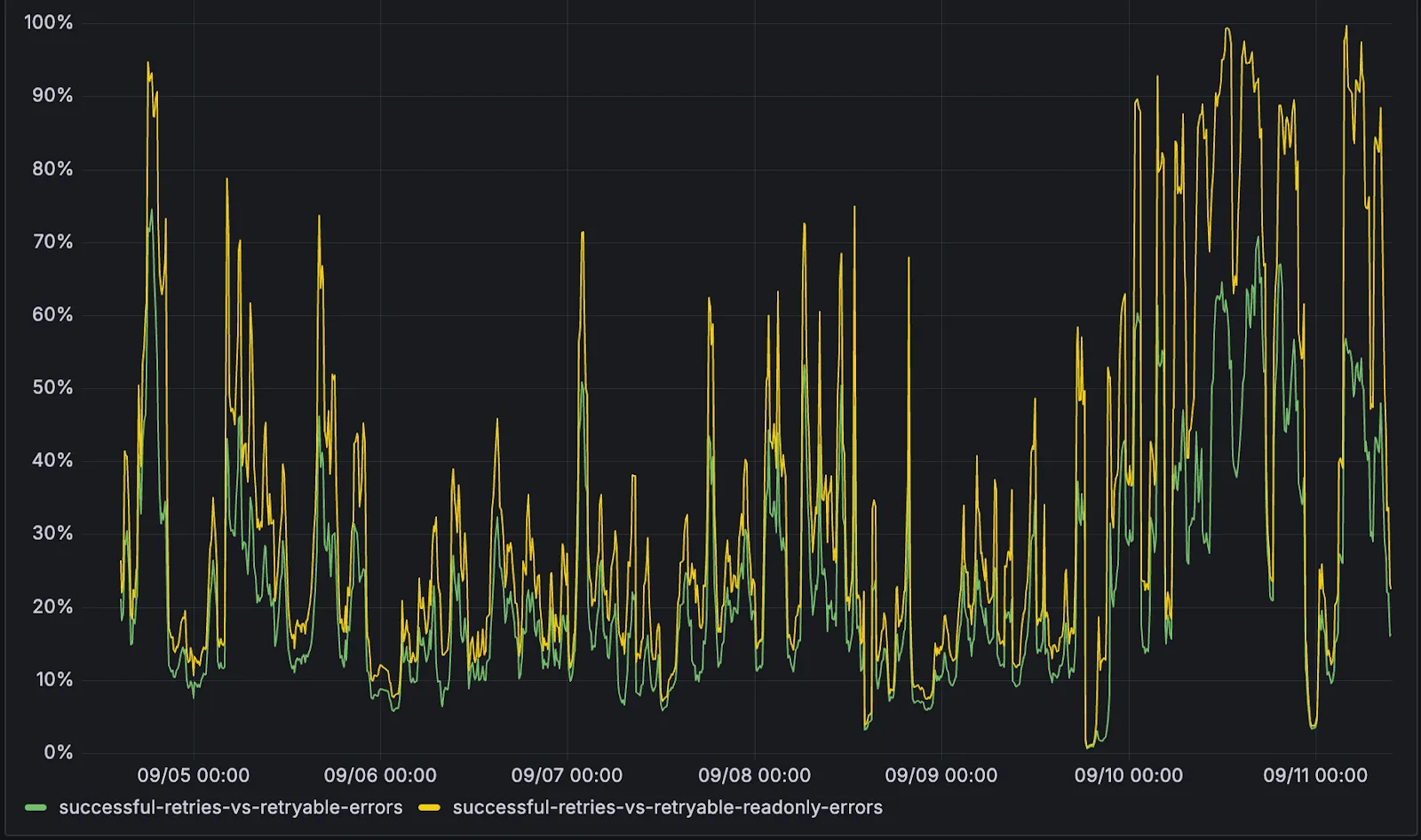
SELECT,EXPLAIN,WITH. Queries containing any SQLite keyword ↗ that leads to database writes are not retried.The retry success ratio among read-only retryable errors varies from 5% all the way up to 95%, depending on the underlying error and its duration (like network errors or other internal errors).
The retry success ratio among all retryable errors is lower, indicating that there are write-queries that could be retried. Therefore, we recommend D1 users to continue applying retries in their own code for queries that are not read-only but are idempotent according to the business logic of the application.
D1 ensures that any retry attempt does not cause database writes, making the automatic retries safe from side-effects, even if a query causing changes slips through the read-only detection. D1 achieves this by checking for modifications after every query execution, and if any write occurred due to a retry attempt, the query is rolled back.
The read-only query detection heuristics are simple for now, and there is room for improvement to capture more cases of queries that can be retried, so this is just the beginning.
Magic WAN and WARP Connector users can now securely route their DNS traffic to the Gateway resolver without exposing traffic to the public Internet.
Routing DNS traffic to the Gateway resolver allows DNS resolution and filtering for traffic coming from private networks while preserving source internal IP visibility. This ensures Magic WAN users have full integration with our Cloudflare One features, including Internal DNS and hostname-based policies.
To configure DNS filtering, change your Magic WAN or WARP Connector DNS settings to use Cloudflare's shared resolver IPs,
172.64.36.1and172.64.36.2. Once you configure DNS resolution and filtering, you can use Source Internal IP as a traffic selector in your resolver policies for routing private DNS traffic to your Internal DNS.
Directly from Log Search results, customers can pivot to other parts of the Cloudflare dashboard to immediately take action as a result of their investigation.
From the
http_requestsorfw_eventsdataset results, right click on an IP Address or JA3 Fingerprint to pivot to the Investigate portal to lookup the reputation of an IP address or JA3 fingerprint.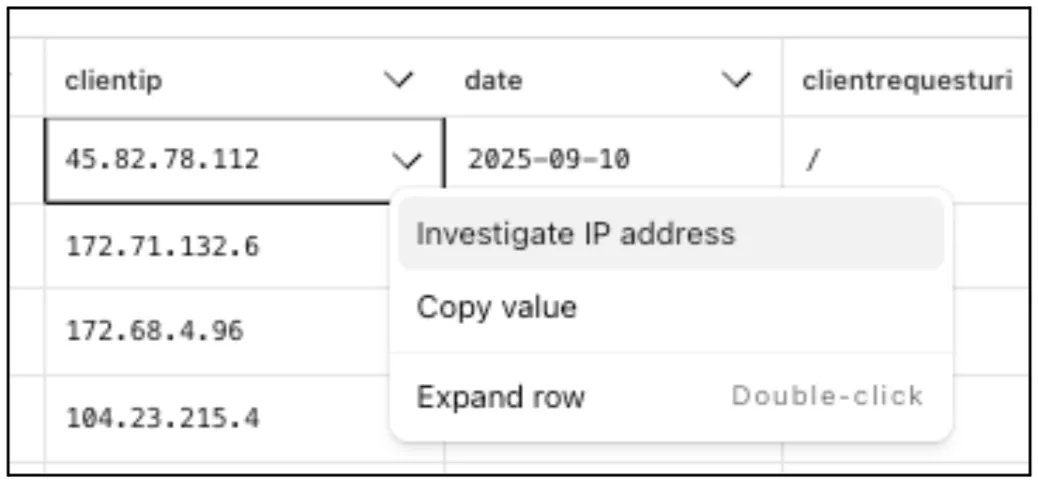
Easily learn about error codes by linking directly to our documentation from the EdgeResponseStatus or OriginResponseStatus fields.
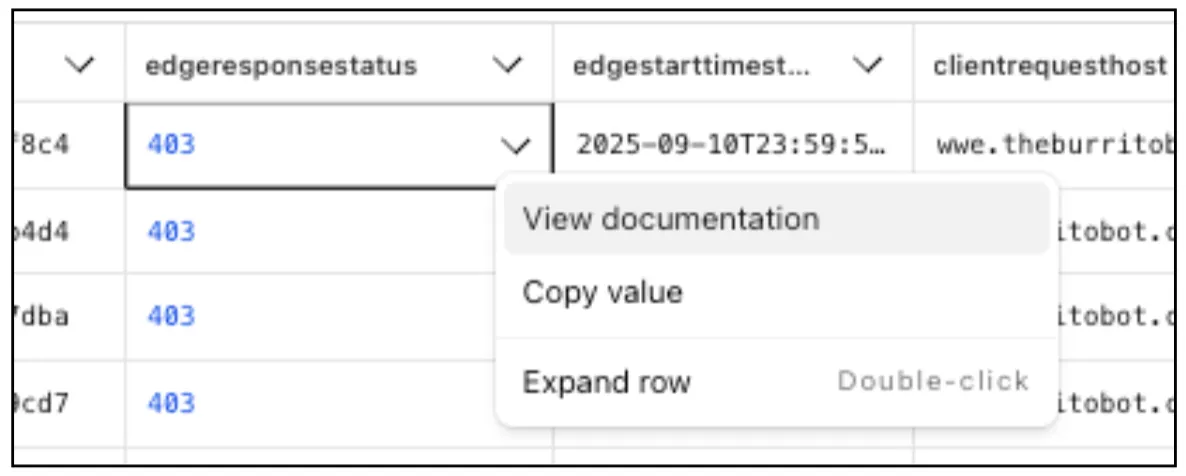
From the
gateway_httpdataset, click on a policyid to link directly to the Zero Trust dashboard to review or make changes to a specific Gateway policy.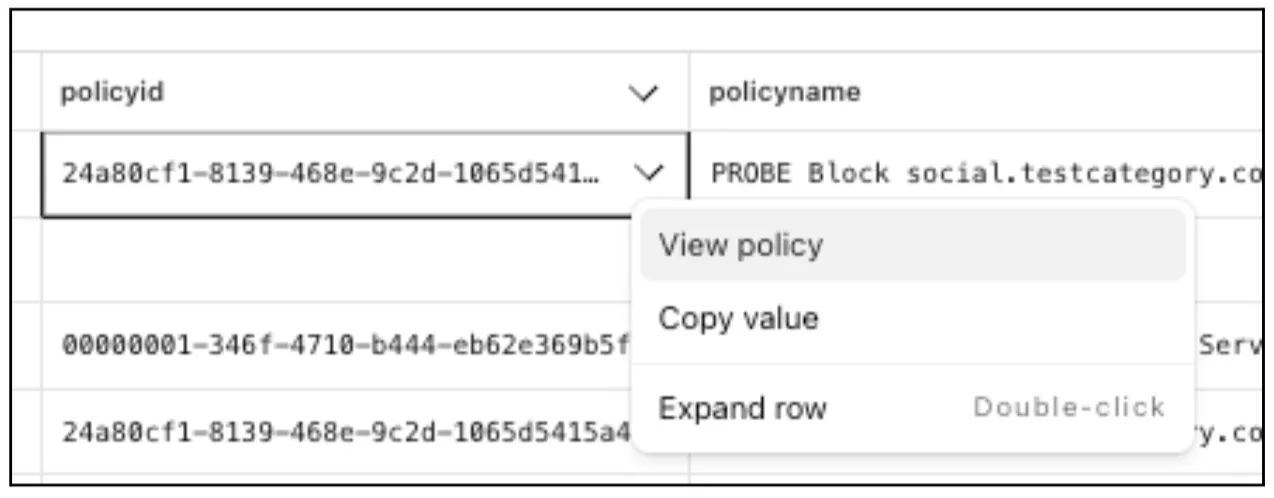
The results table view of Log Search has been updated with additional functionality and a more streamlined user experience. Users can now easily:
- Remove/add columns.
- Resize columns.
- Sort columns.
- Copy values from any field.

The number of recent versions available for a Worker rollback has been increased from 10 to 100.
This allows you to:
-
Promote any of the 100 most recent versions to be the active deployment.
-
Split traffic using gradual deployments between your latest code and any of the 100 most recent versions.
You can do this through the Cloudflare dashboard or with Wrangler's rollback command
Learn more about versioned deployments and rollbacks.
-
A new Beta release for the Windows WARP client is now available on the beta releases downloads page.
This release contains minor fixes and improvements including enhancements to Proxy mode for even faster resolution. The MASQUE protocol is now the only protocol that can use Proxy mode. If you previously configured a device profile to use Proxy mode with Wireguard, you will need to select a new WARP mode or all devices matching the profile will lose connectivity.
Changes and improvements
- Enhancements to Proxy mode for even faster resolution. The MASQUE protocol is now the only protocol that can use Proxy mode. If you previously configured a device profile to use Proxy mode with Wireguard, you will need to select a new WARP mode or all devices matching the profile will lose connectivity.
- Improvement to keep TCP connections up the first time WARP connects on devices so that remote desktop sessions (such as RDP or SSH) continue to work.
- Improvements to maintain Global WARP Override settings when switching between organization configurations.
- The MASQUE protocol is now the default protocol for all new WARP device profiles.
- Improvement to limit idle connections in DoH mode to avoid unnecessary resource usage that can lead to DoH requests not resolving.
Known issues
For Windows 11 24H2 users, Microsoft has confirmed a regression that may lead to performance issues like mouse lag, audio cracking, or other slowdowns. Cloudflare recommends users experiencing these issues upgrade to a minimum Windows 11 24H2 KB5062553 or higher for resolution.
Devices using WARP client 2025.4.929.0 and up may experience Local Domain Fallback failures if a fallback server has not been configured. To configure a fallback server, refer to Route traffic to fallback server.
Devices with KB5055523 installed may receive a warning about Win32/ClickFix.ABA being present in the installer. To resolve this false positive, update Microsoft Security Intelligence to version 1.429.19.0 or later.
DNS resolution may be broken when the following conditions are all true:
- WARP is in Secure Web Gateway without DNS filtering (tunnel-only) mode.
- A custom DNS server address is configured on the primary network adapter.
- The custom DNS server address on the primary network adapter is changed while WARP is connected.
To work around this issue, reconnect the WARP client by toggling off and back on.
A new Beta release for the macOS WARP client is now available on the beta releases downloads page.
This release contains minor fixes and improvements including enhancements to Proxy mode for even faster resolution. The MASQUE protocol is now the only protocol that can use Proxy mode. If you previously configured a device profile to use Proxy mode with Wireguard, you will need to select a new WARP mode or all devices matching the profile will lose connectivity.
Changes and improvements
- Enhancements to Proxy mode for even faster resolution. The MASQUE protocol is now the only protocol that can use Proxy mode. If you previously configured a device profile to use Proxy mode with Wireguard, you will need to select a new WARP mode or all devices matching the profile will lose connectivity.
- Fixed a bug preventing the
warp-diag captive-portalcommand from running successfully due to the client not parsing SSID on macOS. - Improvements to maintain Global WARP Override settings when switching between organization configurations.
- The MASQUE protocol is now the default protocol for all new WARP device profiles.
- Improvement to limit idle connections in DoH mode to avoid unnecessary resource usage that can lead to DoH requests not resolving.
Known issues
- macOS Sequoia: Due to changes Apple introduced in macOS 15.0.x, the WARP client may not behave as expected. Cloudflare recommends the use of macOS 15.4 or later.
- Devices using WARP client 2025.4.929.0 and up may experience Local Domain Fallback failures if a fallback server has not been configured. To configure a fallback server, refer to Route traffic to fallback server.
We've shipped a new release for the Agents SDK ↗ bringing full compatibility with AI SDK v5 ↗ and introducing automatic message migration that handles all legacy formats transparently.
This release includes improved streaming and tool support, tool confirmation detection (for "human in the loop" systems), enhanced React hooks with automatic tool resolution, improved error handling for streaming responses, and seamless migration utilities that work behind the scenes.
This makes it ideal for building production AI chat interfaces with Cloudflare Workers AI models, agent workflows, human-in-the-loop systems, or any application requiring reliable message handling across SDK versions — all while maintaining backward compatibility.
Additionally, we've updated workers-ai-provider v2.0.0, the official provider for Cloudflare Workers AI models, to be compatible with AI SDK v5.
Creates a new chat interface with enhanced v5 capabilities.
TypeScript // Basic chat setupconst { messages, sendMessage, addToolResult } = useAgentChat({agent,experimental_automaticToolResolution: true,tools,});// With custom tool confirmationconst chat = useAgentChat({agent,experimental_automaticToolResolution: true,toolsRequiringConfirmation: ["dangerousOperation"],});Tools are automatically categorized based on their configuration:
TypeScript const tools = {// Auto-executes (has execute function)getLocalTime: {description: "Get current local time",inputSchema: z.object({}),execute: async () => new Date().toLocaleString(),},// Requires confirmation (no execute function)deleteFile: {description: "Delete a file from the system",inputSchema: z.object({filename: z.string(),}),},// Server-executed (no client confirmation)analyzeData: {description: "Analyze dataset on server",inputSchema: z.object({ data: z.array(z.number()) }),serverExecuted: true,},} satisfies Record<string, AITool>;Send messages using the new v5 format with parts array:
TypeScript // Text messagesendMessage({role: "user",parts: [{ type: "text", text: "Hello, assistant!" }],});// Multi-part message with filesendMessage({role: "user",parts: [{ type: "text", text: "Analyze this image:" },{ type: "image", image: imageData },],});Simplified logic for detecting pending tool confirmations:
TypeScript const pendingToolCallConfirmation = messages.some((m) =>m.parts?.some((part) => isToolUIPart(part) && part.state === "input-available",),);// Handle tool confirmationif (pendingToolCallConfirmation) {await addToolResult({toolCallId: part.toolCallId,tool: getToolName(part),output: "User approved the action",});}Seamlessly handle legacy message formats without code changes.
TypeScript // All these formats are automatically converted:// Legacy v4 string contentconst legacyMessage = {role: "user",content: "Hello world",};// Legacy v4 with tool callsconst legacyWithTools = {role: "assistant",content: "",toolInvocations: [{toolCallId: "123",toolName: "weather",args: { city: "SF" },state: "result",result: "Sunny, 72°F",},],};// Automatically becomes v5 format:// {// role: "assistant",// parts: [{// type: "tool-call",// toolCallId: "123",// toolName: "weather",// args: { city: "SF" },// state: "result",// result: "Sunny, 72°F"// }]// }Migrate tool definitions to use the new
inputSchemaproperty.TypeScript // Before (AI SDK v4)const tools = {weather: {description: "Get weather information",parameters: z.object({city: z.string(),}),execute: async (args) => {return await getWeather(args.city);},},};// After (AI SDK v5)const tools = {weather: {description: "Get weather information",inputSchema: z.object({city: z.string(),}),execute: async (args) => {return await getWeather(args.city);},},};Seamless integration with Cloudflare Workers AI models through the updated workers-ai-provider v2.0.0.
Use Cloudflare Workers AI models directly in your agent workflows:
TypeScript import { createWorkersAI } from "workers-ai-provider";import { useAgentChat } from "agents/ai-react";// Create Workers AI model (v2.0.0 - same API, enhanced v5 internals)const model = createWorkersAI({binding: env.AI,})("@cf/meta/llama-3.2-3b-instruct");Workers AI models now support v5 file handling with automatic conversion:
TypeScript // Send images and files to Workers AI modelssendMessage({role: "user",parts: [{ type: "text", text: "Analyze this image:" },{type: "file",data: imageBuffer,mediaType: "image/jpeg",},],});// Workers AI provider automatically converts to proper formatEnhanced streaming support with automatic warning detection:
TypeScript // Streaming with Workers AI modelsconst result = await streamText({model: createWorkersAI({ binding: env.AI })("@cf/meta/llama-3.2-3b-instruct"),messages,onChunk: (chunk) => {// Enhanced streaming with warning handlingconsole.log(chunk);},});Update your imports to use the new v5 types:
TypeScript // Before (AI SDK v4)import type { Message } from "ai";import { useChat } from "ai/react";// After (AI SDK v5)import type { UIMessage } from "ai";// or alias for compatibilityimport type { UIMessage as Message } from "ai";import { useChat } from "@ai-sdk/react";- Migration Guide ↗ - Comprehensive migration documentation
- AI SDK v5 Documentation ↗ - Official AI SDK migration guide
- An Example PR showing the migration from AI SDK v4 to v5 ↗
- GitHub Issues ↗ - Report bugs or request features
We'd love your feedback! We're particularly interested in feedback on:
- Migration experience - How smooth was the upgrade process?
- Tool confirmation workflow - Does the new automatic detection work as expected?
- Message format handling - Any edge cases with legacy message conversion?
We've updated our "Built with Cloudflare" button to make it easier to share that you're building on Cloudflare with the world. Embed it in your project's README, blog post, or wherever you want to let people know.

Check out the documentation for usage information.
Deploying static site to Workers is now easier. When you run
wrangler deploy [directory]orwrangler deploy --assets [directory]without an existing configuration file, Wrangler CLI now guides you through the deployment process with interactive prompts.Before: Required remembering multiple flags and parameters
Terminal window wrangler deploy --assets ./dist --compatibility-date 2025-09-09 --name my-projectAfter: Simple directory deployment with guided setup
Terminal window wrangler deploy dist# Interactive prompts handle the rest as shown in the example flow belowInteractive prompts for missing configuration:
- Wrangler detects when you're trying to deploy a directory of static assets
- Prompts you to confirm the deployment type
- Asks for a project name (with smart defaults)
- Automatically sets the compatibility date to today
Automatic configuration generation:
- Creates a
wrangler.jsoncfile with your deployment settings - Stores your choices for future deployments
- Eliminates the need to remember complex command-line flags
Terminal window # Deploy your built static sitewrangler deploy dist# Wrangler will prompt:✔ It looks like you are trying to deploy a directory of static assets only. Is this correct? … yes✔ What do you want to name your project? … my-astro-site# Automatically generates a wrangler.jsonc file and adds it to your project:{"name": "my-astro-site","compatibility_date": "2025-09-09","assets": {"directory": "dist"}}# Next time you run wrangler deploy, this will use the configuration in your newly generated wrangler.jsonc filewrangler deploy- You must use Wrangler version 4.24.4 or later in order to use this feature
Now, Magic WAN customers can configure a custom IKE ID for their IPsec tunnels. Customers that are using Magic WAN and a VeloCloud SD-WAN device together can utilize this new feature to create a high availability configuration.
This feature is available via API only. Customers can read the Magic WAN documentation to learn more about the Custom IKE ID feature and the API call to configure it.
Two-factor authentication is the best way to help protect your account from account takeovers, but if you lose your second factor, you could be locked out of your account. Lock outs are one of the top reasons customers contact Cloudflare support, and our policies often don't allow us to bypass two-factor authentication for customers that are locked out. Today we are releasing an improvement where Cloudflare will periodically remind you to securely save your backup codes so you don't get locked out in the future.
This week's update
This week’s focus highlights newly disclosed vulnerabilities in web frameworks, enterprise applications, and widely deployed CMS plugins. The vulnerabilities include SSRF, authentication bypass, arbitrary file upload, and remote code execution (RCE), exposing organizations to high-impact risks such as unauthorized access, system compromise, and potential data exposure. In addition, security rule enhancements have been deployed to cover general command injection and server-side injection attacks, further strengthening protections.
Key Findings
-
Next.js (CVE-2025-57822): Improper handling of redirects in custom middleware can lead to server-side request forgery (SSRF) when user-supplied headers are forwarded. Attackers could exploit this to access internal services or cloud metadata endpoints. The issue has been resolved in versions 14.2.32 and 15.4.7. Developers using custom middleware should upgrade and verify proper redirect handling in
next()calls. -
ScriptCase (CVE-2025-47227, CVE-2025-47228): In the Production Environment extension in Netmake ScriptCase through 9.12.006 (23), two vulnerabilities allow attackers to reset admin accounts and execute system commands, potentially leading to full compromise of affected deployments.
-
Sar2HTML (CVE-2025-34030): In Sar2HTML version 3.2.2 and earlier, insufficient input sanitization of the plot parameter allows remote, unauthenticated attackers to execute arbitrary system commands. Exploitation could compromise the underlying server and its data.
-
Zhiyuan OA (CVE-2025-34040): An arbitrary file upload vulnerability exists in the Zhiyuan OA platform. Improper validation in the
wpsAssistServletinterface allows unauthenticated attackers to upload crafted files via path traversal, which can be executed on the web server, leading to remote code execution. -
WordPress:Plugin:InfiniteWP Client (CVE-2020-8772): A vulnerability in the InfiniteWP Client plugin allows attackers to perform restricted actions and gain administrative control of connected WordPress sites.
Impact
These vulnerabilities could allow attackers to gain unauthorized access, execute malicious code, or take full control of affected systems. The Next.js SSRF flaw may expose internal services or cloud metadata endpoints to attackers. Exploitations of ScriptCase and Sar2HTML could result in remote code execution, administrative takeover, and full server compromise. In Zhiyuan OA, the arbitrary file upload vulnerability allows attackers to execute malicious code on the web server, potentially exposing sensitive data and applications. The authentication bypass in WordPress InfiniteWP Client enables attackers to gain administrative access, risking data exposure and unauthorized control of connected sites.
Administrators are strongly advised to apply vendor patches immediately, remove unsupported software, and review authentication and access controls to mitigate these risks.
Ruleset Rule ID Legacy Rule ID Description Previous Action New Action Comments Cloudflare Managed Ruleset 100007D Command Injection - Common Attack Commands Args Log Block This rule has been merged into the original rule "Command Injection - Common Attack Commands" (ID: Cloudflare Managed Ruleset 100617 Next.js - SSRF - CVE:CVE-2025-57822 Log Block This is a New Detection Cloudflare Managed Ruleset 100659_BETA Common Payloads for Server-Side Template Injection - Beta Log Block This rule is merged into the original rule "Common Payloads for Server-Side Template Injection" (ID: Cloudflare Managed Ruleset 100824B CrushFTP - Remote Code Execution - CVE:CVE-2025-54309 - 3 Log Disabled This is a New Detection Cloudflare Managed Ruleset 100848 ScriptCase - Auth Bypass - CVE:CVE-2025-47227 Log Disabled This is a New Detection Cloudflare Managed Ruleset 100849 ScriptCase - Command Injection - CVE:CVE-2025-47228 Log Disabled This is a New Detection Cloudflare Managed Ruleset 100872 WordPress:Plugin:InfiniteWP Client - Missing Authorization - CVE:CVE-2020-8772 Log Block This is a New Detection Cloudflare Managed Ruleset 100873 Sar2HTML - Command Injection - CVE:CVE-2025-34030 Log Block This is a New Detection Cloudflare Managed Ruleset 100875 Zhiyuan OA - Remote Code Execution - CVE:CVE-2025-34040 Log Block This is a New Detection -
All bidirectional tunnel health check return packets are accepted by any Magic on-ramp.
Previously, when a Magic tunnel had a bidirectional health check configured, the bidirectional health check would pass when the return packets came back to Cloudflare over the same tunnel that was traversed by the forward packets.
There are SD-WAN devices, like VeloCloud, that do not offer controls to steer traffic over one tunnel versus another in a high availability tunnel configuration.
Now, when a Magic tunnel has a bidirectional health check configured, the bidirectional health check will pass when the return packet traverses over any tunnel in a high availability configuration.
We're excited to be a launch partner alongside Google ↗ to bring their newest embedding model, EmbeddingGemma, to Workers AI that delivers best-in-class performance for its size, enabling RAG and semantic search use cases.
@cf/google/embeddinggemma-300mis a 300M parameter embedding model from Google, built from Gemma 3 and the same research used to create Gemini models. This multilingual model supports 100+ languages, making it ideal for RAG systems, semantic search, content classification, and clustering tasks.Using EmbeddingGemma in AI Search: Now you can leverage EmbeddingGemma directly through AI Search for your RAG pipelines. EmbeddingGemma's multilingual capabilities make it perfect for global applications that need to understand and retrieve content across different languages with exceptional accuracy.
To use EmbeddingGemma for your AI Search projects:
- Go to Create in the AI Search dashboard ↗
- Follow the setup flow for your new RAG instance
- In the Generate Index step, open up More embedding models and select
@cf/google/embeddinggemma-300mas your embedding model - Complete the setup to create an AI Search
Try it out and let us know what you think!
This week's update
This week, new critical vulnerabilities were disclosed in Sitecore’s Sitecore Experience Manager (XM), Sitecore Experience Platform (XP), specifically versions 9.0 through 9.3, and 10.0 through 10.4. These flaws are caused by unsafe data deserialization and code reflection, leaving affected systems at high risk of exploitation.
Key Findings
- CVE-2025-53690: Remote Code Execution through Insecure Deserialization
- CVE-2025-53691: Remote Code Execution through Insecure Deserialization
- CVE-2025-53693: HTML Cache Poisoning through Unsafe Reflections
Impact
Exploitation could allow attackers to execute arbitrary code remotely on the affected system and conduct cache poisoning attacks, potentially leading to further compromise. Applying the latest vendor-released solution without delay is strongly recommended.
Ruleset Rule ID Legacy Rule ID Description Previous Action New Action Comments Cloudflare Managed Ruleset 100878 Sitecore - Remote Code Execution - CVE:CVE-2025-53691 N/A Block This is a new detection Cloudflare Managed Ruleset 100631 Sitecore - Cache Poisoning - CVE:CVE-2025-53693 N/A Block This is a new detection Cloudflare Managed Ruleset 100879 Sitecore - Remote Code Execution - CVE:CVE-2025-53690 N/A Block This is a new detection
You can now upload up to 100,000 static assets per Worker version
- Paid and Workers for Platforms users can now upload up to 100,000 static assets per Worker version, a 5x increase from the previous limit of 20,000.
- Customers on the free plan still have the same limit as before — 20,000 static assets per version of your Worker
- The individual file size limit of 25 MiB remains unchanged for all customers.
This increase allows you to build larger applications with more static assets without hitting limits.
To take advantage of the increased limits, you must use Wrangler version 4.34.0 or higher. Earlier versions of Wrangler will continue to enforce the previous 20,000 file limit.
For more information about Workers static assets, see the Static Assets documentation and Platform Limits.
You can now manage Workers, Versions, and Deployments as separate resources with a new, resource-oriented API (Beta).
This new API is supported in the Cloudflare Terraform provider ↗ and the Cloudflare Typescript SDK ↗, allowing platform teams to manage a Worker's infrastructure in Terraform, while development teams handle code deployments from a separate repository or workflow. We also designed this API with AI agents in mind, as a clear, predictable structure is essential for them to reliably build, test, and deploy applications.
- New beta API endpoints
- Cloudflare TypeScript SDK v5.0.0 ↗
- Cloudflare Go SDK v6.0.0 ↗
- Terraform provider v5.9.0 ↗:
cloudflare_worker↗ ,cloudflare_worker_version↗, andcloudflare_workers_deployments↗ resources. - See full examples in our Infrastructure as Code (IaC) guide
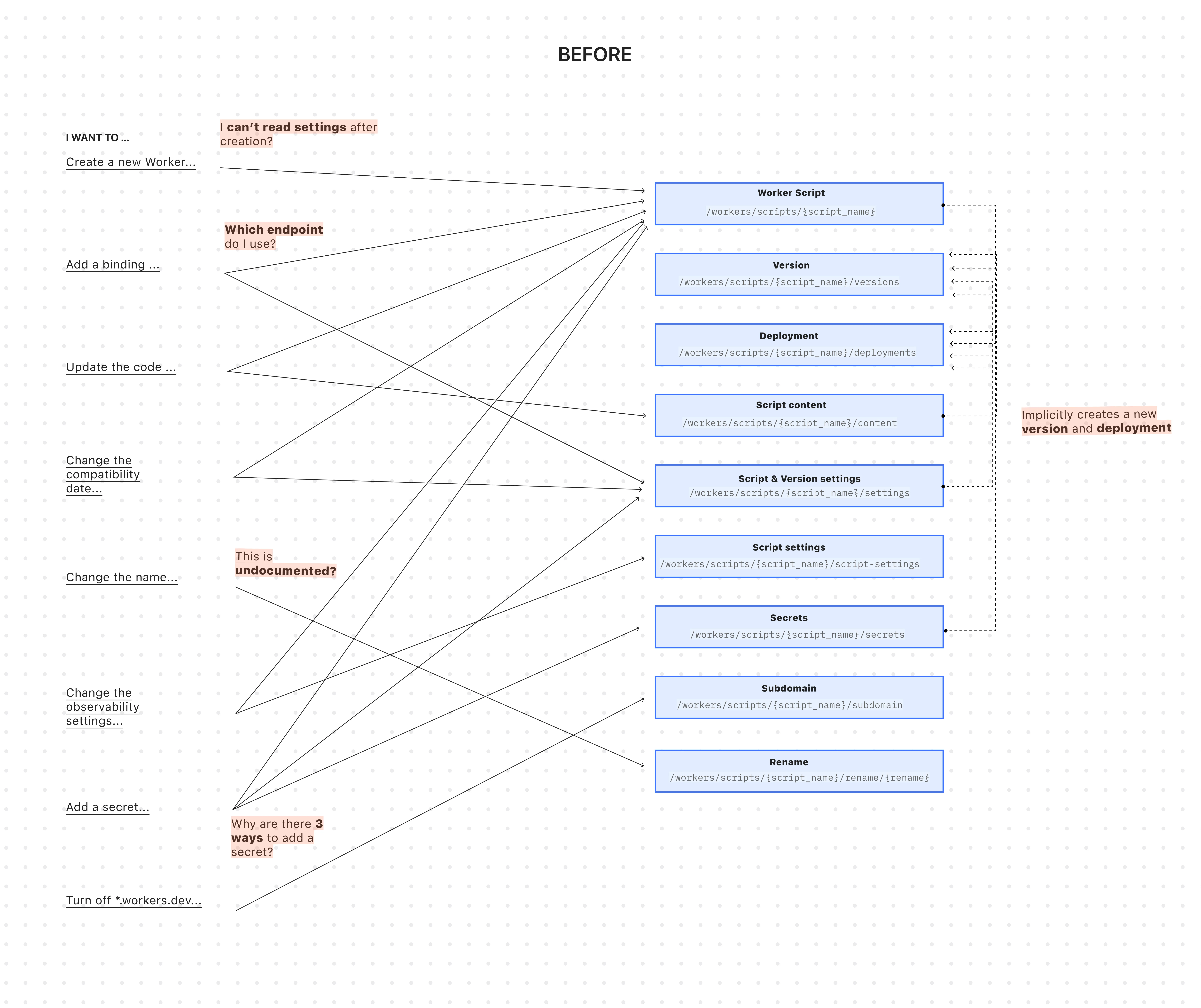
The existing API was originally designed for simple, one-shot script uploads:
Terminal window curl -X PUT "https://api.cloudflare.com/client/v4/accounts/$ACCOUNT_ID/workers/scripts/$SCRIPT_NAME" \-H "X-Auth-Email: $CLOUDFLARE_EMAIL" \-H "X-Auth-Key: $CLOUDFLARE_API_KEY" \-H "Content-Type: multipart/form-data" \-F 'metadata={"main_module": "worker.js","compatibility_date": "$today$"}' \-F "worker.js=@worker.js;type=application/javascript+module"This API worked for creating a basic Worker, uploading all of its code, and deploying it immediately — but came with challenges:
-
A Worker couldn't exist without code: To create a Worker, you had to upload its code in the same API request. This meant platform teams couldn't provision Workers with the proper settings, and then hand them off to development teams to deploy the actual code.
-
Several endpoints implicitly created deployments: Simple updates like adding a secret or changing a script's content would implicitly create a new version and immediately deploy it.
-
Updating a setting was confusing: Configuration was scattered across eight endpoints with overlapping responsibilities. This ambiguity made it difficult for human developers (and even more so for AI agents) to reliably update a Worker via API.
-
Scripts used names as primary identifiers: This meant simple renames could turn into a risky migration, requiring you to create a brand new Worker and update every reference. If you were using Terraform, this could inadvertently destroy your Worker altogether.
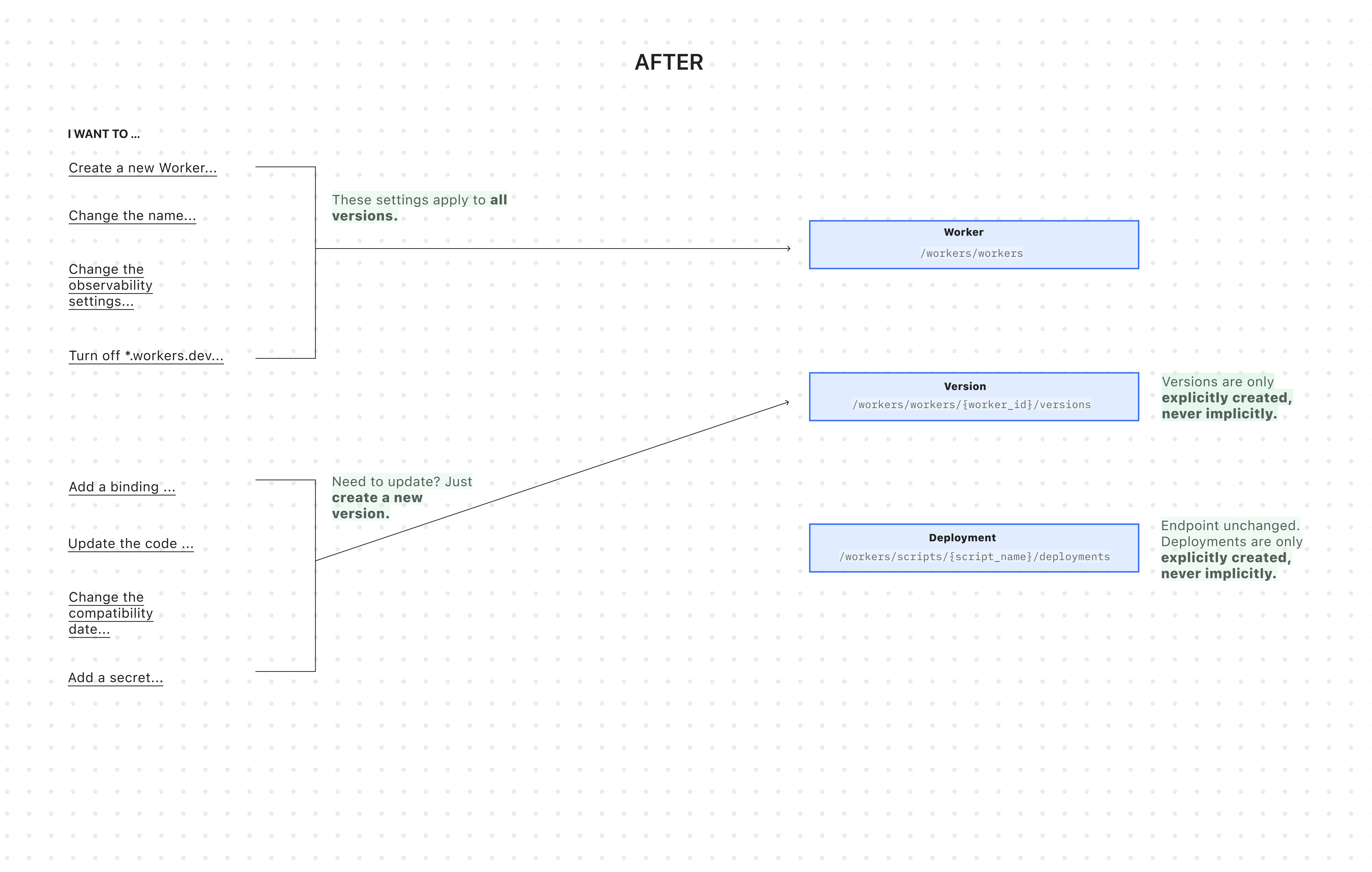
All endpoints now use simple JSON payloads, with script content embedded as
base64-encoded strings -- a more consistent and reliable approach than the previousmultipart/form-dataformat.-
Worker: The parent resource representing your application. It has a stable UUID and holds persistent settings like
name,tags, andlogpush. You can now create a Worker to establish its identity and settings before any code is uploaded. -
Version: An immutable snapshot of your code and its specific configuration, like bindings and
compatibility_date. Creating a new version is a safe action that doesn't affect live traffic. -
Deployment: An explicit action that directs traffic to a specific version.
Workers are now standalone resources that can be created and configured without any code. Platform teams can provision Workers with the right settings, then hand them off to development teams for implementation.
TypeScript // Step 1: Platform team creates the Worker resource (no code needed)const worker = await client.workers.beta.workers.create({name: "payment-service",account_id: "...",observability: {enabled: true,},});// Step 2: Development team adds code and creates a version laterconst version = await client.workers.beta.workers.versions.create(worker.id, {account_id: "...",main_module: "worker.js",compatibility_date: "$today",bindings: [ /*...*/ ],modules: [{name: "worker.js",content_type: "application/javascript+module",content_base64: Buffer.from(scriptContent).toString("base64"),},],});// Step 3: Deploy explicitly when readyconst deployment = await client.workers.scripts.deployments.create(worker.name, {account_id: "...",strategy: "percentage",versions: [{percentage: 100,version_id: version.id,},],});If you use Terraform, you can now declare the Worker in your Terraform configuration and manage configuration outside of Terraform in your Worker's
wrangler.jsoncfile and deploy code changes using Wrangler.resource "cloudflare_worker" "my_worker" {account_id = "..."name = "my-important-service"}# Manage Versions and Deployments here or outside of Terraform# resource "cloudflare_worker_version" "my_worker_version" {}# resource "cloudflare_workers_deployment" "my_worker_deployment" {}Creating a version and deploying it are now always explicit, separate actions - never implicit side effects. To update version-specific settings (like bindings), you create a new version with those changes. The existing deployed version remains unchanged until you explicitly deploy the new one.
Terminal window # Step 1: Create a new version with updated settings (doesn't affect live traffic)POST /workers/workers/{id}/versions{"compatibility_date": "$today","bindings": [{"name": "MY_NEW_ENV_VAR","text": "new_value","type": "plain_text"}],"modules": [...]}# Step 2: Explicitly deploy when ready (now affects live traffic)POST /workers/scripts/{script_name}/deployments{"strategy": "percentage","versions": [{"percentage": 100,"version_id": "new_version_id"}]}Configuration is now logically divided: Worker settings (like
nameandtags) persist across all versions, while Version settings (likebindingsandcompatibility_date) are specific to each code snapshot.Terminal window # Worker settings (the parent resource)PUT /workers/workers/{id}{"name": "payment-service","tags": ["production"],"logpush": true,}Terminal window # Version settings (the "code")POST /workers/workers/{id}/versions{"compatibility_date": "$today","bindings": [...],"modules": [...]}The
/workers/workers/path now supports addressing a Worker by both its immutable UUID and its mutable name.Terminal window # Both work for the same WorkerGET /workers/workers/29494978e03748669e8effb243cf2515 # UUID (stable for automation)GET /workers/workers/payment-service # Name (convenient for humans)This dual approach means:
- Developers can use readable names for debugging.
- Automation can rely on stable UUIDs to prevent errors when Workers are renamed.
- Terraform can rename Workers without destroying and recreating them.
- The pre-existing Workers REST API remains fully supported. Once the new API exits beta, we'll provide a migration timeline with ample notice and comprehensive migration guides.
- Existing Terraform resources and SDK methods will continue to be fully supported through the current major version.
- While the Deployments API currently remains on the
/scripts/endpoint, we plan to introduce a new Deployments endpoint under/workers/to match the new API structure.
Cloudflare's API now supports rate limiting headers using the pattern developed by the IETF draft on rate limiting ↗. This allows API consumers to know how many more calls are left until the rate limit is reached, as well as how long you will need to wait until more capacity is available.
Our SDKs automatically work with these new headers, backing off when rate limits are approached. There is no action required for users of the latest Cloudflare SDKs to take advantage of this.
As always, if you need any help with rate limits, please contact Support.
Headers that are always returned:
Ratelimit: List of service limit items, composed of the limit name, the remaining quota (r) and the time next window resets (t). For example:"default";r=50;t=30Ratelimit-Policy: List of quota policy items, composed of the policy name, the total quota (q) and the time window the quota applies to (w). For example:"burst";q=100;w=60
Returned only when a rate limit has been reached (error code: 429):
- Retry-After: Number of Seconds until more capacity is available, rounded up
- All of Cloudflare's latest SDKs will automatically respond to the headers, instituting a backoff when limits are approached.
These new headers and back offs are only available for Cloudflare REST APIs, and will not affect GraphQL.
Log Explorer now supports logging and filtering on header or cookie fields in the
http_requestsdataset.Create a custom field to log desired header or cookie values into the
http_requestsdataset and Log Explorer will import these as searchable fields. Once configured, use the custom SQL editor in Log Explorer to view or filter on these requests.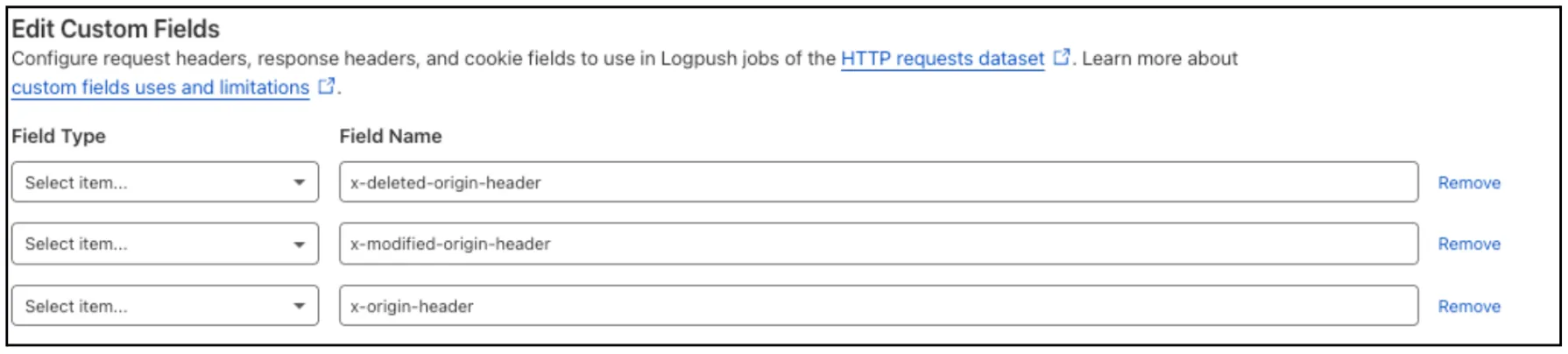
For more details, refer to Headers and cookies.