Skip to content
Cloudflare Docs

Changelog

New updates and improvements at Cloudflare.

All products
hero image
  1. A new Beta release for the Windows WARP client is now available on the beta releases downloads page.

    This release contains new improvements in addition to the features and improvements introduced in Beta client version 2025.5.735.1.

    Changes and improvements

    • Improvement to better handle multi-user fast user switching.
    • Fix for an issue causing WARP connectivity to fail without full system reboot.

    Known issues

    • Microsoft has confirmed a regression with Windows 11 starting around 24H2 that may cause performance issues for some users. These performance issues could manifest as mouse lag, audio cracking, or other slowdowns. A fix from Microsoft is expected in early July.

    • Devices with KB5055523 installed may receive a warning about Win32/ClickFix.ABA being present in the installer. To resolve this false positive, update Microsoft Security Intelligence to version 1.429.19.0 or later.

    • DNS resolution may be broken when the following conditions are all true:

      • WARP is in Secure Web Gateway without DNS filtering (tunnel-only) mode.
      • A custom DNS server address is configured on the primary network adapter.
      • The custom DNS server address on the primary network adapter is changed while WARP is connected. To work around this issue, reconnect the WARP client by toggling off and back on.
  1. A new Beta release for the macOS WARP client is now available on the beta releases downloads page.

    This release contains new improvements in addition to the features and improvements introduced in Beta client version 2025.5.735.1.

    Changes and improvements

    • Improvement for WARP connectivity issues on macOS due to the operating system not accepting DNS server configurations.

    Known issues

    • macOS Sequoia: Due to changes Apple introduced in macOS 15.0.x, the WARP client may not behave as expected. Cloudflare recommends the use of macOS 15.4 or later.
  1. Earlier this year, we announced the launch of the new Terraform v5 Provider. Unlike the earlier Terraform providers, v5 is automatically generated based on the OpenAPI Schemas for our REST APIs. Since launch, we have seen an unexpectedly high number of issues reported by customers. These issues currently impact about 15% of resources. We have been working diligently to address these issues across the company, and have released the v5.6.0 release which includes a number of bug fixes. Please keep an eye on this changelog for more information about upcoming releases.

    Changes

    • Broad fixes across resources with recurring diffs, including, but not limited to:
      • cloudflare_zero_trust_access_identity_provider
        • cloudflare_zone
    • cloudflare_page_rules runtime panic when setting cache_level to cache_ttl_by_status
    • Failure to serialize requests in cloudflare_zero_trust_tunnel_cloudflared_config
    • Undocumented field 'priority' on zone_lockdown resource
    • Missing importability for cloudflare_zero_trust_device_default_profile_local_domain_fallback and cloudflare_account_subscription
    • New resources:
      • cloudflare_schema_validation_operation_settings
      • cloudflare_schema_validation_schemas
      • cloudflare_schema_validation_settings
      • cloudflare_zero_trust_device_settings
    • Other bug fixes

    For a more detailed look at all of the changes, see the changelog in GitHub.

    Issues Closed

    If you have an unaddressed issue with the provider, we encourage you to check the open issues and open a new one if one does not already exist for what you are experiencing.

    Upgrading

    If you are evaluating a move from v4 to v5, please make use of the migration guide. We have provided automated migration scripts using Grit which simplify the transition, although these do not support implementations which use Terraform modules, so customers making use of modules need to migrate manually. Please make use of terraform plan to test your changes before applying, and let us know if you encounter any additional issues by reporting to our GitHub repository.

    For more info

  1. For those building Single Page Applications (SPAs) on Workers, you can now explicitly define which routes invoke your Worker script in Wrangler configuration. The run_worker_first config option has now been expanded to accept an array of route patterns, allowing you to more granularly specify when your Worker script runs.

    Configuration example:

    {
    "name": "my-spa-worker",
    // Set this to today's date
    "compatibility_date": "2026-03-12",
    "main": "./src/index.ts",
    "assets": {
    "directory": "./dist/",
    "not_found_handling": "single-page-application",
    "binding": "ASSETS",
    "run_worker_first": ["/api/*", "!/api/docs/*"]
    }
    }

    This new routing control was done in partnership with our community and customers who provided great feedback on our public proposal. Thank you to everyone who brought forward use-cases and feedback on the design!

    Prerequisites

    To use advanced routing control with run_worker_first, you'll need:

  1. Mitigations have been put in place for all existing and future deployments of sites with the Cloudflare adapter for Open Next in response to an identified Server-Side Request Forgery (SSRF) vulnerability in the @opennextjs/cloudflare package.

    The vulnerability stemmed from an unimplemented feature in the Cloudflare adapter for Open Next, which allowed users to proxy arbitrary remote content via the /_next/image endpoint.

    This issue allowed attackers to load remote resources from arbitrary hosts under the victim site's domain for any site deployed using the Cloudflare adapter for Open Next. For example: https://victim-site.com/_next/image?url=https://attacker.com. In this example, attacker-controlled content from attacker.com is served through the victim site's domain (victim-site.com), violating the same-origin policy and potentially misleading users or other services.

    References: https://www.cve.org/cverecord?id=CVE-2025-6087, https://github.com/opennextjs/opennextjs-cloudflare/security/advisories/GHSA-rvpw-p7vw-wj3m

    Impact

    • SSRF via unrestricted remote URL loading
    • Arbitrary remote content loading
    • Potential internal service exposure or phishing risks through domain abuse

    Mitigation

    The following mitigations have been put in place:

    Server side updates to Cloudflare's platform to restrict the content loaded via the /_next/image endpoint to images. The update automatically mitigates the issue for all existing and any future sites deployed to Cloudflare using the affected version of the Cloudflare adapter for Open Next

    Root cause fix: Pull request #727 to the Cloudflare adapter for Open Next. The patched version of the adapter has been released as @opennextjs/cloudflare@1.3.0

    Package dependency update: Pull request cloudflare/workers-sdk#9608 to create-cloudflare (c3) to use the fixed version of the Cloudflare adapter for Open Next. The patched version of create-cloudflare has been published as create-cloudflare@2.49.3.

    In addition to the automatic mitigation deployed on Cloudflare's platform, we encourage affected users to upgrade to @opennext/cloudflare v1.3.0 and use the remotePatterns filter in Next config if they need to allow-list external urls with images assets.

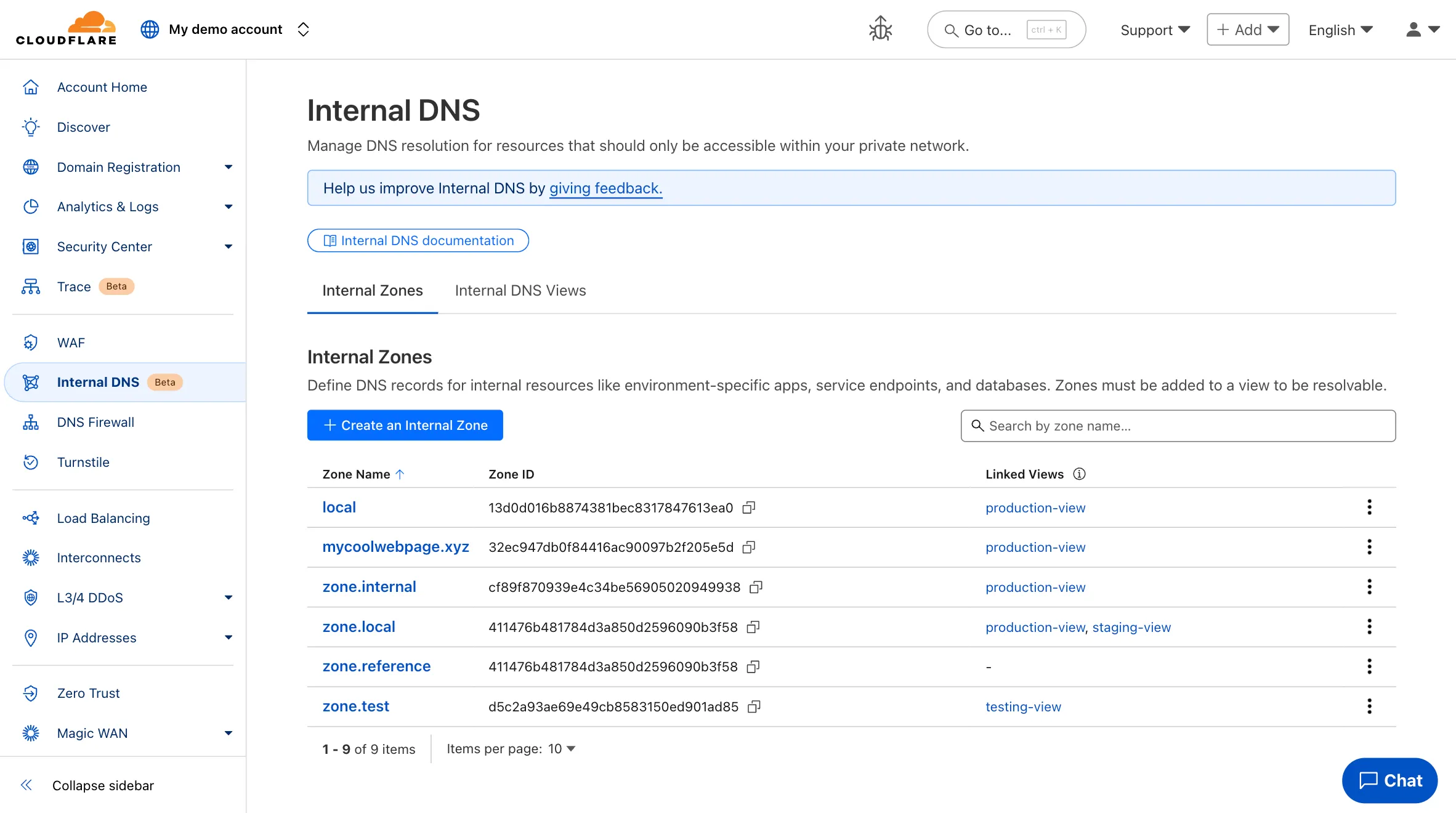
  1. Participating beta testers can now fully configure Internal DNS directly in the Cloudflare dashboard.

    Internal DNS enables customers to:

    • Map internal hostnames to private IPs for services, devices, and applications not exposed to the public Internet

    • Resolve internal DNS queries securely through Cloudflare Gateway

    • Use split-horizon DNS to return different responses based on network context

    • Consolidate internal and public DNS zones within a single management platform

    What’s new in this release:

    • Beta participants can now create and manage internal zones and views in the Cloudflare dashboard
    Internal DNS UI

    To learn more and get started, refer to the Internal DNS documentation.

  1. This week’s roundup highlights multiple critical vulnerabilities across popular web frameworks, plugins, and enterprise platforms. The focus lies on remote code execution (RCE), server-side request forgery (SSRF), and insecure file upload vectors that enable full system compromise or data exfiltration.

    Key Findings

    • Cisco IOS XE (CVE-2025-20188): Critical RCE vulnerability enabling unauthenticated attackers to execute arbitrary commands on network infrastructure devices, risking total router compromise.
    • Axios (CVE-2024-39338): SSRF flaw impacting server-side request control, allowing attackers to manipulate internal service requests when misconfigured with unsanitized user input.
    • vBulletin (CVE-2025-48827, CVE-2025-48828): Two high-impact RCE flaws enabling attackers to remotely execute PHP code, compromising forum installations and underlying web servers.
    • Invision Community (CVE-2025-47916): A critical RCE vulnerability allowing authenticated attackers to run arbitrary code in community platforms, threatening data and lateral movement risk.
    • CrushFTP (CVE-2025-32102, CVE-2025-32103): SSRF vulnerabilities in upload endpoint processing permit attackers to pivot internal network scans and abuse internal services.
    • Roundcube (CVE-2025-49113): RCE via email processing enables attackers to execute code upon viewing a crafted email — particularly dangerous for webmail deployments.
    • WooCommerce WordPress Plugin (CVE-2025-47577): Dangerous file upload vulnerability permits unauthenticated users to upload executable payloads, leading to full WordPress site takeover.
    • Cross-Site Scripting (XSS) Detection Improvements: Enhanced detection patterns.

    Impact

    These vulnerabilities span core systems — from routers to e-commerce to email. RCE in Cisco IOS XE, Roundcube, and vBulletin poses full system compromise. SSRF in Axios and CrushFTP supports internal pivoting, while WooCommerce’s file upload bug opens doors to mass WordPress exploitation.

    RulesetRule IDLegacy Rule IDDescriptionPrevious ActionNew ActionComments
    Cloudflare Managed Ruleset 100783Cisco IOS XE - Remote Code Execution - CVE:CVE-2025-20188LogBlockThis is a New Detection
    Cloudflare Managed Ruleset 100784Axios - SSRF - CVE:CVE-2024-39338LogBlockThis is a New Detection
    Cloudflare Managed Ruleset 100785

    vBulletin - Remote Code Execution - CVE:CVE-2025-48827, CVE:CVE-2025-48828

    LogBlockThis is a New Detection
    Cloudflare Managed Ruleset 100786Invision Community - Remote Code Execution - CVE:CVE-2025-47916LogBlockThis is a New Detection
    Cloudflare Managed Ruleset 100791CrushFTP - SSRF - CVE:CVE-2025-32102, CVE:CVE-2025-32103LogBlockThis is a New Detection
    Cloudflare Managed Ruleset 100792Roundcube - Remote Code Execution - CVE:CVE-2025-49113LogBlockThis is a New Detection
    Cloudflare Managed Ruleset 100793XSS - OntoggleLogDisabledThis is a New Detection
    Cloudflare Managed Ruleset 100794

    WordPress WooCommerce Plugin - Dangerous File Upload - CVE:CVE-2025-47577

    LogBlockThis is a New Detection
  1. You can now grant members of your Cloudflare account read-only access to the Workers Platform.

    The new "Workers Platform (Read-only)" role grants read-only access to all products typically used as part of Cloudflare's Developer Platform, including Workers, Pages, Durable Objects, KV, R2, Zones, Zone Analytics and Page Rules. When Cloudflare introduces new products to the Workers platform, we will add additional read-only permissions to this role.

    Additionally, the role previously named "Workers Admin" has been renamed to "Workers Platform Admin". This change ensures that the name more accurately reflects the permissions granted — this role has always granted access to more than just Workers — it grants read and write access to the products mentioned above, and similarly, as new products are added to the Workers platform, we will add additional read and write permissions to this role.

    You can review the updated roles in the developer docs.

  1. Enterprise customers can now select NSEC3 as method for proof of non-existence on their zones.

    What's new:

    • NSEC3 support for live-signed zones – For both primary and secondary zones that are configured to be live-signed (also known as "on-the-fly signing"), NSEC3 can now be selected as proof of non-existence.

    • NSEC3 support for pre-signed zones – Secondary zones that are transferred to Cloudflare in a pre-signed setup now also support NSEC3 as proof of non-existence.

    For more information and how to enable NSEC3, refer to the NSEC3 documentation.

  1. We have increased the limits for Media Transformations:

    • Input file size limit is now 100MB (was 40MB)
    • Output video duration limit is now 1 minute (was 30 seconds)

    Additionally, we have improved caching of the input asset, resulting in fewer requests to origin storage even when transformation options may differ.

    For more information, learn about Transforming Videos.

  1. Workers Builds connects your Worker to a Git repository, and automates building and deploying your code on each pushed change.

    To make CI/CD pipelines even more flexible, Workers Builds now automatically injects default environment variables into your build process (much like the defaults in Cloudflare Pages projects). You can use these variables to customize your build process based on the deployment context, such as the branch or commit.

    The following environment variables are injected by default:

    Environment VariableInjected valueExample use-case
    CItrueChanging build behavior when run on CI versus locally
    WORKERS_CI1Changing build behavior when run on Workers Builds versus locally
    WORKERS_CI_BUILD_UUID<build-uuid-of-current-build>Passing the Build UUID along to custom workflows
    WORKERS_CI_COMMIT_SHA<sha1-hash-of-current-commit>Passing current commit ID to error reporting, for example, Sentry
    WORKERS_CI_BRANCH<branch-name-from-push-eventCustomizing build based on branch, for example, disabling debug logging on production

    You can override these default values and add your own custom environment variables by navigating to your Worker > Settings > Environment variables.

    Learn more in the Build configuration documentation.

  1. Custom Errors can now fetch and store assets and error pages from your origin even if they are served with a 4xx or 5xx HTTP status code — previously, only 200 OK responses were allowed.

    What’s new:

    • You can now upload error pages and error assets that return error status codes (for example, 403, 500, 502, 503, 504) when fetched.
    • These assets are stored and minified at the edge, so they can be reused across multiple Custom Error rules without triggering requests to the origin.

    This is especially useful for retrieving error content or downtime banners from your backend when you can’t override the origin status code.

    Learn more in the Custom Errors documentation.

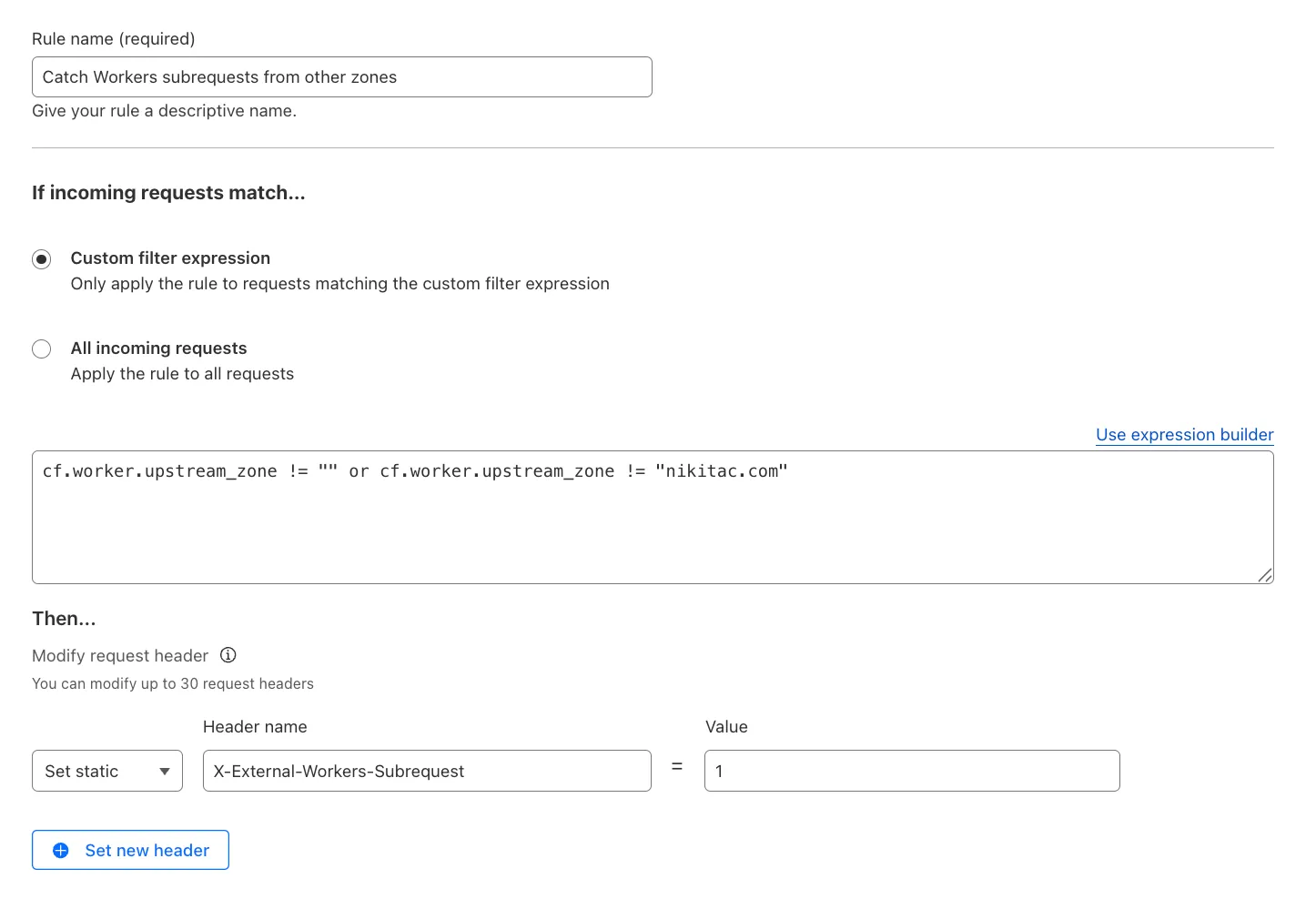
  1. You can now use the cf.worker.upstream_zone field in Transform Rules to control rule execution based on whether a request originates from Workers, including subrequests issued by Workers in other zones.

    Match Workers subrequests by upstream zone in Transform Rules

    What's new:

    • cf.worker.upstream_zone is now supported in Transform Rules expressions.
    • Skip or apply logic conditionally when handling Workers subrequests.

    For example, to add a header when the subrequest comes from another zone:

    Text in Expression Editor (replace myappexample.com with your domain):

    (cf.worker.upstream_zone != "" and cf.worker.upstream_zone != "myappexample.com")

    Selected operation under Modify request header: Set static

    Header name: X-External-Workers-Subrequest

    Value: 1
    This gives you more granular control in how you handle incoming requests for your zone.

    Learn more in the Transform Rules documentation and Rules language fields reference.

  1. This week’s update spotlights four critical vulnerabilities across CMS platforms, VoIP systems, and enterprise applications. Several flaws enable remote code execution or privilege escalation, posing significant enterprise risks.

    Key Findings

    • WordPress OttoKit Plugin (CVE-2025-27007): Privilege escalation flaw allows unauthenticated attackers to create or elevate user accounts, compromising WordPress administrative control.
    • SAP NetWeaver (CVE-2025-42999): Remote Code Execution vulnerability enables attackers to execute arbitrary code on SAP NetWeaver systems, threatening core ERP and business operations.
    • Fortinet FortiVoice (CVE-2025-32756): Buffer error vulnerability may lead to memory corruption and potential code execution, directly impacting enterprise VoIP infrastructure.
    • Camaleon CMS (CVE-2024-46986): Remote Code Execution vulnerability allows attackers to gain full control over Camaleon CMS installations, exposing hosted content and underlying servers.

    Impact

    These vulnerabilities target widely deployed CMS, ERP, and VoIP systems. RCE flaws in SAP NetWeaver and Camaleon CMS allow full takeover of business-critical applications. Privilege escalation in OttoKit exposes WordPress environments to full administrative compromise. FortiVoice buffer handling issues risk destabilizing or fully compromising enterprise telephony systems.

    RulesetRule IDLegacy Rule IDDescriptionPrevious ActionNew ActionComments
    Cloudflare Managed Ruleset 100769

    WordPress OttoKit Plugin - Privilege Escalation - CVE:CVE-2025-27007

    LogBlockThis is a New Detection
    Cloudflare Managed Ruleset 100770SAP NetWeaver - Remote Code Execution - CVE:CVE-2025-42999LogBlockThis is a New Detection
    Cloudflare Managed Ruleset 100779Fortinet FortiVoice - Buffer Error - CVE:CVE-2025-32756LogBlockThis is a New Detection
    Cloudflare Managed Ruleset 100780Camaleon CMS - Remote Code Execution - CVE:CVE-2024-46986LogBlockThis is a New Detection
  1. Workers native integrations were originally launched in May 2023 to connect to popular database and observability providers with your Worker in just a few clicks. We are changing how developers connect Workers to these external services. The Integrations tab in the dashboard has been removed in favor of a more direct, command-line-based approach using Wrangler secrets.

    What's changed

    • Integrations tab removed: The integrations setup flow is no longer available in the Workers dashboard.
    • Manual secret configuration: New connections should be configured by adding credentials as secrets to your Workers using npx wrangler secret put commands.

    Impact on existing integrations

    Existing integrations will continue to work without any changes required. If you have integrations that were previously created through the dashboard, they will remain functional.

    Updating existing integrations

    If you'd like to modify your existing integration, you can update the secrets, environment variables, or Tail Workers that were created from the original integration setup.

    • Update secrets: Use npx wrangler secret put <SECRET_NAME> to update credential values.
    • Modify environment variables: Update variables through the dashboard or Wrangler configuration.
    • Dashboard management: Access your Worker's settings in the Cloudflare dashboard to modify connections created by our removed native integrations feature.

    If you have previously set up an observability integration with Sentry, the following environment variables were set and are still modifiable:

    • BLOCKED_HEADERS: headers to exclude sending to Sentry
    • EXCEPTION_SAMPLING_RATE: number from 0 - 100, where 0 = no events go through to Sentry, and 100 = all events go through to Sentry
    • STATUS_CODES_TO_SAMPLING_RATES: a map of status codes -- like 400 or with wildcards like 4xx -- to sampling rates described above

    Setting up new database and observability connections

    For new connections, refer to our step-by-step guides on connecting to popular database and observability providers including: Sentry, Turso, Neon, Supabase, PlanetScale, Upstash, Xata.

  1. A new Beta release for the Windows WARP client is now available on the beta releases downloads page.

    This release contains improvements and new exciting features, including SCCM VPN boundary support and post-quantum cryptography. By tunneling your corporate network traffic over Cloudflare, you can now gain the immediate protection of post-quantum cryptography without needing to upgrade any of your individual corporate applications or systems.

    Changes and improvements

    • Fixed a device registration issue causing WARP connection failures when changing networks.
    • Captive portal improvements including showing connectivity status in the client and sending system notifications for captive portal sign in.
    • Fixed a bug where in Gateway with DoH mode, connection to DNS servers was not automatically restored after reconnecting WARP.
    • The WARP client now applies post-quantum cryptography end-to-end on enabled devices accessing resources behind a Cloudflare Tunnel. This feature can be enabled by MDM.
    • Improvement to gracefully handle changes made by MDM while WARP is not running.
    • Improvement for multi-user mode to avoid unnecessary key rotations when transitioning from a pre-login to a logged-in state.
    • Added a WARP client device posture check for SAN attributes to the client certificate check.
    • Fixed an issue affecting Split Tunnel Include mode, where traffic outside the tunnel was blocked when switching between Wi-Fi and Ethernet networks.
    • Added SCCM VPN boundary support to device profile settings. With SCCM VPN boundary support enabled, operating systems will register WARP's local interface IP with the on-premise DNS server when reachable.

    Known issues

    • Microsoft has confirmed a regression with Windows 11 starting around 24H2 that may cause performance issues for some users. These performance issues could manifest as mouse lag, audio cracking, or other slowdowns. A fix from Microsoft is expected in early July.

    • Devices with KB5055523 installed may receive a warning about Win32/ClickFix.ABA being present in the installer. To resolve this false positive, update Microsoft Security Intelligence to version 1.429.19.0 or later.

    • DNS resolution may be broken when the following conditions are all true:

      • WARP is in Secure Web Gateway without DNS filtering (tunnel-only) mode.
      • A custom DNS server address is configured on the primary network adapter.
      • The custom DNS server address on the primary network adapter is changed while WARP is connected. To work around this issue, reconnect the WARP client by toggling off and back on.
  1. A new Beta release for the macOS WARP client is now available on the beta releases downloads page.

    This release contains improvements and new exciting features, including post-quantum cryptography. By tunneling your corporate network traffic over Cloudflare, you can now gain the immediate protection of post-quantum cryptography without needing to upgrade any of your individual corporate applications or systems.

    Changes and improvements

    • Fixed an issue where the Cloudflare WARP application may not have automatically relaunched after an update.
    • Fixed a device registration issue causing WARP connection failures when changing networks.
    • Captive portal improvements including showing connectivity status in the client and sending system notifications for captive portal sign in.
    • The WARP client now applies post-quantum cryptography end-to-end on enabled devices accessing resources behind a Cloudflare Tunnel. This feature can be enabled by MDM.
    • Improvement to gracefully handle changes made by MDM while WARP is not running.
    • Fixed an issue affecting Split Tunnel Include mode, where traffic outside the tunnel was blocked when switching between Wi-Fi and Ethernet networks.

    Known issues

    • macOS Sequoia: Due to changes Apple introduced in macOS 15.0.x, the WARP client may not behave as expected. Cloudflare recommends the use of macOS 15.4 or later.
  1. With the release of the Cloudflare adapter for Open Next v1.0.0 in May 2025, we already had followups plans to improve performance and size.

    @opennextjs/cloudflare v1.2 released on June 5, 2025 delivers on these enhancements. By removing babel from the app code and dropping a dependency on @ampproject/toolbox-optimizer, we were able to reduce generated bundle sizes. Additionally, by stopping preloading of all app routes, we were able to improve the cold start time.

    This means that users will now see a decrease from 14 to 8MiB (2.3 to 1.6MiB gzipped) in generated bundle size for a Next app created via create-next-app, and typically 100ms faster startup times for their medium-sized apps.

    Users only need to update to the latest version of @opennextjs/cloudflare to automatically benefit from these improvements.

    Note that we published CVE-2005-6087 for a SSRF vulnerability in the @opennextjs/cloudflare package. The vulnerability has been fixed from @opennextjs/cloudflare v1.3.0 onwards. Please update to any version after this one.

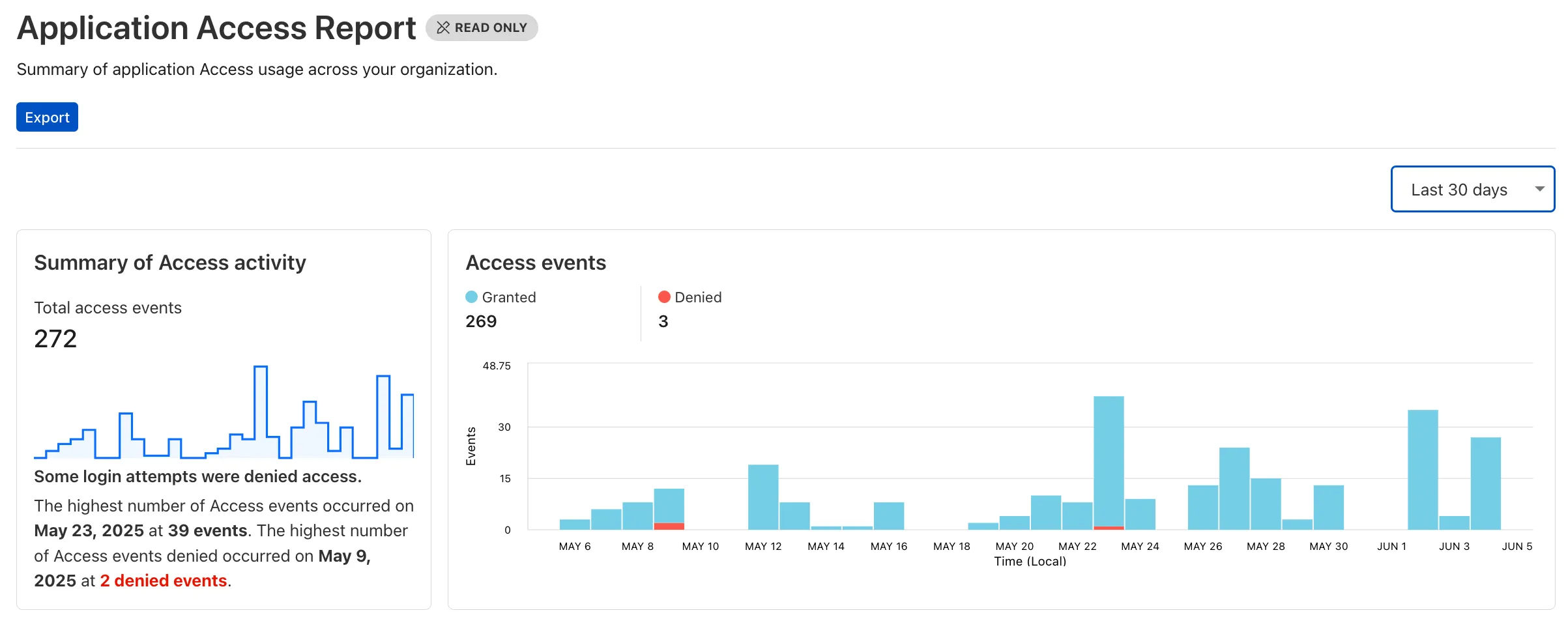
  1. Cloudflare One now offers powerful new analytics dashboards to help customers easily discover available insights into their application access and network activity. These dashboards provide a centralized, intuitive view for understanding user behavior, application usage, and security posture.

    ![Cloudflare One Analytics Dashboards](~/assets/images/changelog/cloudflare-one/Analytics Dashboards.png)

    Additionally, a new exportable access report is available, allowing customers to quickly view high-level metrics and trends in their application access. A preview of the report is shown below, with more to be found in the report:

    Cloudflare One Analytics Dashboards

    Both features are accessible in the Cloudflare Zero Trust dashboard, empowering organizations with better visibility and control.

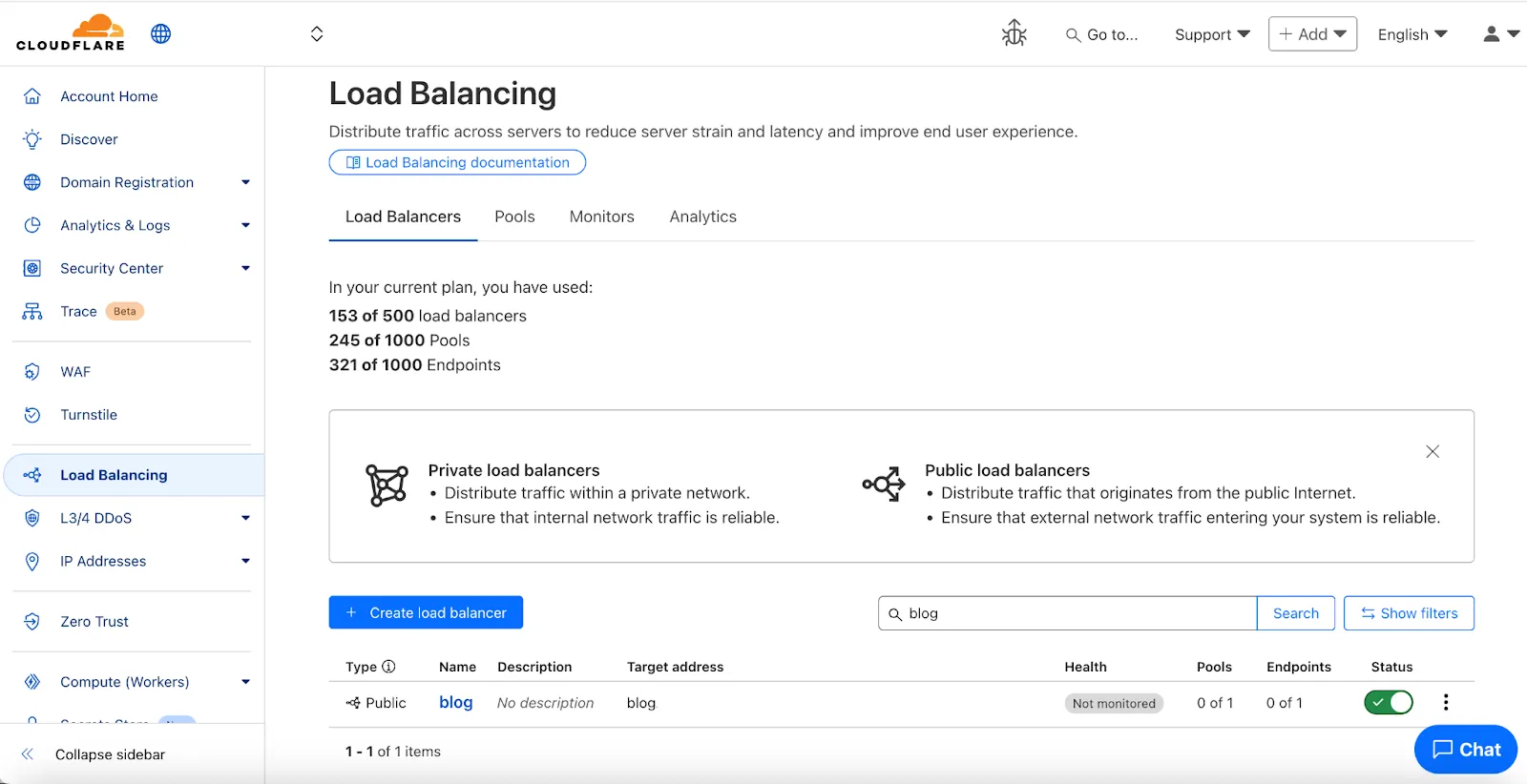
  1. We've made two large changes to load balancing:

    • Redesigned the user interface, now centralized at the account level.
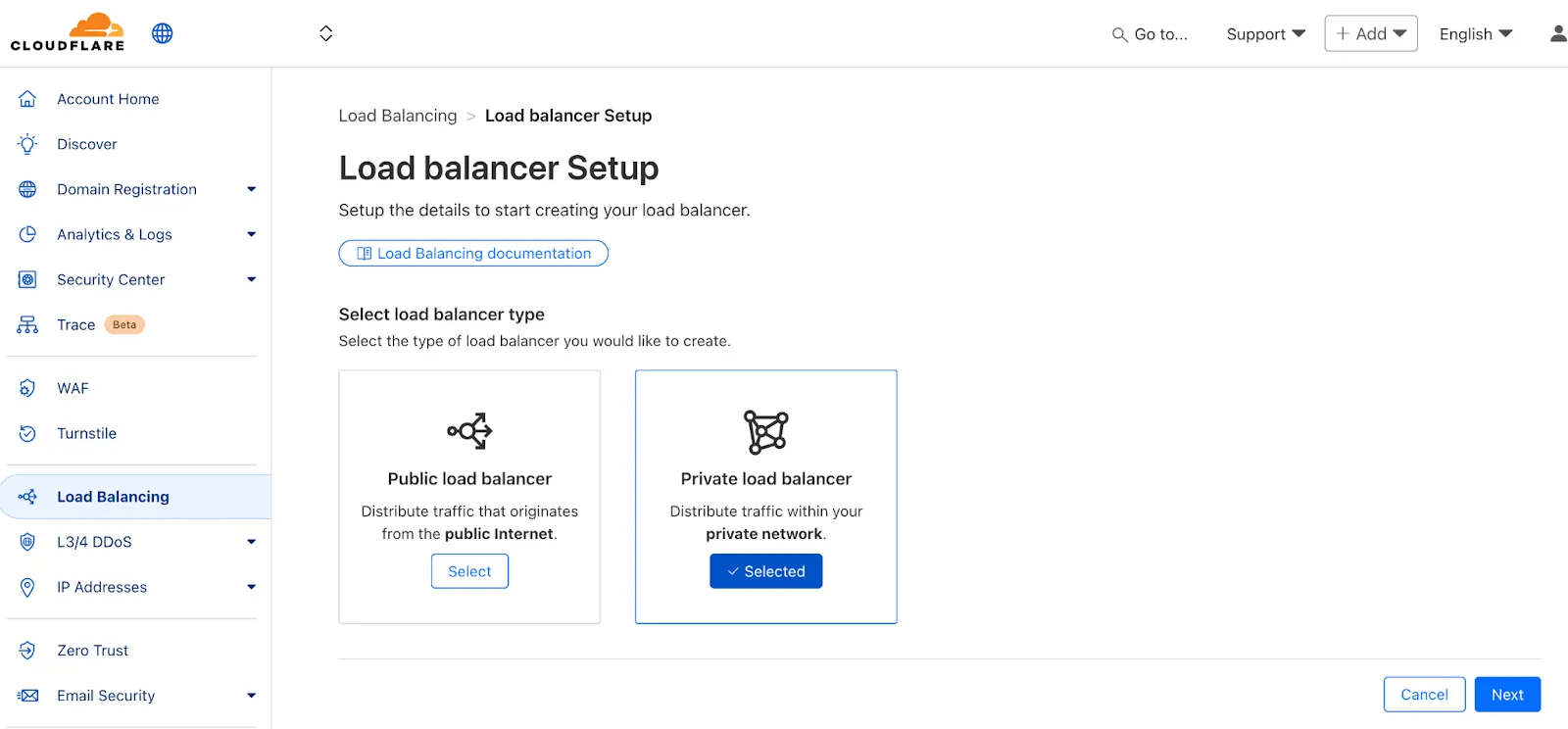
    • Introduced Private Load Balancers to the UI, enabling you to manage traffic for all of your external and internal applications in a single spot.

    This update streamlines how you manage load balancers across multiple zones and extends robust traffic management to your private network infrastructure.

    Load Balancing UI

    Key Enhancements:

    • Account-Level UI Consolidation:

      • Unified Management: Say goodbye to navigating individual zones for load balancing tasks. You can now view, configure, and monitor all your load balancers across every zone in your account from a single, intuitive interface at the account level.

      • Improved Efficiency: This centralized approach provides a more streamlined workflow, making it faster and easier to manage both your public-facing and internal traffic distribution.

    • Private Network Load Balancing:

      • Secure Internal Application Access: Create Private Load Balancers to distribute traffic to applications hosted within your private network, ensuring they are not exposed to the public Internet.

      • WARP & Magic WAN Integration: Effortlessly direct internal traffic from users connected via Cloudflare WARP or through your Magic WAN infrastructure to the appropriate internal endpoint pools.

      • Enhanced Security for Internal Resources: Combine reliable Load Balancing with Zero Trust access controls to ensure your internal services are both performant and only accessible by verified users.

    Private Load Balancers
  1. Users can now use an OpenAI Compatible endpoint in AI Gateway to easily switch between providers, while keeping the exact same request and response formats. We're launching now with the chat completions endpoint, with the embeddings endpoint coming up next.

    To get started, use the OpenAI compatible chat completions endpoint URL with your own account id and gateway id and switch between providers by changing the model and apiKey parameters.

    OpenAI SDK Example
    import OpenAI from "openai";
    const client = new OpenAI({
    apiKey: "YOUR_PROVIDER_API_KEY", // Provider API key
    baseURL:
    "https://gateway.ai.cloudflare.com/v1/{account_id}/{gateway_id}/compat",
    });
    const response = await client.chat.completions.create({
    model: "google-ai-studio/gemini-2.0-flash",
    messages: [{ role: "user", content: "What is Cloudflare?" }],
    });
    console.log(response.choices[0].message.content);

    Additionally, the OpenAI Compatible endpoint can be combined with our Universal Endpoint to add fallbacks across multiple providers. That means AI Gateway will return every response in the same standardized format, no extra parsing logic required!

    Learn more in the OpenAI Compatibility documentation.

  1. Shopify merchants can now onboard to Orange-to-Orange (O2O) automatically, without needing to contact support or community members.

    What's new:

    • Automatic enablement – O2O is available for all mutual Cloudflare and Shopify customers.

    • Branded record display – Merchants see a Shopify logo in DNS records, complete with helpful tooltips.

      Shopify O2O logo

    • Checkout protection – Workers and Snippets are blocked from running on the checkout path to reduce risk and improve security.

    For more information, refer to the provider guide.

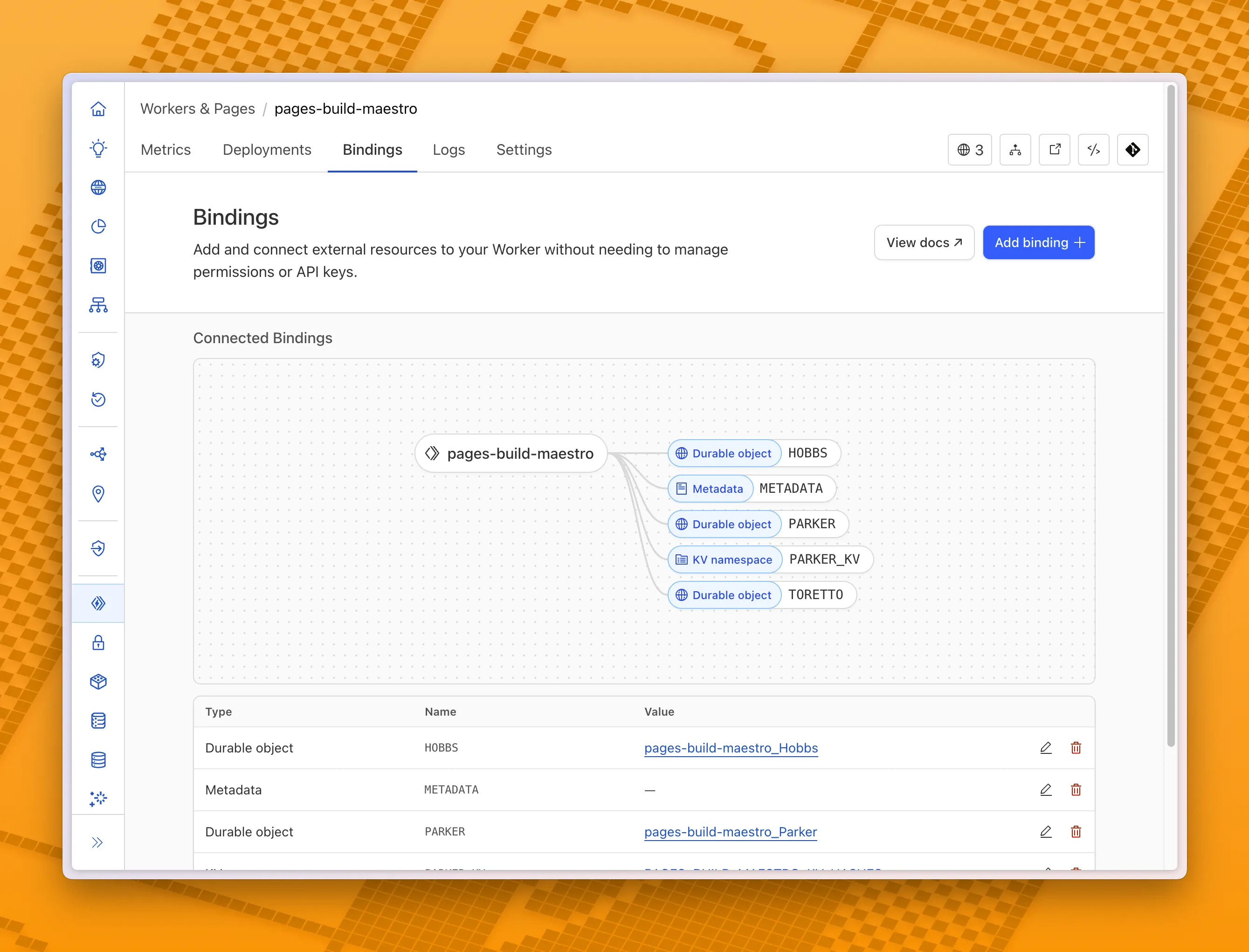
  1. You can now visualize, explore and modify your Worker’s architecture directly in the Cloudflare dashboard, making it easier to understand how your application connects to Cloudflare resources like D1 databases, Durable Objects, KV namespaces, and more.

    Bindings canvas

    With this new view, you can easily:

    • Explore existing bindings in a visual, architecture-style diagram
    • Add and manage bindings directly from the same interface
    • Discover the full range of compute, storage, AI, and media resources you can attach to your Workers application.

    To get started, head to the Cloudflare dashboard and open the Bindings tab of any Workers application.

  1. We're excited to announce the Public Beta launch of User Groups for Cloudflare Dashboard and System for Cross Domain Identity Management (SCIM) User Groups, expanding our RBAC capabilities to simplify user and group management at scale.

    We've also visually overhauled the Permission Policies UI to make defining permissions more intuitive.

    What's New

    User Groups [BETA]: User Groups are a new Cloudflare IAM primitive that enable administrators to create collections of account members that are treated equally from an access control perspective. User Groups can be assigned permission policies, with individual members in the group inheriting all permissions granted to the User Group. User Groups can be created manually or via our APIs.

    SCIM User Groups [BETA]: Centralize & simplify your user and group management at scale by syncing memberships directly from your upstream identity provider (like Okta or Entra ID) to the Cloudflare Platform. This ensures Cloudflare stays in sync with your identity provider, letting you apply Permission Policies to those synced groups directly within the Cloudflare Dashboard.

    Revamped Permission Policies UI [BETA]: As Cloudflare's services have grown, so has the need for precise, role-based access control. We've given the Permission Policies builder a visual overhaul to make it much easier for administrators to find and define the exact permissions they want for specific principals.

    Updated Permissions Policy UX

    For more info:

  1. This week’s roundup highlights five high-risk vulnerabilities affecting SD-WAN, load balancers, and AI platforms. Several flaws enable unauthenticated remote code execution or authentication bypass.

    Key Findings

    • Versa Concerto SD-WAN (CVE-2025-34026, CVE-2025-34027): Authentication bypass vulnerabilities allow attackers to gain unauthorized access to SD-WAN management interfaces, compromising network segmentation and control.
    • Kemp LoadMaster (CVE-2024-7591): Remote Code Execution vulnerability enables attackers to execute arbitrary commands, potentially leading to full device compromise within enterprise load balancing environments.
    • AnythingLLM (CVE-2024-0759): Server-Side Request Forgery (SSRF) flaw allows external attackers to force the LLM backend to make unauthorized internal network requests, potentially exposing sensitive internal resources.
    • Anyscale Ray (CVE-2023-48022): Remote Code Execution vulnerability affecting distributed AI workloads, allowing attackers to execute arbitrary code on Ray cluster nodes.
    • Server-Side Request Forgery (SSRF) - Generic & Obfuscated Payloads: Ongoing advancements in SSRF payload techniques observed, including obfuscation and expanded targeting of cloud metadata services and internal IP ranges.

    Impact

    These vulnerabilities expose critical infrastructure across networking, AI platforms, and SaaS integrations. Unauthenticated RCE and auth bypass flaws in Versa Concerto, Kemp LoadMaster, and Anyscale Ray allow full system compromise. AnythingLLM and SSRF payload variants expand attack surfaces into internal cloud resources, sensitive APIs, and metadata services, increasing risk of privilege escalation, data theft, and persistent access.

    RulesetRule IDLegacy Rule IDDescriptionPrevious ActionNew ActionComments
    Cloudflare Managed Ruleset 100764Versa Concerto SD-WAN - Auth Bypass - CVE:CVE-2025-34027LogBlockThis is a New Detection
    Cloudflare Managed Ruleset 100765Versa Concerto SD-WAN - Auth Bypass - CVE:CVE-2025-34026LogBlockThis is a New Detection
    Cloudflare Managed Ruleset 100766Kemp LoadMaster - Remote Code Execution - CVE:CVE-2024-7591LogBlockThis is a New Detection
    Cloudflare Managed Ruleset 100767AnythingLLM - SSRF - CVE:CVE-2024-0759LogBlockThis is a New Detection
    Cloudflare Managed Ruleset 100768Anyscale Ray - Remote Code Execution - CVE:CVE-2023-48022LogBlockThis is a New Detection
    Cloudflare Managed Ruleset 100781SSRF - Generic PayloadsN/ADisabledThis is a New Detection
    Cloudflare Managed Ruleset 100782SSRF - Obfuscated PayloadsN/ADisabledThis is a New Detection