

When you use the built-in build system that is part of Cloudflare Pages, the Build Image now includes Node.js v22. Previously, Node.js v18 was provided by default, and Node.js v18 is now end-of-life (EOL).
If you are creating a new Pages project, the new V3 build image that includes Node.js v22 will be used by default. If you have an existing Pages project, you can update to the latest build image by navigating to Settings > Build & deployments > Build system version in the Cloudflare dashboard for a specific Pages project.
Note that you can always specify a particular version of Node.js or other built-in dependencies by setting an environment variable.
For more, refer to the developer docs for Cloudflare Pages builds
You can now enable Polish with the
webpformat directly in Configuration Rules, allowing you to optimize image delivery for specific routes, user agents, or A/B tests — without applying changes zone-wide.What’s new:

This gives you more precise control over how images are compressed and delivered, whether you're targeting modern browsers, running experiments, or tailoring performance by geography or device type.
Learn more in the Polish and Configuration Rules documentation.
You can now debug, profile, view logs, and analyze memory usage for your Worker ↗ using Chrome Devtools ↗ when your Worker runs locally using the Cloudflare Vite plugin ↗.
Previously, this was only possible if your Worker ran locally using the Wrangler CLI ↗, and now you can do all the same things if your Worker uses Vite ↗.
When you run
vite, you'll now see a debug URL in your console:VITE v6.3.5 ready in 461 ms➜ Local: http://localhost:5173/➜ Network: use --host to expose➜ Debug: http://localhost:5173/__debug➜ press h + enter to show helpOpen the URL in Chrome, and an instance of Chrome Devtools will open and connect to your Worker running locally. You can then use Chrome Devtools to debug and introspect performance issues. For example, you can navigate to the Performance tab to understand where CPU time is spent in your Worker:
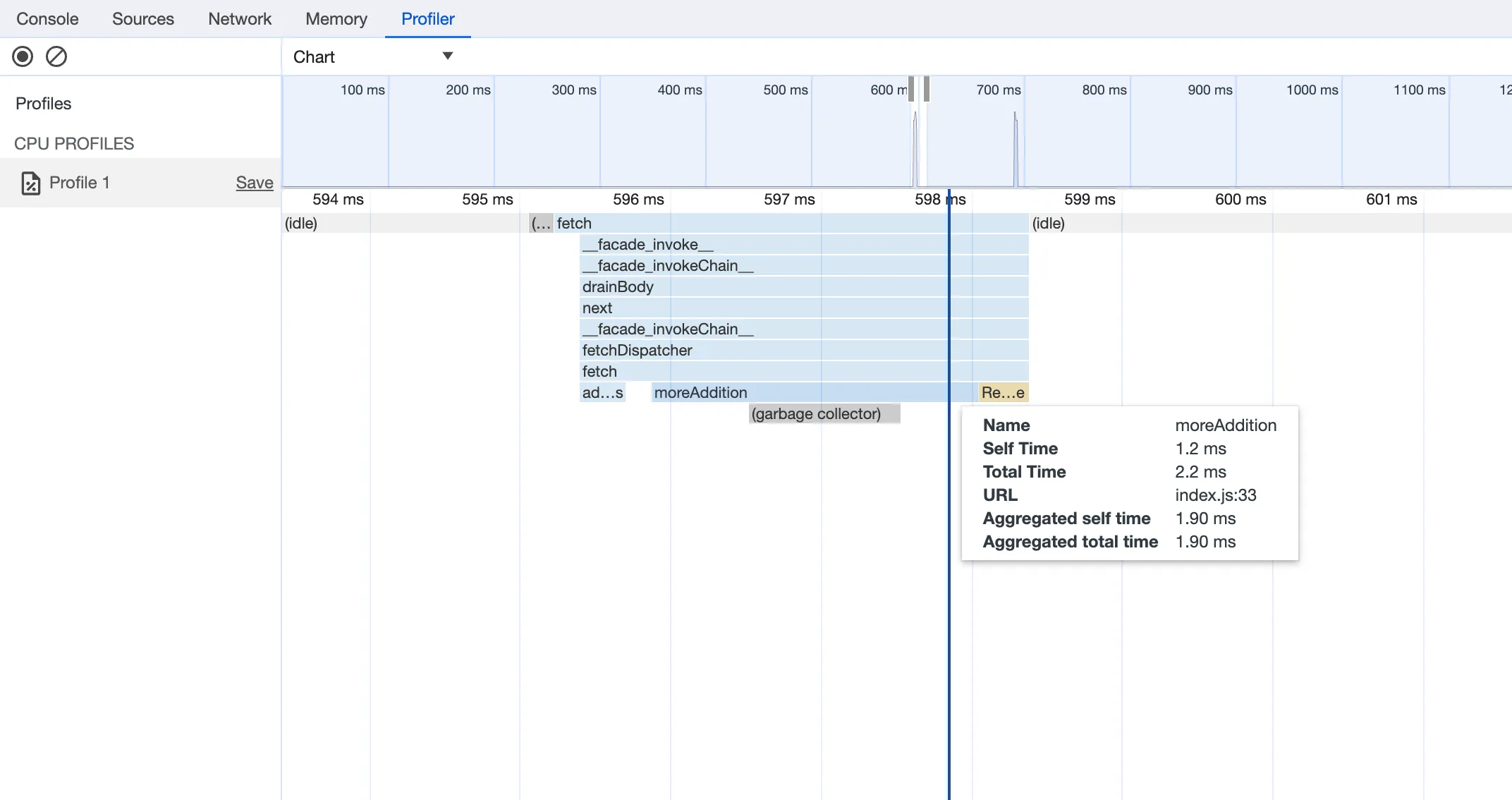
For more information on how to get the most out of Chrome Devtools, refer to the following docs:
Users can now access significant enhancements to Cloudflare Gateway analytics, providing you with unprecedented visibility into your organization's DNS queries, HTTP requests, and Network sessions. These powerful new dashboards enable you to go beyond raw logs and gain actionable insights into how your users are interacting with the Internet and your protected resources.
You can now visualize and explore:
- Patterns Over Time: Understand trends in traffic volume and blocked requests, helping you identify anomalies and plan for future capacity.
- Top Users & Destinations: Quickly pinpoint the most active users, enabling better policy enforcement and resource allocation.
- Actions Taken: See a clear breakdown of security actions applied by Gateway policies, such as blocks and allows, offering a comprehensive view of your security posture.
- Geographic Regions: Gain insight into the global distribution of your traffic.
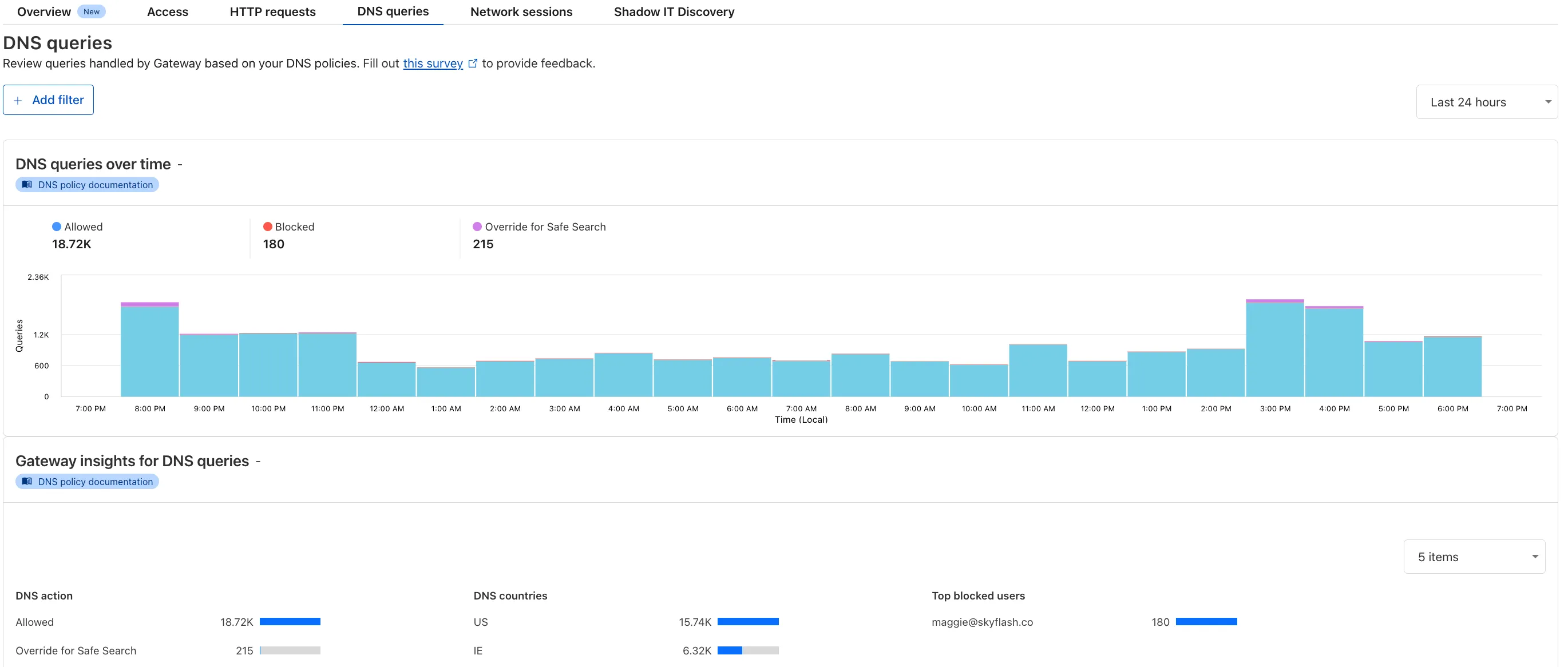
To access the new overview, log in to your Cloudflare Zero Trust dashboard ↗ and go to Analytics in the side navigation bar.
Users using Cloudflare's REST API to query their D1 database can see lower end-to-end request latency now that D1 authentication is performed at the closest Cloudflare network data center that received the request. Previously, authentication required D1 REST API requests to proxy to Cloudflare's core, centralized data centers, which added network round trips and latency.
Latency improvements range from 50-500 ms depending on request location and database location and only apply to the REST API. REST API requests and databases outside the United States see a bigger benefit since Cloudflare's primary core data centers reside in the United States.
D1 query endpoints like
/queryand/rawhave the most noticeable improvements since they no longer access Cloudflare's core data centers. D1 control plane endpoints such as those to create and delete databases see smaller improvements, since they still require access to Cloudflare's core data centers for other control plane metadata.
We're excited to share that you can now use the Playwright MCP ↗ server with Browser Rendering.
Once you deploy the server, you can use any MCP client with it to interact with Browser Rendering. This allows you to run AI models that can automate browser tasks, such as taking screenshots, filling out forms, or scraping data.
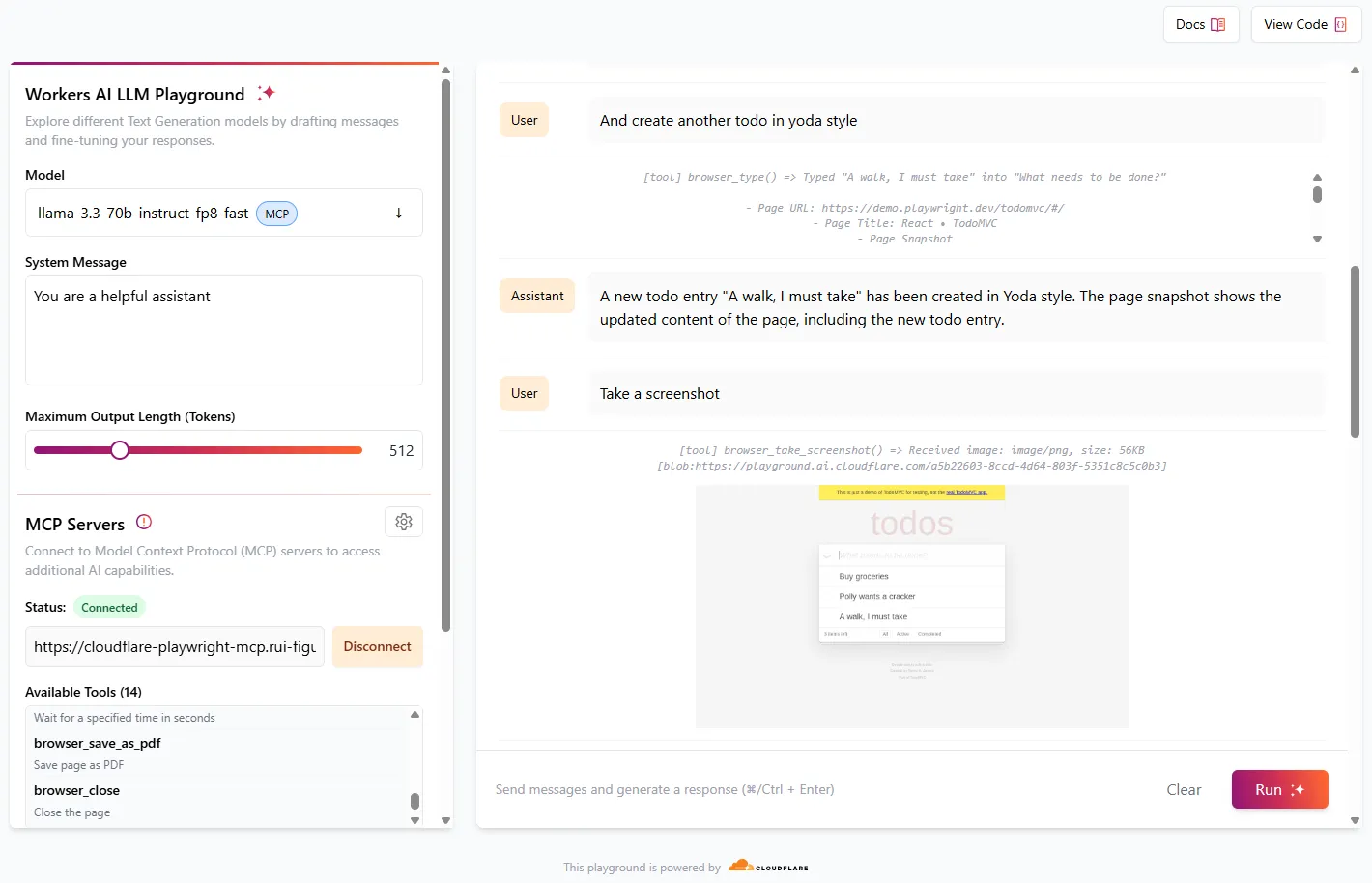
Playwright MCP is available as an npm package at
@cloudflare/playwright-mcp↗. To install it, type:Terminal window npm i -D @cloudflare/playwright-mcpTerminal window yarn add -D @cloudflare/playwright-mcpTerminal window pnpm add -D @cloudflare/playwright-mcpDeploying the server is then as easy as:
TypeScript import { env } from "cloudflare:workers";import { createMcpAgent } from "@cloudflare/playwright-mcp";export const PlaywrightMCP = createMcpAgent(env.BROWSER);export default PlaywrightMCP.mount("/sse");Check out the full code at GitHub ↗.
Learn more about Playwright MCP in our documentation.
We have deployed an updated attack score model focused on enhancing the detection of multiple false positives (FPs).
As a result of this improvement, some changes in observed attack scores are expected.
With upgraded limits to all free and paid plans ↗, you can now scale more easily with Cloudflare for SaaS ↗ and Secrets Store ↗.
Cloudflare for SaaS ↗ allows you to extend the benefits of Cloudflare to your customers via their own custom or vanity domains. Now, the limit for custom hostnames ↗ on a Cloudflare for SaaS pay-as-you-go plan has been raised from 5,000 custom hostnames to 50,000 custom hostnames.
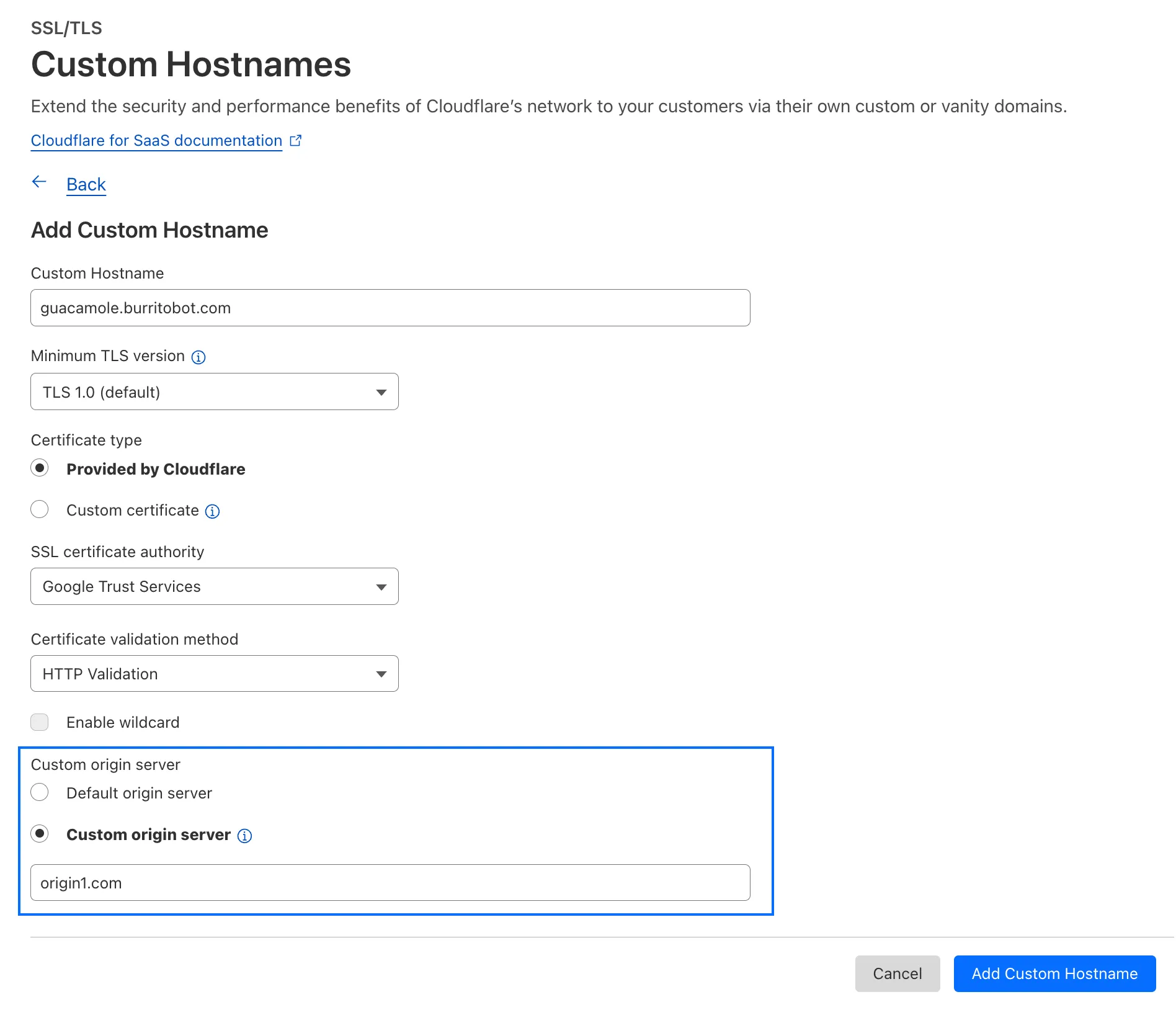
With custom origin server -- previously an enterprise-only feature -- you can route traffic from one or more custom hostnames somewhere other than your default proxy fallback. Custom origin server ↗ is now available to Cloudflare for SaaS customers on Free, Pro, and Business plans.
You can enable custom origin server on a per-custom hostname basis via the API ↗ or the UI:
Currently in beta with a Workers integration ↗, Cloudflare Secrets Store ↗ allows you to store, manage, and deploy account level secrets from a secure, centralized platform your Cloudflare Workers ↗. Now, you can create and deploy 100 secrets per account. Try it out in the dashboard ↗, with Wrangler ↗, or via the API ↗ today.
All Cloudflare One Gateway users can now use Protocol detection logging and filtering, including those on Pay-as-you-go and Free plans.
With Protocol Detection, admins can identify and enforce policies on traffic proxied through Gateway based on the underlying network protocol (for example, HTTP, TLS, or SSH), enabling more granular traffic control and security visibility no matter your plan tier.
This feature is available to enable in your account network settings for all accounts. For more information on using Protocol Detection, refer to the Protocol detection documentation.
This week’s roundup covers nine vulnerabilities, including six critical RCEs and one dangerous file upload. Affected platforms span cloud services, CI/CD pipelines, CMSs, and enterprise backup systems. Several are now addressed by updated WAF managed rulesets.
Key Findings
- Ingress-Nginx (CVE-2025-1098): Unauthenticated RCE via unsafe annotation handling. Impacts Kubernetes clusters.
- GitHub Actions (CVE-2025-30066): RCE through malicious workflow inputs. Targets CI/CD pipelines.
- Craft CMS (CVE-2025-32432): Template injection enables unauthenticated RCE. High risk to content-heavy sites.
- F5 BIG-IP (CVE-2025-31644): RCE via TMUI exploit, allowing full system compromise.
- AJ-Report (CVE-2024-15077): RCE through untrusted template execution. Affects reporting dashboards.
- NAKIVO Backup (CVE-2024-48248): RCE via insecure script injection. High-value target for ransomware.
- SAP NetWeaver (CVE-2025-31324): Dangerous file upload flaw enables remote shell deployment.
- Ivanti EPMM (CVE-2025-4428, 4427): Auth bypass allows full access to mobile device management.
- Vercel (CVE-2025-32421): Information leak via misconfigured APIs. Useful for attacker recon.
Impact
These vulnerabilities expose critical components across Kubernetes, CI/CD pipelines, and enterprise systems to severe threats including unauthenticated remote code execution, authentication bypass, and information leaks. High-impact flaws in Ingress-Nginx, Craft CMS, F5 BIG-IP, and NAKIVO Backup enable full system compromise, while SAP NetWeaver and AJ-Report allow remote shell deployment and template-based attacks. Ivanti EPMM’s auth bypass further risks unauthorized control over mobile device fleets.
GitHub Actions and Vercel introduce supply chain and reconnaissance risks, allowing malicious workflow inputs and data exposure that aid in targeted exploitation. Organizations should prioritize immediate patching, enhance monitoring, and deploy updated WAF and IDS signatures to defend against likely active exploitation.
Ruleset Rule ID Legacy Rule ID Description Previous Action New Action Comments Cloudflare Managed Ruleset 100746 Vercel - Information Disclosure Log Disabled This is a New Detection Cloudflare Managed Ruleset 100754 AJ-Report - Remote Code Execution - CVE:CVE-2024-15077 Log Block This is a New Detection Cloudflare Managed Ruleset 100756 NAKIVO Backup - Remote Code Execution - CVE:CVE-2024-48248 Log Block This is a New Detection Cloudflare Managed Ruleset 100757 Ingress-Nginx - Remote Code Execution - CVE:CVE-2025-1098 Log Disabled This is a New Detection Cloudflare Managed Ruleset 100759 SAP NetWeaver - Dangerous File Upload - CVE:CVE-2025-31324 Log Block This is a New Detection Cloudflare Managed Ruleset 100760 Craft CMS - Remote Code Execution - CVE:CVE-2025-32432 Log Block This is a New Detection Cloudflare Managed Ruleset 100761 GitHub Action - Remote Code Execution - CVE:CVE-2025-30066 Log Disabled This is a New Detection Cloudflare Managed Ruleset 100762 Ivanti EPMM - Auth Bypass - CVE:CVE-2025-4428, CVE:CVE-2025-4427 Log Block This is a New Detection Cloudflare Managed Ruleset 100763 F5 Big IP - Remote Code Execution - CVE:CVE-2025-31644 Log Disabled This is a New Detection
We’ve launched two powerful new tools to make the GraphQL Analytics API more accessible:
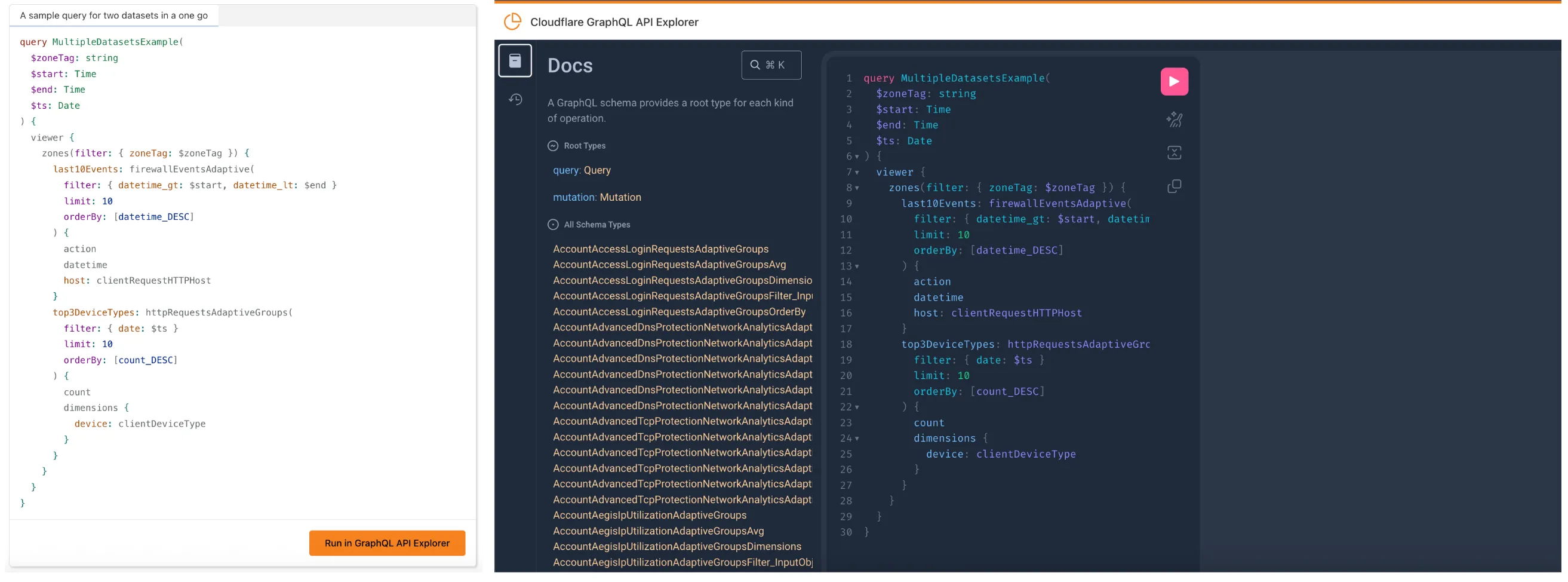
The new GraphQL API Explorer ↗ helps you build, test, and run queries directly in your browser. Features include:
- In-browser schema documentation to browse available datasets and fields
- Interactive query editor with autocomplete and inline documentation
- A "Run in GraphQL API Explorer" button to execute example queries from our docs
- Seamless OAuth authentication — no manual setup required
MCP Servers let you use natural language tools like Claude to generate structured queries against your data. See our blog post ↗ for details on how they work and which servers are available. The new GraphQL MCP server ↗ helps you discover and generate useful queries for the GraphQL Analytics API. With this server, you can:
- Explore what data is available to query
- Generate and refine queries using natural language, with one-click links to run them in the API Explorer
- Build dashboards and visualizations from structured query outputs
Example prompts include:
- “Show me HTTP traffic for the last 7 days for example.com”
- “What GraphQL node returns firewall events?”
- “Can you generate a link to the Cloudflare GraphQL API Explorer with a pre-populated query and variables?”
We’re continuing to expand these tools, and your feedback helps shape what’s next. Explore the documentation to learn more and get started.
A new GA release for the Windows WARP client is now available on the stable releases downloads page.
This release contains a hotfix for managed networks for the 2025.4.929.0 release.
Changes and improvements
- Fixed an issue where it could take up to 3 minutes for the correct device profile to be applied in some circumstances. In the worst case, it should now only take up to 40 seconds. This will be improved further in a future release.
Known issues
DNS resolution may be broken when the following conditions are all true:
- WARP is in Secure Web Gateway without DNS filtering (tunnel-only) mode.
- A custom DNS server address is configured on the primary network adapter.
- The custom DNS server address on the primary network adapter is changed while WARP is connected.
To work around this issue, reconnect the WARP client by toggling off and back on.
Microsoft has confirmed a regression with Windows 11 starting around 24H2 that may cause performance issues for some users. These performance issues could manifest as mouse lag, audio cracking, or other slowdowns. A fix from Microsoft is expected in early July.
Devices with
KB5055523installed may receive a warning aboutWin32/ClickFix.ABAbeing present in the installer. To resolve this false positive, update Microsoft Security Intelligence to version 1.429.19.0 or later.
A new GA release for the macOS WARP client is now available on the stable releases downloads page.
This release contains a hotfix for managed networks for the 2025.4.929.0 release.
Changes and improvements
- Fixed an issue where it could take up to 3 minutes for the correct device profile to be applied in some circumstances. In the worst case, it should now only take up to 40 seconds. This will be improved further in a future release.
Known issues
- macOS Sequoia: Due to changes Apple introduced in macOS 15.0.x, the WARP client may not behave as expected. Cloudflare recommends the use of macOS 15.4 or later.
A new GA release for the Linux WARP client is now available on the stable releases downloads page.
This release contains a hotfix for managed networks for the 2025.4.929.0 release.
Changes and improvements
- Fixed an issue where it could take up to 3 minutes for the correct device profile to be applied in some circumstances. In the worst case, it should now only take up to 40 seconds. This will be improved further in a future release.
Known issues
- Devices using WARP client 2025.4.929.0 and up may experience Local Domain Fallback failures if a fallback server has not been configured. To configure a fallback server, refer to Route traffic to fallback server.
In Cloudflare Workers, you can now attach an event listener to
Requestobjects, using thesignalproperty ↗. This allows you to perform tasks when the request to your Worker is canceled by the client. To use this feature, you must set theenable_request_signalcompatibility flag.You can use a listener to perform cleanup tasks or write to logs before your Worker's invocation ends. For example, if you run the Worker below, and then abort the request from the client, a log will be written:
index.js export default {async fetch(request, env, ctx) {// This sets up an event listener that will be called if the client disconnects from your// worker.request.signal.addEventListener("abort", () => {console.log("The request was aborted!");});const { readable, writable } = new IdentityTransformStream();sendPing(writable);return new Response(readable, {headers: { "Content-Type": "text/plain" },});},};async function sendPing(writable) {const writer = writable.getWriter();const enc = new TextEncoder();for (;;) {// Send 'ping' every second to keep the connection aliveawait writer.write(enc.encode("ping\r\n"));await scheduler.wait(1000);}}index.ts export default {async fetch(request, env, ctx): Promise<Response> {// This sets up an event listener that will be called if the client disconnects from your// worker.request.signal.addEventListener('abort', () => {console.log('The request was aborted!');});const { readable, writable } = new IdentityTransformStream();sendPing(writable);return new Response(readable, { headers: { 'Content-Type': 'text/plain' } });},} satisfies ExportedHandler<Env>;async function sendPing(writable: WritableStream): Promise<void> {const writer = writable.getWriter();const enc = new TextEncoder();for (;;) {// Send 'ping' every second to keep the connection aliveawait writer.write(enc.encode('ping\r\n'));await scheduler.wait(1000);}}For more information see the
Requestdocumentation.
Earlier this year, we announced the launch of the new Terraform v5 Provider. Unlike the earlier Terraform providers, v5 is automatically generated based on the OpenAPI Schemas for our REST APIs. Since launch, we have seen an unexpectedly high number of issues ↗ reported by customers. These issues currently impact about 15% of resources. We have been working diligently to address these issues across the company, and have released the v5.5.0 release which includes a number of bug fixes. Please keep an eye on this changelog for more information about upcoming releases.
- Broad fixes across resources with recurring diffs, including, but not limited to:
cloudflare_zero_trust_gateway_policycloudflare_zero_trust_access_applicationcloudflare_zero_trust_tunnel_cloudflared_routecloudflare_zone_settingcloudflare_rulesetcloudflare_page_rule
- Zone settings can be re-applied without client errors
- Page rules conversion errors are fixed
- Failure to apply changes to
cloudflare_zero_trust_tunnel_cloudflared_route - Other bug fixes
For a more detailed look at all of the changes, see the changelog ↗ in GitHub.
- #5304: Importing cloudflare_zero_trust_gateway_policy invalid attribute filter value ↗
- #5303: cloudflare_page_rule import does not set values for all of the fields in terraform state ↗
- #5178: cloudflare_page_rule Page rule creation with redirect fails ↗
- #5336: cloudflare_turnstile_wwidget not able to udpate ↗
- #5418: cloudflare_cloud_connector_rules: Provider returned invalid result object after apply ↗
- #5423: cloudflare_zone_setting: "Invalid value for zone setting always_use_https" ↗
If you have an unaddressed issue with the provider, we encourage you to check the open issues ↗ and open a new one if one does not already exist for what you are experiencing.
If you are evaluating a move from v4 to v5, please make use of the migration guide ↗. We have provided automated migration scripts using Grit which simplify the transition, although these do not support implementations which use Terraform modules, so customers making use of modules need to migrate manually. Please make use of
terraform planto test your changes before applying, and let us know if you encounter any additional issues by reporting to our GitHub repository ↗.- Broad fixes across resources with recurring diffs, including, but not limited to:
This week's analysis covers four vulnerabilities, with three rated critical due to their Remote Code Execution (RCE) potential. One targets a high-traffic frontend platform, while another targets a popular content management system. These detections are now part of the Cloudflare Managed Ruleset in Block mode.
Key Findings
- Commvault Command Center (CVE-2025-34028) exposes an unauthenticated RCE via insecure command injection paths in the web UI. This is critical due to its use in enterprise backup environments.
- BentoML (CVE-2025-27520) reveals an exploitable vector where serialized payloads in model deployment APIs can lead to arbitrary command execution. This targets modern AI/ML infrastructure.
- Craft CMS (CVE-2024-56145) allows RCE through template injection in unauthenticated endpoints. It poses a significant risk for content-heavy websites with plugin extensions.
- Apache HTTP Server (CVE-2024-38475) discloses sensitive server config data due to misconfigured
mod_proxybehavior. While not RCE, this is useful for pre-attack recon.
Impact
These newly detected vulnerabilities introduce critical risk across modern web stacks, AI infrastructure, and content platforms: unauthenticated RCEs in Commvault, BentoML, and Craft CMS enable full system compromise with minimal attacker effort.
Apache HTTPD information leak can support targeted reconnaissance, increasing the success rate of follow-up exploits. Organizations using these platforms should prioritize patching and monitor for indicators of exploitation using updated WAF detection rules.
Ruleset Rule ID Legacy Rule ID Description Previous Action New Action Comments Cloudflare Managed Ruleset 100745 Apache HTTP Server - Information Disclosure - CVE:CVE-2024-38475 Log Block This is a New Detection Cloudflare Managed Ruleset 100747 Commvault Command Center - Remote Code Execution - CVE:CVE-2025-34028
Log Block This is a New Detection Cloudflare Managed Ruleset 100749 BentoML - Remote Code Execution - CVE:CVE-2025-27520 Log Disabled This is a New Detection Cloudflare Managed Ruleset 100753 Craft CMS - Remote Code Execution - CVE:CVE-2024-56145 Log Block This is a New Detection
42 new applications have been added for Zero Trust support within the Application Library and Gateway policy enforcement, giving you the ability to investigate or apply inline policies to these applications.
33 of the 42 applications are Artificial Intelligence applications. The others are Human Resources (2 applications), Development (2 applications), Productivity (2 applications), Sales & Marketing, Public Cloud, and Security.
To view all available applications, log in to your Cloudflare Zero Trust dashboard ↗, navigate to the App Library under My Team.
For more information on creating Gateway policies, see our Gateway policy documentation.
A new Access Analytics dashboard is now available to all Cloudflare One customers. Customers can apply and combine multiple filters to dive into specific slices of their Access metrics. These filters include:
- Logins granted and denied
- Access events by type (SSO, Login, Logout)
- Application name (Salesforce, Jira, Slack, etc.)
- Identity provider (Okta, Google, Microsoft, onetimepin, etc.)
- Users (
chris@cloudflare.com,sally@cloudflare.com,rachel@cloudflare.com, etc.) - Countries (US, CA, UK, FR, BR, CN, etc.)
- Source IP address
- App type (self-hosted, Infrastructure, RDP, etc.)
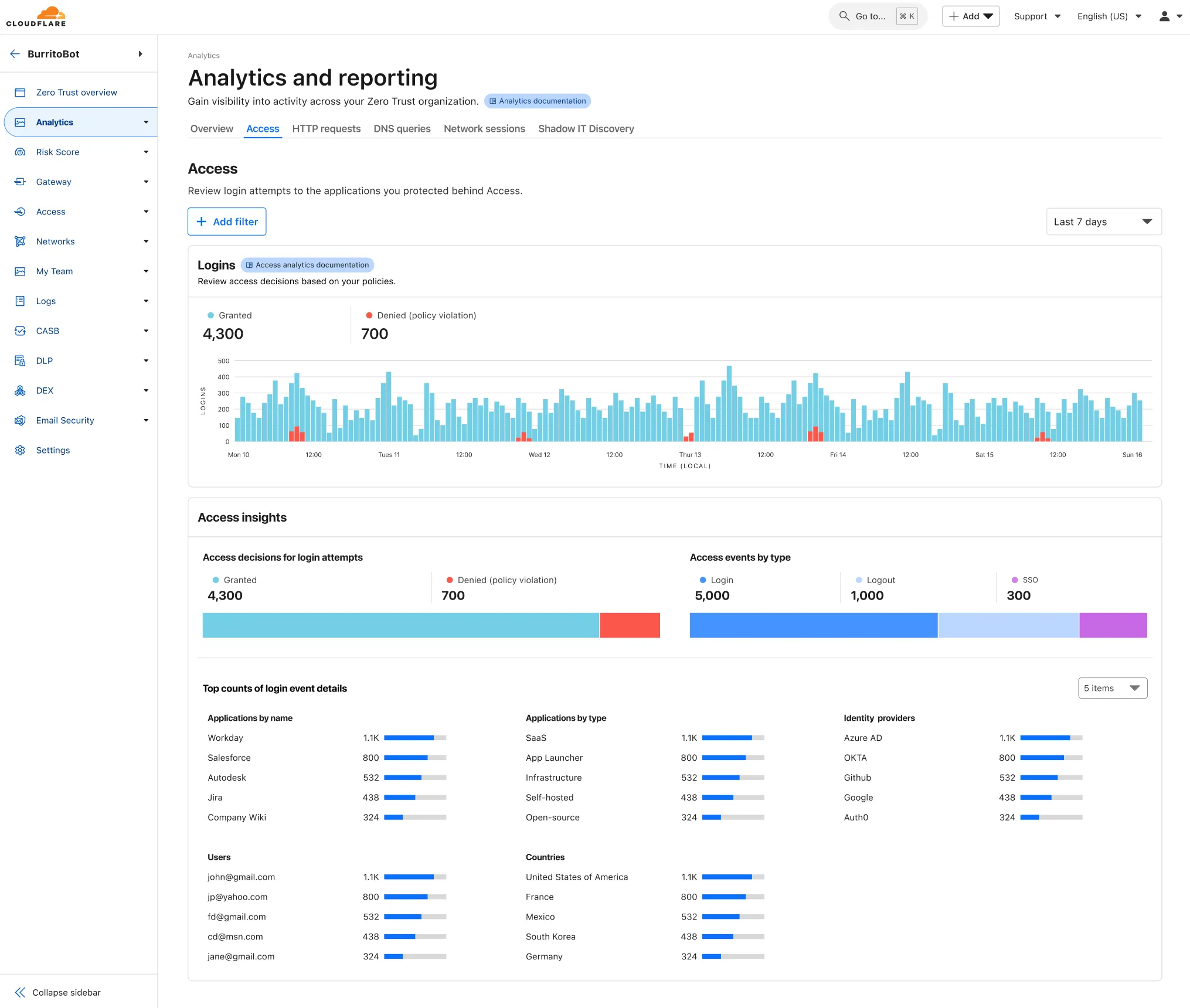
To access the new overview, log in to your Cloudflare Zero Trust dashboard ↗ and find Analytics in the side navigation bar.
You can now create Durable Objects using Python Workers. A Durable Object is a special kind of Cloudflare Worker which uniquely combines compute with storage, enabling stateful long-running applications which run close to your users. For more info see here.
You can define a Durable Object in Python in a similar way to JavaScript:
Python from workers import DurableObject, Response, WorkerEntrypointfrom urllib.parse import urlparseclass MyDurableObject(DurableObject):def __init__(self, ctx, env):self.ctx = ctxself.env = envdef fetch(self, request):result = self.ctx.storage.sql.exec("SELECT 'Hello, World!' as greeting").one()return Response(result.greeting)class Default(WorkerEntrypoint):async def fetch(self, request):url = urlparse(request.url)id = env.MY_DURABLE_OBJECT.idFromName(url.path)stub = env.MY_DURABLE_OBJECT.get(id)greeting = await stub.fetch(request.url)return greetingDefine the Durable Object in your Wrangler configuration file:
{"durable_objects": {"bindings": [{"name": "MY_DURABLE_OBJECT","class_name": "MyDurableObject"}]}}[[durable_objects.bindings]]name = "MY_DURABLE_OBJECT"class_name = "MyDurableObject"Then define the storage backend for your Durable Object:
{"migrations": [{"tag": "v1", // Should be unique for each entry"new_sqlite_classes": [ // Array of new classes"MyDurableObject"]}]}[[migrations]]tag = "v1"new_sqlite_classes = [ "MyDurableObject" ]Then test your new Durable Object locally by running
wrangler dev:npx wrangler devConsult the Durable Objects documentation for more details.
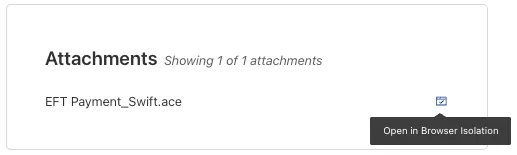
You can now safely open email attachments to view and investigate them.
What this means is that messages now have a Attachments section. Here, you can view processed attachments and their classifications (for example, Malicious, Suspicious, Encrypted). Next to each attachment, a Browser Isolation icon allows your team to safely open the file in a clientless, isolated browser with no risk to the analyst or your environment.
To use this feature, you must:
- Enable Clientless Web Isolation in your Zero Trust settings.
- Have Browser Isolation (BISO) seats assigned.
For more details, refer to our setup guide.
Some attachment types may not render in Browser Isolation. If there is a file type that you would like to be opened with Browser Isolation, reach out to your Cloudflare contact.
This feature is available across these Email security packages:
- Advantage
- Enterprise
- Enterprise + PhishGuard
A new GA release for the Windows WARP client is now available on the stable releases downloads page.
This release contains two significant changes all customers should be aware of:
- All DNS traffic now flows inside the WARP tunnel. Customers are no longer required to configure their local firewall rules to allow our DoH IP addresses and domains.
- When using MASQUE, the connection will fall back to HTTP/2 (TCP) when we detect that HTTP/3 traffic is blocked. This allows for a much more reliable connection on some public WiFi networks.
Changes and improvements
- Fixed an issue causing reconnection loops when captive portals are detected.
- Fixed an issue that caused WARP client disk encryption posture checks to fail due to missing drive names.
- Fixed an issue where managed network policies could incorrectly report network location beacons as missing.
- Improved DEX test error reporting.
- Fixed an issue where some parts of the WARP Client UI were missing in high contrast mode.
- Fixed an issue causing client notifications to fail in IPv6 only environments which prevented the client from receiving configuration changes to settings like device profile.
- Added a TCP fallback for the MASQUE tunnel protocol to improve connectivity on networks that block UDP or HTTP/3 specifically.
- Added new IP addresses for tunnel connectivity checks. If your organization uses a firewall or other policies you will need to exempt these IPs.
- DNS over HTTPS traffic is now included in the WARP tunnel by default.
- Improved the error message displayed in the client GUI when the rate limit for entering an incorrect admin override code is met.
- Improved handling of non-SLAAC IPv6 interface addresses for better connectivity in IPv6 only environments.
- Fixed an issue where frequent network changes could cause WARP to become unresponsive.
- Improvement for WARP to check if tunnel connectivity fails or times out at device wake before attempting to reconnect.
- Fixed an issue causing WARP connection disruptions after network changes.
Known issues
DNS resolution may be broken when the following conditions are all true:
- WARP is in Secure Web Gateway without DNS filtering (tunnel-only) mode.
- A custom DNS server address is configured on the primary network adapter.
- The custom DNS server address on the primary network adapter is changed while WARP is connected.
To work around this issue, reconnect the WARP client by toggling off and back on.
Microsoft has confirmed a regression with Windows 11 starting around 24H2 that may cause performance issues for some users. These performance issues could manifest as mouse lag, audio cracking, or other slowdowns. A fix from Microsoft is expected in early July.
Devices with
KB5055523installed may receive a warning aboutWin32/ClickFix.ABAbeing present in the installer. To resolve this false positive, update Microsoft Security Intelligence to version 1.429.19.0 or later.
Hyperdrive has been approved for FedRAMP Authorization and is now available in the FedRAMP Marketplace ↗.
FedRAMP is a U.S. government program that provides standardized assessment and authorization for cloud products and services. As a result of this product update, Hyperdrive has been approved as an authorized service to be used by U.S. federal agencies at the Moderate Impact level.
For detailed information regarding FedRAMP and its implications, please refer to the official FedRAMP documentation for Cloudflare ↗.
New categories added
Parent ID Parent Name Category ID Category Name 1 Ads 66 Advertisements 3 Business & Economy 185 Personal Finance 3 Business & Economy 186 Brokerage & Investing 21 Security Threats 187 Compromised Domain 21 Security Threats 188 Potentially Unwanted Software 6 Education 189 Reference 9 Government & Politics 190 Charity and Non-profit Changes to existing categories
Original Name New Name Religion Religion & Spirituality Government Government/Legal Redirect URL Alias/Redirect Refer to Gateway domain categories to learn more.
We are adding source origin restrictions to the Media Transformations beta. This allows customers to restrict what sources can be used to fetch images and video for transformations. This feature is the same as --- and uses the same settings as --- Image Transformations sources.
When transformations is first enabled, the default setting only allows transformations on images and media from the same website or domain being used to make the transformation request. In other words, by default, requests to
example.com/cdn-cgi/mediacan only reference originals onexample.com.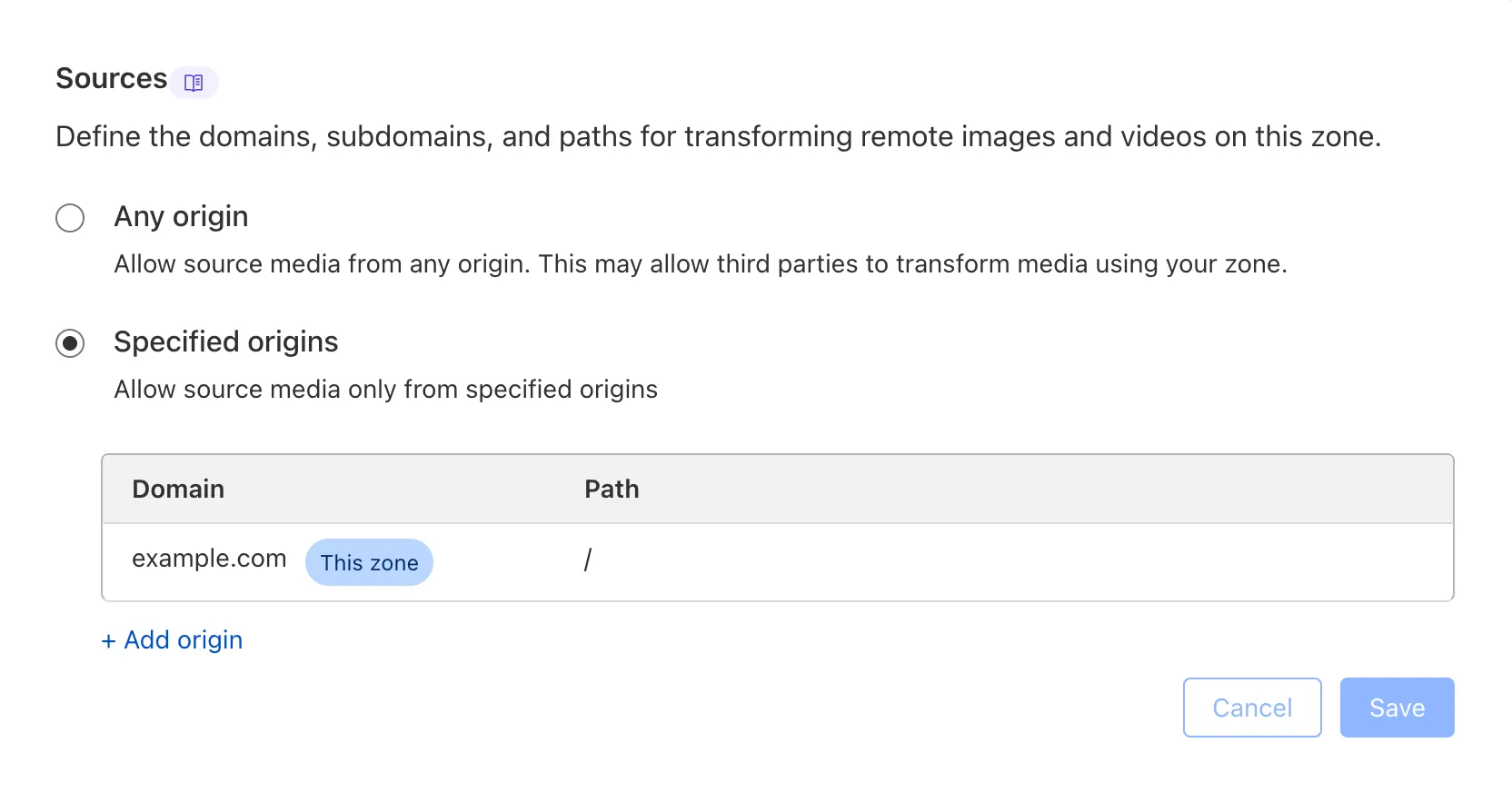
Adding access to other sources, or allowing any source, is easy to do in the Transformations tab under Stream. Click each domain enabled for Transformations and set its sources list to match the needs of your content. The user making this change will need permission to edit zone settings.
For more information, learn about Transforming Videos.