
Remote Browser Isolation (RBI) now supports SAML HTTP-POST bindings, enabling seamless authentication for SSO-enabled applications that rely on POST-based SAML responses from Identity Providers (IdPs) within a Remote Browser Isolation session. This update resolves a previous limitation that caused
405errors during login and improves compatibility with multi-factor authentication (MFA) flows.With expanded support for major IdPs like Okta and Azure AD, this enhancement delivers a more consistent and user-friendly experience across authentication workflows. Learn how to set up Remote Browser Isolation.
You can now create DNS policies to manage outbound traffic for an expanded list of applications. This update adds support for 273 new applications, giving you more control over your organization's outbound traffic.
With this update, you can:
- Create DNS policies for a wider range of applications
- Manage outbound traffic more effectively
- Improve your organization's security and compliance posture
For more information on creating DNS policies, see our DNS policy documentation.
A new GA release for the Linux WARP client is now available on the stable releases downloads page.
This release contains two significant changes all customers should be aware of:
- All DNS traffic now flows inside the WARP tunnel. Customers are no longer required to configure their local firewall rules to allow our DoH IP addresses and domains.
- When using MASQUE, the connection will fall back to HTTP/2 (TCP) when we detect that HTTP/3 traffic is blocked. This allows for a much more reliable connection on some public WiFi networks.
Changes and improvements
- Fixed an issue where the managed network policies could incorrectly report network location beacons as missing.
- Improved DEX test error reporting.
- Fixed an issue causing client notifications to fail in IPv6 only environments which prevented the client from receiving configuration changes to settings like device profile.
- Added a TCP fallback for the MASQUE tunnel protocol to improve connectivity on networks that block UDP or HTTP/3 specifically.
- Added new IP addresses for tunnel connectivity checks. If your organization uses a firewall or other policies you will need to exempt these IPs.
- Fixed an issue where frequent network changes could cause WARP to become unresponsive.
- DNS over HTTPS traffic is now included in the WARP tunnel by default.
- Improvement for WARP to check if tunnel connectivity fails or times out at device wake before attempting to reconnect.
- Fixed an issue causing WARP connection disruptions after network changes.
Known issues
- Devices using WARP client 2025.4.929.0 and up may experience Local Domain Fallback failures if a fallback server has not been configured. To configure a fallback server, refer to Route traffic to fallback server.
A new GA release for the macOS WARP client is now available on the stable releases downloads page.
This release contains two significant changes all customers should be aware of:
- All DNS traffic now flows inside the WARP tunnel. Customers are no longer required to configure their local firewall rules to allow our DoH IP addresses and domains.
- When using MASQUE, the connection will fall back to HTTP/2 (TCP) when we detect that HTTP/3 traffic is blocked. This allows for a much more reliable connection on some public WiFi networks.
Changes and improvements
- Fixed an issue where the managed network policies could incorrectly report network location beacons as missing.
- Improved DEX test error reporting.
- Fixed an issue causing client notifications to fail in IPv6 only environments which prevented the client from receiving configuration changes to settings like device profile.
- Improved captive portal detection.
- Added a TCP fallback for the MASQUE tunnel protocol to improve connectivity on networks that block UDP or HTTP/3 specifically.
- Added new IP addresses for tunnel connectivity checks. If your organization uses a firewall or other policies you will need to exempt these IPs.
- DNS over HTTPS traffic is now included in the WARP tunnel by default.
- Improved the error message displayed in the client GUI when the rate limit for entering an incorrect admin override code is met.
- Improved handling of non-SLAAC IPv6 interface addresses for better connectivity in IPv6 only environments.
- Fixed an issue where frequent network changes could cause WARP to become unresponsive.
- Improvement for WARP to check if tunnel connectivity fails or times out at device wake before attempting to reconnect.
- Fixed an issue causing WARP connection disruptions after network changes.
Known issues
- macOS Sequoia: Due to changes Apple introduced in macOS 15.0.x, the WARP client may not behave as expected. Cloudflare recommends the use of macOS 15.4 or later.
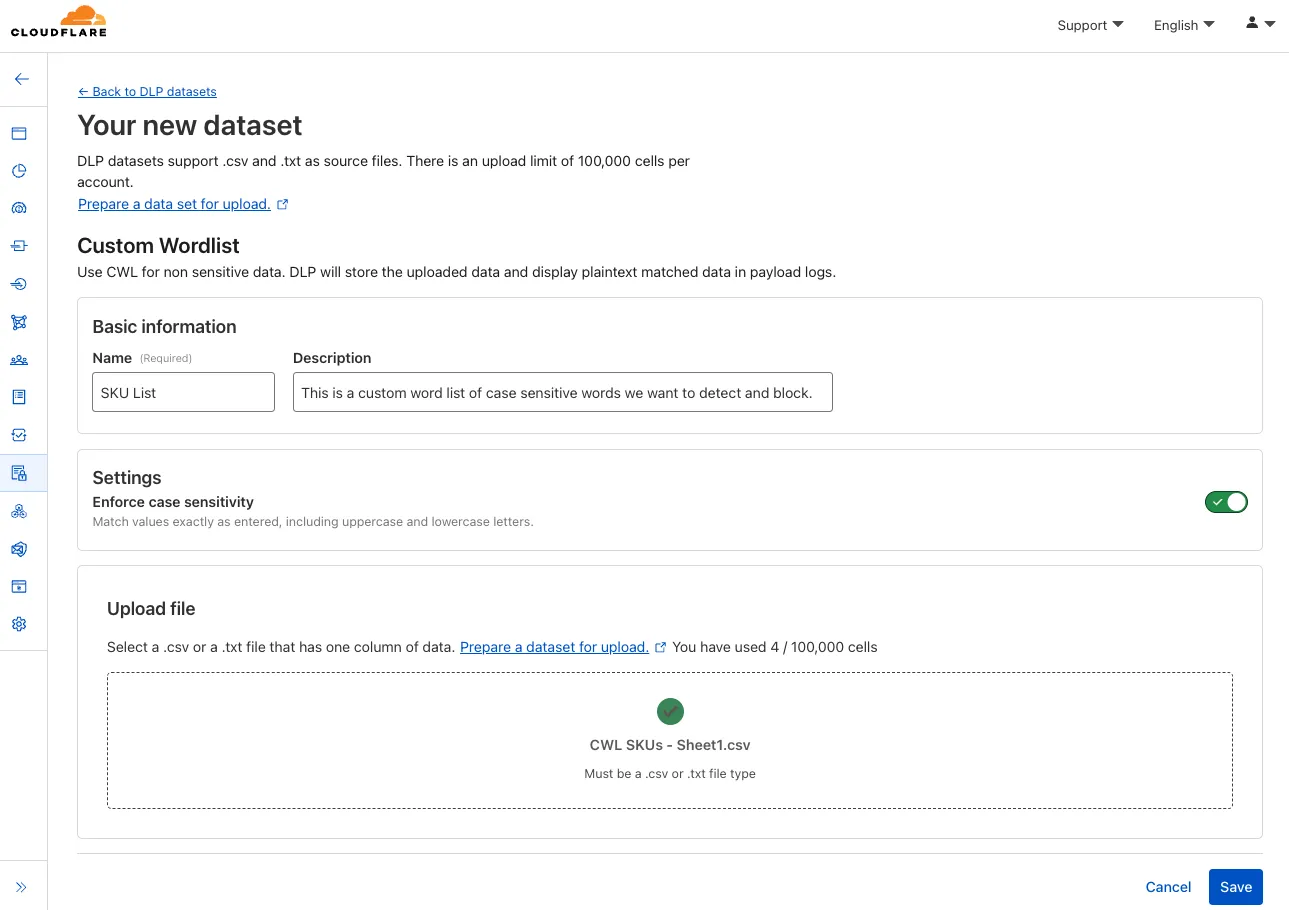
You can now configure custom word lists to enforce case sensitivity. This setting supports flexibility where needed and aims to reduce false positives where letter casing is critical.
You can now publish messages to Cloudflare Queues directly via HTTP from any service or programming language that supports sending HTTP requests. Previously, publishing to queues was only possible from within Cloudflare Workers. You can already consume from queues via Workers or HTTP pull consumers, and now publishing is just as flexible.
Publishing via HTTP requires a Cloudflare API token with
Queues Editpermissions for authentication. Here's a simple example:Terminal window curl "https://api.cloudflare.com/client/v4/accounts/<account_id>/queues/<queue_id>/messages" \-X POST \-H 'Authorization: Bearer <api_token>' \--data '{ "body": { "greeting": "hello", "timestamp": "2025-07-24T12:00:00Z"} }'You can also use our SDKs for TypeScript, Python, and Go.
To get started with HTTP publishing, check out our step-by-step example and the full API documentation in our API reference.
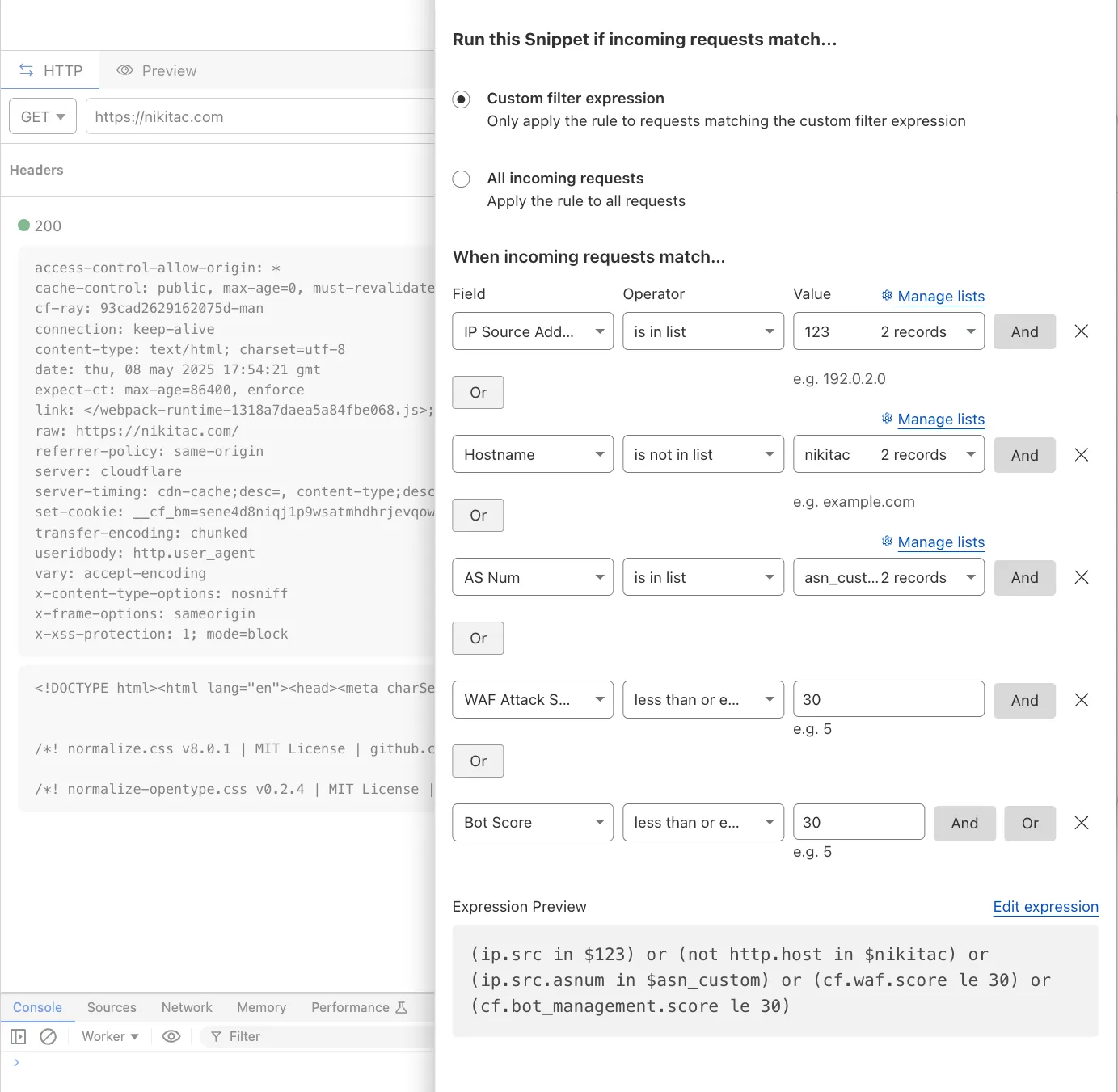
You can now use IP, Autonomous System (AS), and Hostname custom lists to route traffic to Snippets and Cloud Connector, giving you greater precision and control over how you match and process requests at the edge.
In Snippets, you can now also match on Bot Score and WAF Attack Score, unlocking smarter edge logic for everything from request filtering and mitigation to tarpitting and logging.
What’s new:
- Custom lists matching – Snippets and Cloud Connector now support user-created IP, AS, and Hostname lists via dashboard or Lists API. Great for shared logic across zones.
- Bot Score and WAF Attack Score – Use Cloudflare’s intelligent traffic signals to detect bots or attacks and take advanced, tailored actions with just a few lines of code.
These enhancements unlock new possibilities for building smarter traffic workflows with minimal code and maximum efficiency.
Learn more in the Snippets and Cloud Connector documentation.
You can now safely open links in emails to view and investigate them.
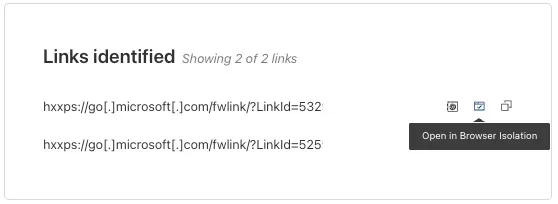
From Investigation, go to View details, and look for the Links identified section. Next to each link, the Cloudflare dashboard will display an Open in Browser Isolation icon which allows your team to safely open the link in a clientless, isolated browser with no risk to the analyst or your environment. Refer to Open links to learn more about this feature.
To use this feature, you must:
- Enable Clientless Web Isolation in your Zero Trust settings.
- Have Browser Isolation (RBI) seats assigned.
For more details, refer to our setup guide.
This feature is available across these Email security packages:
- Advantage
- Enterprise
- Enterprise + PhishGuard
Enterprise customers can now choose the geographic location from which a URL scan is performed — either via Security Center in the Cloudflare dashboard or via the URL Scanner API.
This feature gives security teams greater insight into how a website behaves across different regions, helping uncover targeted, location-specific threats.
What’s new:
- Location Picker: Select a location for the scan via Security Center → Investigate in the dashboard or through the API.
- Region-aware scanning: Understand how content changes by location — useful for detecting regionally tailored attacks.
- Default behavior: If no location is set, scans default to the user’s current geographic region.
Learn more in the Security Center documentation.
We have upgraded WAF Payload Logging to enhance rule diagnostics and usability:
- Targeted logging: Logs now capture only the specific portions of requests that triggered WAF rules, rather than entire request segments.
- Visual highlighting: Matched content is visually highlighted in the UI for faster identification.
- Enhanced context: Logs now include surrounding context to make diagnostics more effective.
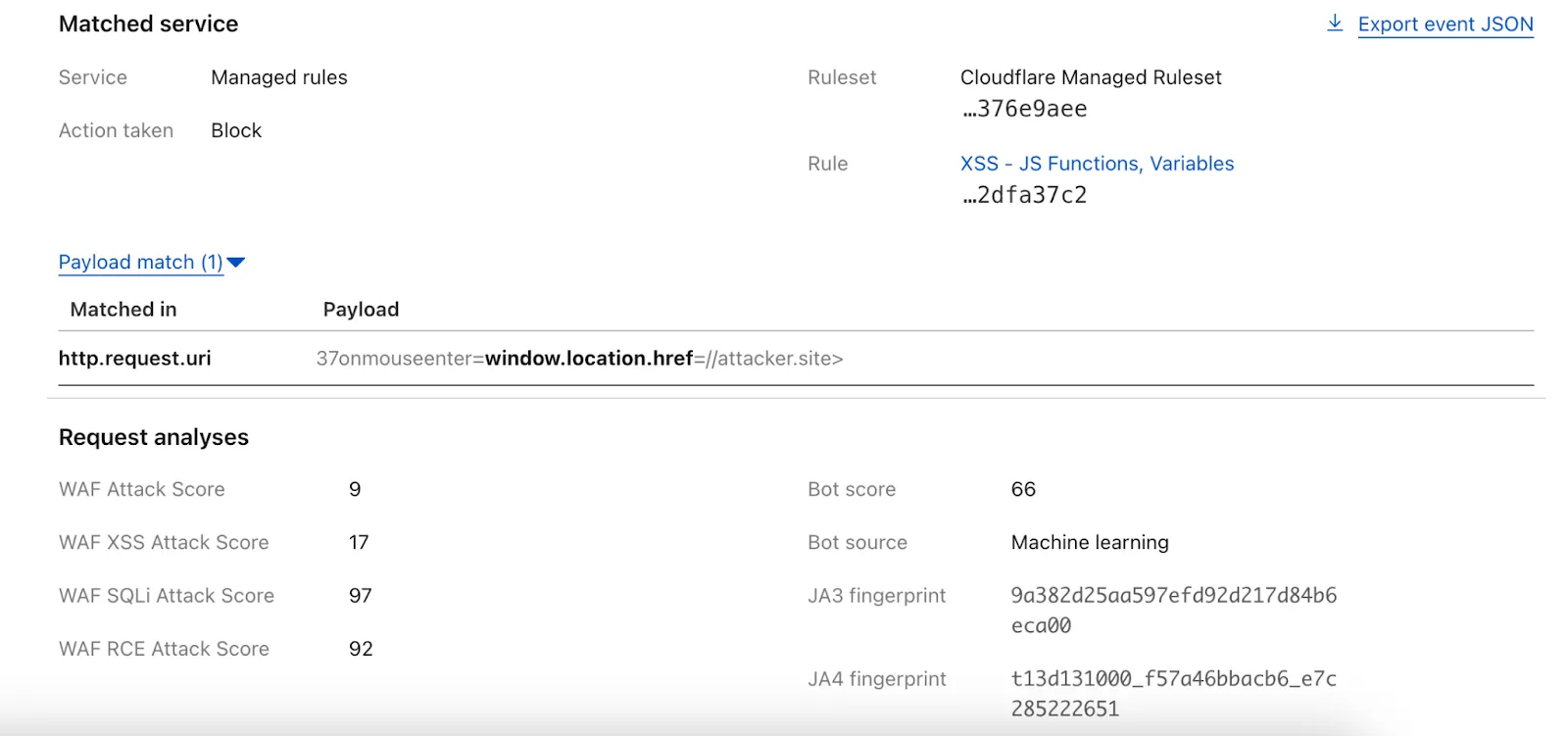
Payload Logging is available to all Enterprise customers. If you have not used Payload Logging before, check how you can get started.
Note: The structure of the
encrypted_matched_datafield in Logpush has changed fromMap<Field, Value>toMap<Field, {Before: bytes, Content: Value, After: bytes}>. If you rely on this field in your Logpush jobs, you should review and update your processing logic accordingly.
FinalizationRegistry ↗ is now available in Workers. You can opt-in using the
enable_weak_refcompatibility flag.This can reduce memory leaks when using WebAssembly-based Workers, which includes Python Workers and Rust Workers. The FinalizationRegistry works by enabling toolchains such as Emscripten ↗ and wasm-bindgen ↗ to automatically free WebAssembly heap allocations. If you are using WASM and seeing Exceeded Memory errors and cannot determine a cause using memory profiling, you may want to enable the FinalizationRegistry.
For more information refer to the
enable_weak_refcompatibility flag documentation.
You can now send DLP forensic copies to third-party storage for any HTTP policy with an
AlloworBlockaction, without needing to include a DLP profile. This change increases flexibility for data handling and forensic investigation use cases.By default, Gateway will send all matched HTTP requests to your configured DLP Forensic Copy jobs.
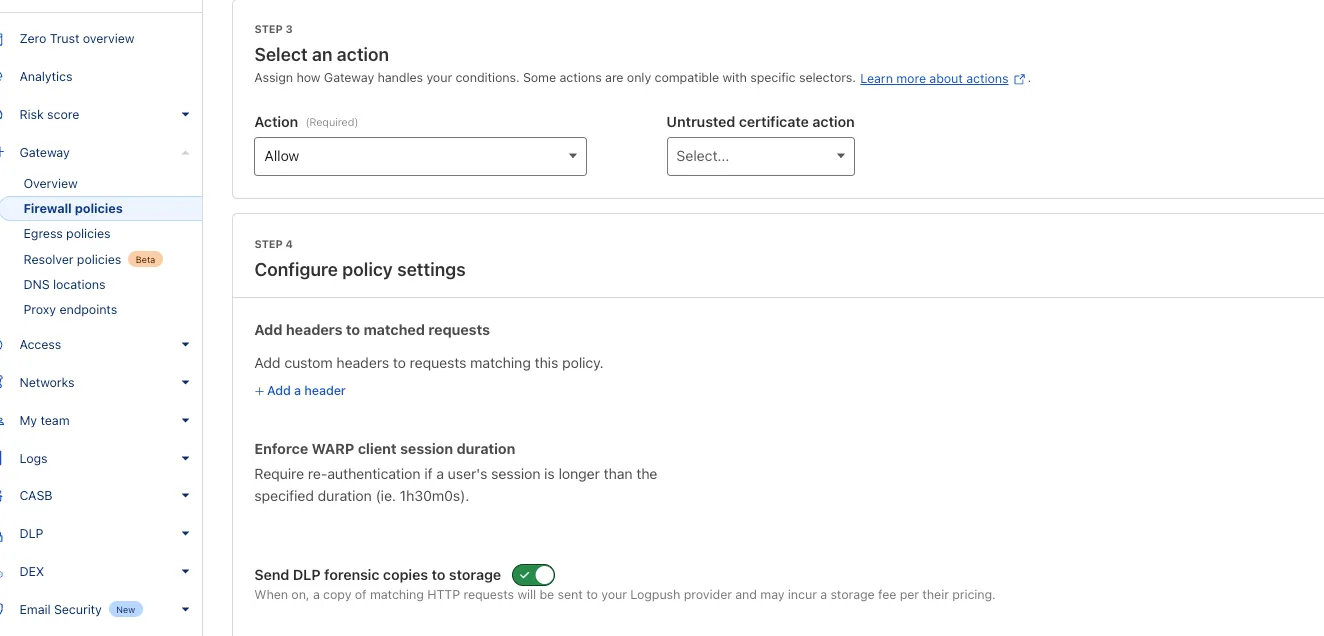
Cloudflare Load Balancing now supports UDP (Layer 4) and ICMP (Layer 3) health monitors for private endpoints. This makes it simple to track the health and availability of internal services that don’t respond to HTTP, TCP, or other protocol probes.
- Set up ICMP ping monitors to check if your private endpoints are reachable.
- Use UDP monitors for lightweight health checks on non-TCP workloads, such as DNS, VoIP, or custom UDP-based services.
- Gain better visibility and uptime guarantees for services running behind Private Network Load Balancing, without requiring public IP addresses.
This enhancement is ideal for internal applications that rely on low-level protocols, especially when used in conjunction with Cloudflare Tunnel, WARP, and Magic WAN to create a secure and observable private network.
Learn more about Private Network Load Balancing or view the full list of supported health monitor protocols.
Earlier this year, we announced the launch of the new Terraform v5 Provider. Unlike the earlier Terraform providers, v5 is automatically generated based on the OpenAPI Schemas for our REST APIs. Since launch, we have seen an unexpectedly high number of issues ↗ reported by customers. These issues currently impact about 15% of resources. We have been working diligently to address these issues across the company, and have released the v5.4.0 release which includes a number of bug fixes. Please keep an eye on this changelog for more information about upcoming releases.
- Removes the
worker_platforms_script_secretresource from the provider (see migration guide ↗ for alternatives—applicable to both Workers and Workers for Platforms) - Removes duplicated fields in
cloudflare_cloud_connector_rulesresource - Fixes
cloudflare_workers_routeid issues #5134 ↗ #5501 ↗ - Fixes issue around refreshing resources that have unsupported response types
Affected resources
cloudflare_certificate_packcloudflare_registrar_domaincloudflare_stream_downloadcloudflare_stream_webhookcloudflare_usercloudflare_workers_kvcloudflare_workers_script
- Fixes
cloudflare_workers_kvstate refresh issues - Fixes issues around configurability of nested properties without computed values for the following resources
Affected resources
cloudflare_accountcloudflare_account_dns_settingscloudflare_account_tokencloudflare_api_tokencloudflare_cloud_connector_rulescloudflare_custom_sslcloudflare_d1_databasecloudflare_dns_recordemail_security_trusted_domainscloudflare_hyperdrive_configcloudflare_keyless_certificatecloudflare_list_itemcloudflare_load_balancercloudflare_logpush_dataset_jobcloudflare_magic_network_monitoring_configurationcloudflare_magic_transit_sitecloudflare_magic_transit_site_lancloudflare_magic_transit_site_wancloudflare_magic_wan_static_routecloudflare_notification_policycloudflare_pages_projectcloudflare_queuecloudflare_queue_consumercloudflare_r2_bucket_corscloudflare_r2_bucket_event_notificationcloudflare_r2_bucket_lifecyclecloudflare_r2_bucket_lockcloudflare_r2_bucket_sippycloudflare_rulesetcloudflare_snippet_rulescloudflare_snippetscloudflare_spectrum_applicationcloudflare_workers_deploymentcloudflare_zero_trust_access_applicationcloudflare_zero_trust_access_group
- Fixed defaults that made
cloudflare_workers_scriptfail when using Assets - Fixed Workers Logpush setting in
cloudflare_workers_scriptmistakenly being readonly - Fixed
cloudflare_pages_projectbroken when using "source"
The detailed changelog ↗ is available on GitHub.
If you are evaluating a move from v4 to v5, please make use of the migration guide ↗. We have provided automated migration scripts using Grit which simplify the transition, although these do not support implementations which use Terraform modules, so customers making use of modules need to migrate manually. Please make use of
terraform planto test your changes before applying, and let us know if you encounter any additional issues either by reporting to our GitHub repository ↗, or by opening a support ticket ↗.- Removes the
This week's analysis covers five CVEs with varying impact levels. Four are rated critical, while one is rated high severity. Remote Code Execution vulnerabilities dominate this set.
Key Findings
GFI KerioControl (CVE-2024-52875) contains an unauthenticated Remote Code Execution (RCE) vulnerability that targets firewall appliances. This vulnerability can let attackers gain root level system access, making this CVE particularly attractive for threat actors.
The SonicWall SMA vulnerabilities remain concerning due to their continued exploitation since 2021. These critical vulnerabilities in remote access solutions create dangerous entry points to networks.
Impact
Customers using the Managed Ruleset will receive rule coverage following this week's release. Below is a breakdown of the recommended prioritization based on current exploitation trends:
- GFI KerioControl (CVE-2024-52875) - Highest priority; unauthenticated RCE
- SonicWall SMA (Multiple vulnerabilities) - Critical for network appliances
- XWiki (CVE-2025-24893) - High priority for development environments
- Langflow (CVE-2025-3248) - Important for AI workflow platforms
- MinIO (CVE-2025-31489) - Important for object storage implementations
Ruleset Rule ID Legacy Rule ID Description Previous Action New Action Comments Cloudflare Managed Ruleset 100724 GFI KerioControl - Remote Code Execution - CVE:CVE-2024-52875 Log Block This is a New Detection Cloudflare Managed Ruleset 100748 XWiki - Remote Code Execution - CVE:CVE-2025-24893 Log Block This is a New Detection Cloudflare Managed Ruleset 100750 SonicWall SMA - Dangerous File Upload - CVE:CVE-2021-20040, CVE:CVE-2021-20041, CVE:CVE-2021-20042
Log Block This is a New Detection Cloudflare Managed Ruleset 100751 Langflow - Remote Code Execution - CVE:CVE-2025-3248 Log Block This is a New Detection Cloudflare Managed Ruleset 100752 MinIO - Auth Bypass - CVE:CVE-2025-31489 Log Block This is a New Detection
A new Browser Isolation Overview page is now available in the Cloudflare Zero Trust dashboard. This centralized view simplifies the management of Remote Browser Isolation (RBI) deployments, providing:
- Streamlined Onboarding: Easily set up and manage isolation policies from one location.
- Quick Testing: Validate clientless web application isolation with ease.
- Simplified Configuration: Configure isolated access applications and policies efficiently.
- Centralized Monitoring: Track aggregate usage and blocked actions.
This update consolidates previously disparate settings, accelerating deployment, improving visibility into isolation activity, and making it easier to ensure your protections are working effectively.
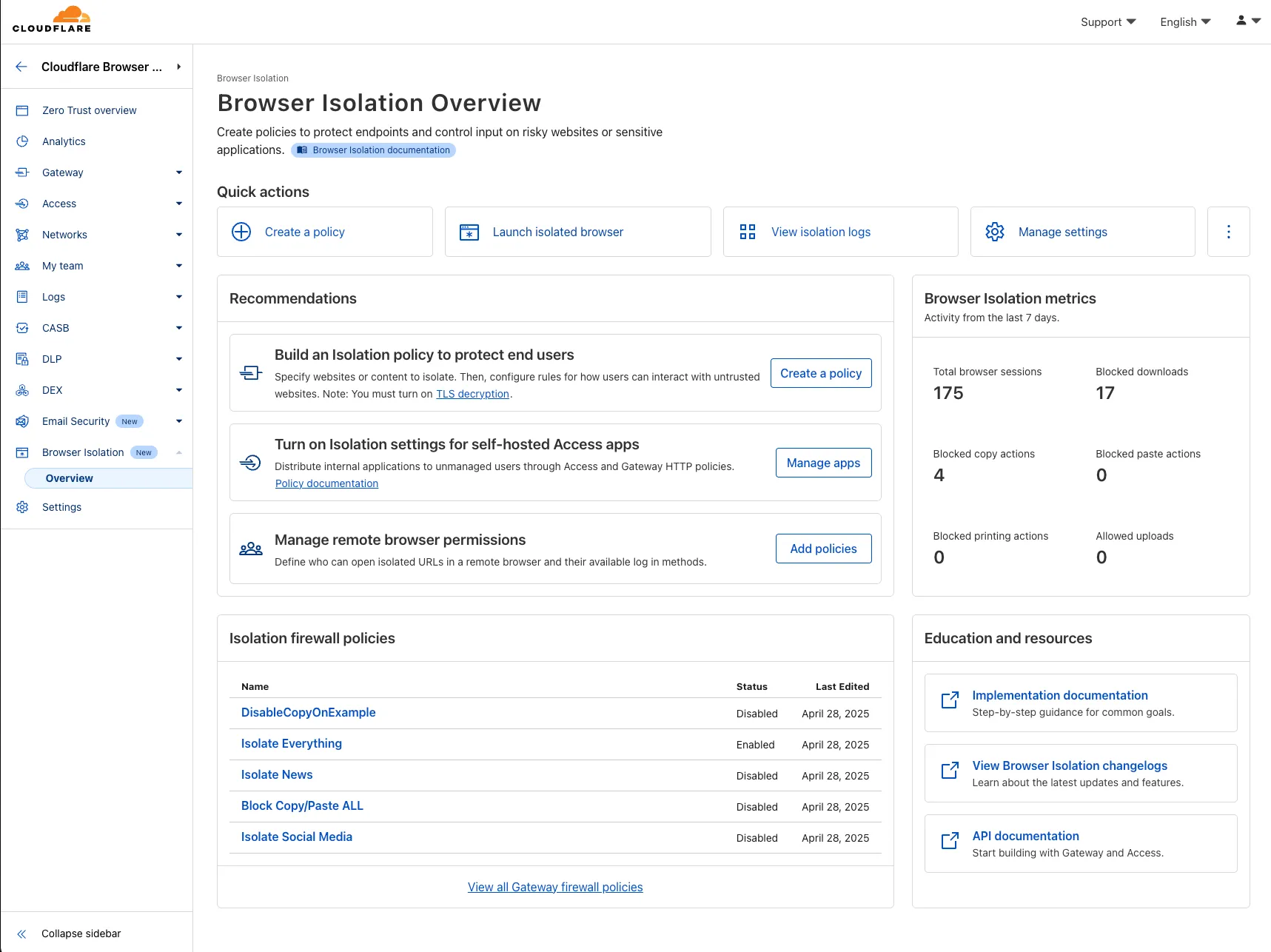
To access the new overview, log in to your Cloudflare Zero Trust dashboard ↗ and find Browser Isolation in the side navigation bar.
We're excited to announce several improvements to the Cloudflare R2 dashboard experience that make managing your object storage easier and more intuitive:
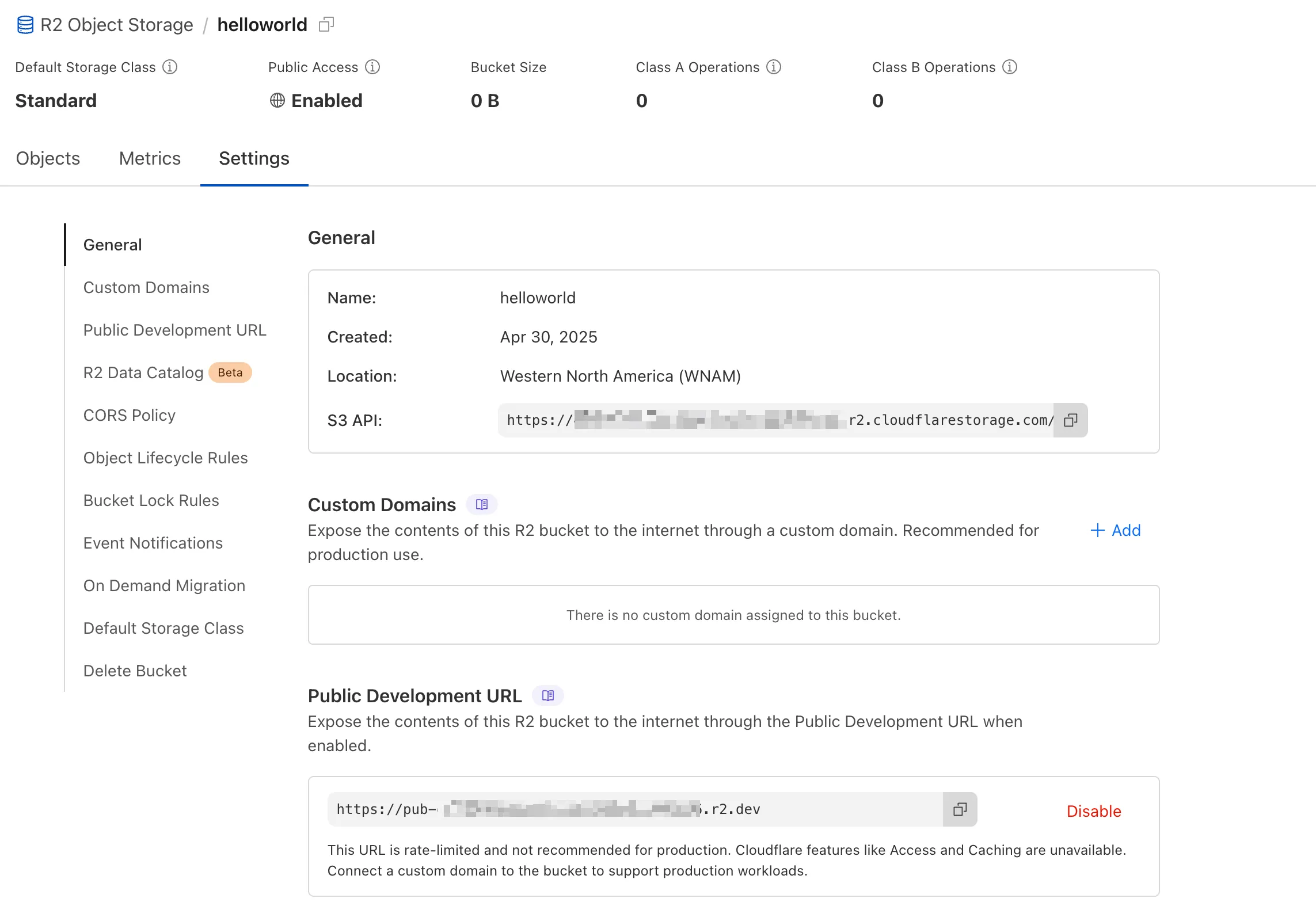
We've redesigned the bucket settings page, giving you a centralized location to manage all your bucket configurations in one place.
- Deeplink support for prefix directories: Navigate through your bucket hierarchy without losing your state. Your browser's back button now works as expected, and you can share direct links to specific prefix directories with teammates.
- Objects as clickable links: Objects are now proper links that you can copy or
CMD + Clickto open in a new tab.
- Renamed "r2.dev domain" to "Public Development URL" for better clarity when exposing bucket contents for non-production workloads.
- Public Access status now clearly displays "Enabled" when your bucket is exposed to the internet (via Public Development URL or Custom Domains).
We've also made numerous other usability improvements across the board to make your R2 experience smoother and more productive.
The Cloudflare Zero Trust dashboard ↗ now supports Cloudflare's native dark mode for all accounts and plan types.
Zero Trust Dashboard will automatically accept your user-level preferences for system settings, so if your Dashboard appearance is set to 'system' or 'dark', the Zero Trust dashboard will enter dark mode whenever the rest of your Cloudflare account does.
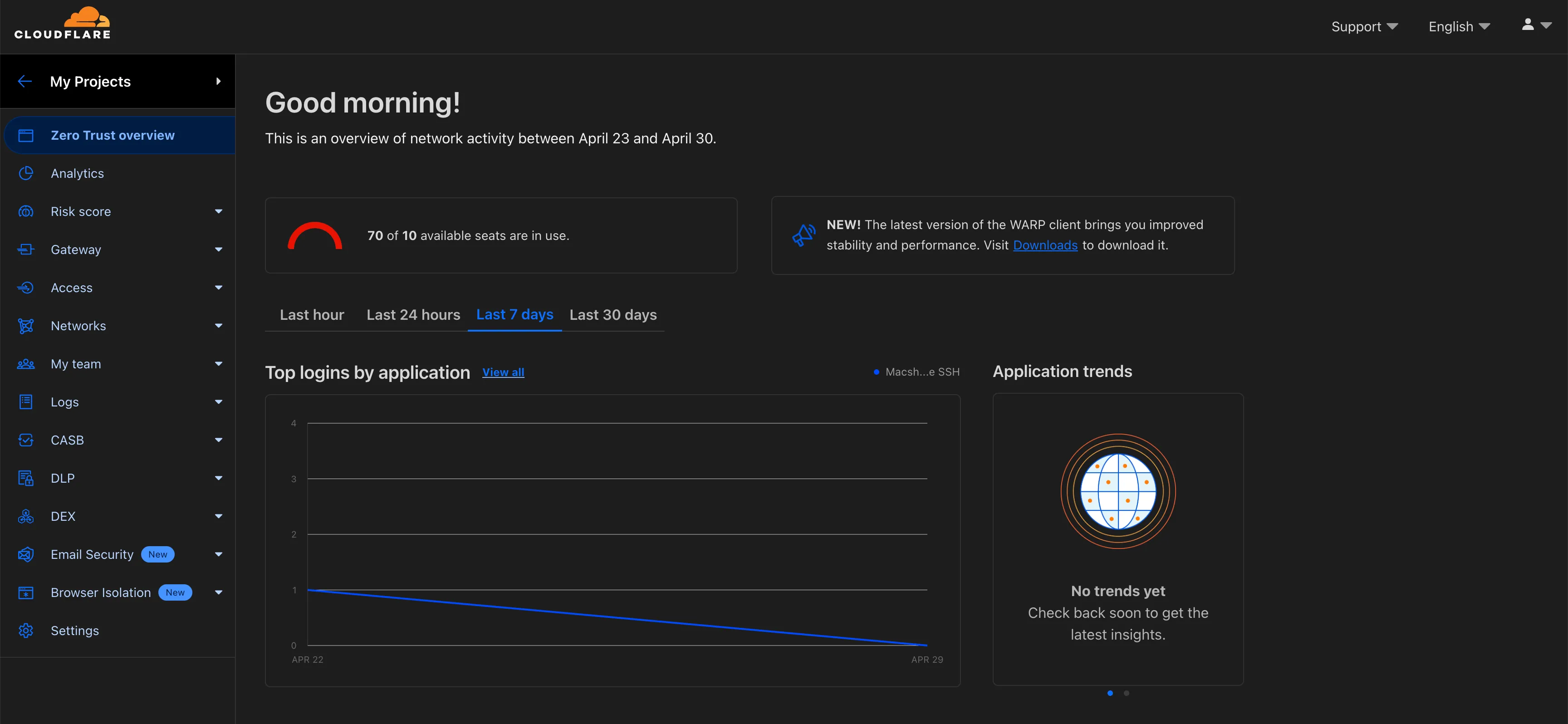
To update your view preference in the Zero Trust dashboard:
- Log into the Zero Trust dashboard ↗.
- Select your user icon.
- Select Dark Mode.
To update your view preference in the Core dashboard:
- Log into the Cloudflare dashboard ↗.
- Go to My Profile
- For Appearance, choose Dark.
Cloudflare One Appliance DHCP server settings now support specifying multiple DNS server IP addresses in the DHCP pool.
Previously, customers could only configure a single DNS server per DHCP pool. With this update, you can specify multiple DNS servers to provide redundancy for clients at branch locations.
For configuration details, refer to DHCP server.
Cloudflare One administrators can now control which egress IP is used based on a destination's fully qualified domain name (FDQN) within Gateway Egress policies.
- Host, Domain, Content Categories, and Application selectors are now available in the Gateway Egress policy builder in beta.
- During the beta period, you can use these selectors with traffic on-ramped to Gateway with the WARP client, proxy endpoints (commonly deployed with PAC files), or Cloudflare Browser Isolation.
- For WARP client support, additional configuration is required. For more information, refer to the WARP client configuration documentation.
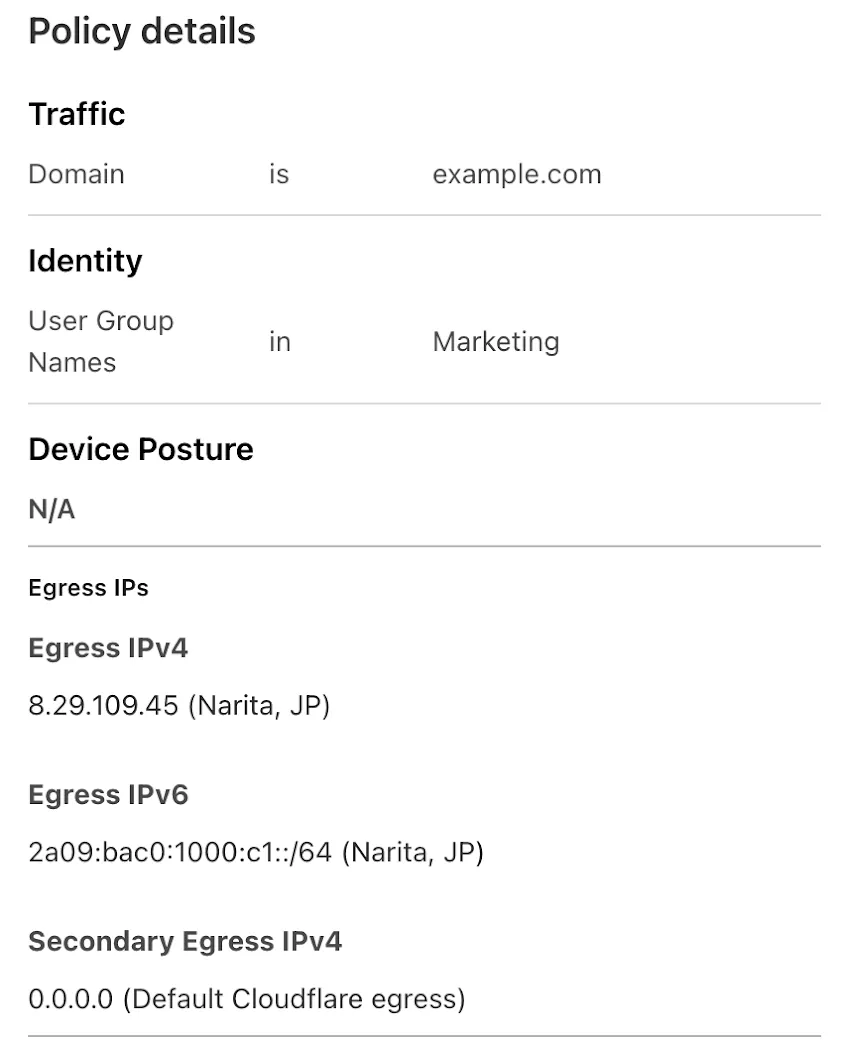
This will help apply egress IPs to your users' traffic when an upstream application or network requires it, while the rest of their traffic can take the most performant egress path.
Ruleset Rule ID Legacy Rule ID Description Previous Action New Action Comments Cloudflare Managed Ruleset 100755 React.js - Router and Remix Vulnerability - CVE:CVE-2025-43864, CVE:CVE-2025-43865
Block Block This is a New Detection

Custom Errors are now generally available for all paid plans — bringing a unified and powerful experience for customizing error responses at both the zone and account levels.
You can now manage Custom Error Rules, Custom Error Assets, and redesigned Error Pages directly from the Cloudflare dashboard. These features let you deliver tailored messaging when errors occur, helping you maintain brand consistency and improve user experience — whether it’s a 404 from your origin or a security challenge from Cloudflare.
What's new:
- Custom Errors are now GA – Available on all paid plans and ready for production traffic.
- UI for Custom Error Rules and Assets – Manage your zone-level rules from the Rules > Overview and your zone-level assets from the Rules > Settings tabs.
- Define inline content or upload assets – Create custom responses directly in the rule builder, upload new or reuse previously stored assets.
- Refreshed UI and new name for Error Pages – Formerly known as “Custom Pages,” Error Pages now offer a cleaner, more intuitive experience for both zone and account-level configurations.
- Powered by Ruleset Engine – Custom Error Rules support conditional logic and override Error Pages for 500 and 1000 class errors, as well as errors originating from your origin or other Cloudflare products. You can also configure Response Header Transform Rules to add, change, or remove HTTP headers from responses returned by Custom Error Rules.
Learn more in the Custom Errors documentation.
You can now create Python Workers which are executed via a cron trigger.
This is similar to how it's done in JavaScript Workers, simply define a scheduled event listener in your Worker:
Python from workers import handler@handlerasync def on_scheduled(event, env, ctx):print("cron processed")Define a cron trigger configuration in your Wrangler configuration file:
{"triggers": {// Schedule cron triggers:// - At every 3rd minute// - At 15:00 (UTC) on first day of the month// - At 23:59 (UTC) on the last weekday of the month"crons": ["*/3 * * * *","0 15 1 * *","59 23 LW * *"]}}[triggers]crons = [ "*/3 * * * *", "0 15 1 * *", "59 23 LW * *" ]Then test your new handler by using Wrangler with the
--test-scheduledflag and making a request to/cdn-cgi/handler/scheduled?cron=*+*+*+*+*:Terminal window npx wrangler dev --test-scheduledcurl "http://localhost:8787/cdn-cgi/handler/scheduled?cron=*+*+*+*+*"Consult the Workers Cron Triggers page for full details on cron triggers in Workers.
You can now filter AutoRAG search results by
folderandtimestampusing metadata filtering to narrow down the scope of your query.This makes it easy to build multitenant experiences where each user can only access their own data. By organizing your content into per-tenant folders and applying a
folderfilter at query time, you ensure that each tenant retrieves only their own documents.Example folder structure:
Terminal window customer-a/logs/customer-a/contracts/customer-b/contracts/Example query:
JavaScript const response = await env.AI.autorag("my-autorag").search({query: "When did I sign my agreement contract?",filters: {type: "eq",key: "folder",value: "customer-a/contracts/",},});You can use metadata filtering by creating a new AutoRAG or reindexing existing data. To reindex all content in an existing AutoRAG, update any chunking setting and select Sync index. Metadata filtering is available for all data indexed on or after April 21, 2025.
If you are new to AutoRAG, get started with the Get started AutoRAG guide.
A new Beta release for the Windows WARP client is now available on the beta releases downloads page.
Changes and improvements
- Fixed an issue causing reconnection loops when captive portals are detected.
- Fixed an issue that caused WARP client disk encryption posture checks to fail due to missing drive names.
- Fixed an issue where managed network policies could incorrectly report network location beacons as missing.
- Improved error reporting for DEX tests.
- Improved WARP client UI high contrast mode.
- Fixed an issue causing client notifications to fail in IPv6 only environments which prevented the client from receiving configuration changes to settings like device profile.
- Added a TCP fallback for the MASQUE tunnel protocol to improve compatibility with networks on MASQUE.
- Added new IP addresses for tunnel connectivity checks. If your organization uses a firewall or other policies you will need to exempt these IPs.
- DNS over HTTPS traffic is now included in the WARP tunnel by default.
- Improved the error message displayed in the client GUI when the rate limit for entering an incorrect admin override code is met.
- Added a Collect Captive Portal Diag button in the client GUI to make it easier for users to collect captive portal debugging diagnostics.
- Improved handling of non-SLAAC IPv6 interface addresses for better connectivity in IPv6 only environments.
- Fixed an issue where frequent network changes could cause WARP to become unresponsive.
Known issues
DNS resolution may be broken when the following conditions are all true:
- WARP is in Secure Web Gateway without DNS filtering (tunnel-only) mode.
- A custom DNS server address is configured on the primary network adapter.
- The custom DNS server address on the primary network adapter is changed while WARP is connected.
To work around this issue, reconnect the WARP client by toggling off and back on.