

Ruleset Rule ID Legacy Rule ID Description Previous Action New Action Comments Cloudflare Managed Ruleset 100739 Next.js - Auth Bypass - CVE:CVE-2025-29927 N/A Disabled This is a New Detection
Update: Mon Mar 24th, 11PM UTC: Next.js has made further changes to address a smaller vulnerability introduced in the patches made to its middleware handling. Users should upgrade to Next.js versions
15.2.4,14.2.26,13.5.10or12.3.6. If you are unable to immediately upgrade or are running an older version of Next.js, you can enable the WAF rule described in this changelog as a mitigation.Update: Mon Mar 24th, 8PM UTC: Next.js has now backported the patch for this vulnerability ↗ to cover Next.js v12 and v13. Users on those versions will need to patch to
13.5.9and12.3.5(respectively) to mitigate the vulnerability.Update: Sat Mar 22nd, 4PM UTC: We have changed this WAF rule to opt-in only, as sites that use auth middleware with third-party auth vendors were observing failing requests.
We strongly recommend updating your version of Next.js (if eligible) to the patched versions, as your app will otherwise be vulnerable to an authentication bypass attack regardless of auth provider.
This rule is opt-in only for sites on the Pro plan or above in the WAF managed ruleset.
To enable the rule:
- Head to Security > WAF > Managed rules in the Cloudflare dashboard for the zone (website) you want to protect.
- Click the three dots next to Cloudflare Managed Ruleset and choose Edit
- Scroll down and choose Browse Rules
- Search for CVE-2025-29927 (ruleId:
34583778093748cc83ff7b38f472013e) - Change the Status to Enabled and the Action to Block. You can optionally set the rule to Log, to validate potential impact before enabling it. Log will not block requests.
- Click Next
- Scroll down and choose Save

This will enable the WAF rule and block requests with the
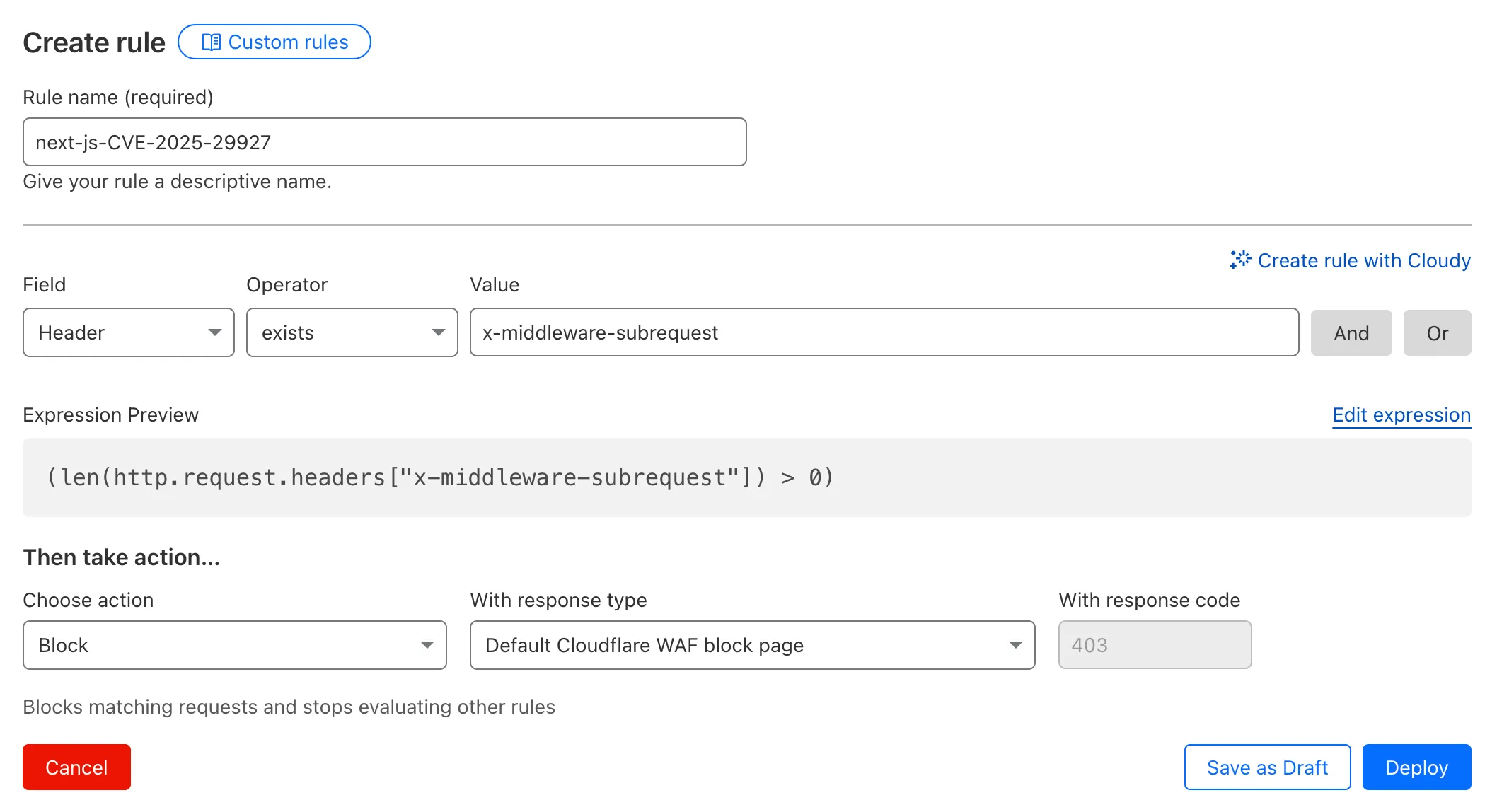
x-middleware-subrequestheader regardless of Next.js version.For users on the Free plan, or who want to define a more specific rule, you can create a Custom WAF rule to block requests with the
x-middleware-subrequestheader regardless of Next.js version.To create a custom rule:
- Head to Security > WAF > Custom rules in the Cloudflare dashboard for the zone (website) you want to protect.
- Give the rule a name - e.g.
next-js-CVE-2025-29927 - Set the matching parameters for the rule match any request where the
x-middleware-subrequestheaderexistsper the rule expression below.
Terminal window (len(http.request.headers["x-middleware-subrequest"]) > 0)- Set the action to 'block'. If you want to observe the impact before blocking requests, set the action to 'log' (and edit the rule later).
- Deploy the rule.
We've made a WAF (Web Application Firewall) rule available to all sites on Cloudflare to protect against the Next.js authentication bypass vulnerability ↗ (
CVE-2025-29927) published on March 21st, 2025.Note: This rule is not enabled by default as it blocked requests across sites for specific authentication middleware.
- This managed rule protects sites using Next.js on Workers and Pages, as well as sites using Cloudflare to protect Next.js applications hosted elsewhere.
- This rule has been made available (but not enabled by default) to all sites as part of our WAF Managed Ruleset and blocks requests that attempt to bypass authentication in Next.js applications.
- The vulnerability affects almost all Next.js versions, and has been fully patched in Next.js
14.2.26and15.2.4. Earlier, interim releases did not fully patch this vulnerability. - Users on older versions of Next.js (
11.1.4to13.5.6) did not originally have a patch available, but this the patch for this vulnerability and a subsequent additional patch have been backported to Next.js versions12.3.6and13.5.10as of Monday, March 24th. Users on Next.js v11 will need to deploy the stated workaround or enable the WAF rule.
The managed WAF rule mitigates this by blocking external user requests with the
x-middleware-subrequestheader regardless of Next.js version, but we recommend users using Next.js 14 and 15 upgrade to the patched versions of Next.js as an additional mitigation.
Smart Placement is a unique Cloudflare feature that can make decisions to move your Worker to run in a more optimal location (such as closer to a database). Instead of always running in the default location (the one closest to where the request is received), Smart Placement uses certain “heuristics” (rules and thresholds) to decide if a different location might be faster or more efficient.
Previously, if these heuristics weren't consistently met, your Worker would revert to running in the default location—even after it had been optimally placed. This meant that if your Worker received minimal traffic for a period of time, the system would reset to the default location, rather than remaining in the optimal one.
Now, once Smart Placement has identified and assigned an optimal location, temporarily dropping below the heuristic thresholds will not force a return to default locations. For example in the previous algorithm, a drop in requests for a few days might return to default locations and heuristics would have to be met again. This was problematic for workloads that made requests to a geographically located resource every few days or longer. In this scenario, your Worker would never get placed optimally. This is no longer the case.
We are excited to announce that AI Gateway now supports real-time AI interactions with the new Realtime WebSockets API.
This new capability allows developers to establish persistent, low-latency connections between their applications and AI models, enabling natural, real-time conversational AI experiences, including speech-to-speech interactions.
The Realtime WebSockets API works with the OpenAI Realtime API ↗, Google Gemini Live API ↗, and supports real-time text and speech interactions with models from Cartesia ↗, and ElevenLabs ↗.
Here's how you can connect AI Gateway to OpenAI's Realtime API ↗ using WebSockets:
OpenAI Realtime API example import WebSocket from "ws";const url ="wss://gateway.ai.cloudflare.com/v1/<account_id>/<gateway>/openai?model=gpt-4o-realtime-preview-2024-12-17";const ws = new WebSocket(url, {headers: {"cf-aig-authorization": process.env.CLOUDFLARE_API_KEY,Authorization: "Bearer " + process.env.OPENAI_API_KEY,"OpenAI-Beta": "realtime=v1",},});ws.on("open", () => console.log("Connected to server."));ws.on("message", (message) => console.log(JSON.parse(message.toString())));ws.send(JSON.stringify({type: "response.create",response: { modalities: ["text"], instructions: "Tell me a joke" },}),);Get started by checking out the Realtime WebSockets API documentation.
We're excited to introduce the Cloudflare Zero Trust Secure DNS Locations Write role, designed to provide DNS filtering customers with granular control over third-party access when configuring their Protective DNS (PDNS) solutions.
Many DNS filtering customers rely on external service partners to manage their DNS location endpoints. This role allows you to grant access to external parties to administer DNS locations without overprovisioning their permissions.
Secure DNS Location Requirements:
-
Mandate usage of Bring your own DNS resolver IP addresses ↗ if available on the account.
-
Require source network filtering for IPv4/IPv6/DoT endpoints; token authentication or source network filtering for the DoH endpoint.
You can assign the new role via Cloudflare Dashboard (
Manage Accounts > Members) or via API. For more information, refer to the Secure DNS Locations documentation ↗.-
In Cloudflare Terraform Provider ↗ versions 5.2.0 and above, dozens of resources now have proper drift detection. Before this fix, these resources would indicate they needed to be updated or replaced — even if there was no real change. Now, you can rely on your
terraform planto only show what resources are expected to change.This issue affected resources ↗ related to these products and features:
- API Shield
- Argo Smart Routing
- Argo Tiered Caching
- Bot Management
- BYOIP
- D1
- DNS
- Email Routing
- Hyperdrive
- Observatory
- Pages
- R2
- Rules
- SSL/TLS
- Waiting Room
- Workers
- Zero Trust
In the Cloudflare Terraform Provider ↗ versions 5.2.0 and above, sensitive properties of resources are redacted in logs. Sensitive properties in Cloudflare's OpenAPI Schema ↗ are now annotated with
x-sensitive: true. This results in proper auto-generation of the corresponding Terraform resources, and prevents sensitive values from being shown when you run Terraform commands.This issue affected resources ↗ related to these products and features:
- Alerts and Audit Logs
- Device API
- DLP
- DNS
- Magic Visibility
- Magic WAN
- TLS Certs and Hostnames
- Tunnels
- Turnstile
- Workers
- Zaraz
Document conversion plays an important role when designing and developing AI applications and agents. Workers AI now provides the
toMarkdownutility method that developers can use to for quick, easy, and convenient conversion and summary of documents in multiple formats to Markdown language.You can call this new tool using a binding by calling
env.AI.toMarkdown()or the using the REST API endpoint.In this example, we fetch a PDF document and an image from R2 and feed them both to
env.AI.toMarkdown(). The result is a list of converted documents. Workers AI models are used automatically to detect and summarize the image.TypeScript import { Env } from "./env";export default {async fetch(request: Request, env: Env, ctx: ExecutionContext) {// https://pub-979cb28270cc461d94bc8a169d8f389d.r2.dev/somatosensory.pdfconst pdf = await env.R2.get("somatosensory.pdf");// https://pub-979cb28270cc461d94bc8a169d8f389d.r2.dev/cat.jpegconst cat = await env.R2.get("cat.jpeg");return Response.json(await env.AI.toMarkdown([{name: "somatosensory.pdf",blob: new Blob([await pdf.arrayBuffer()], {type: "application/octet-stream",}),},{name: "cat.jpeg",blob: new Blob([await cat.arrayBuffer()], {type: "application/octet-stream",}),},]),);},};This is the result:
[{"name": "somatosensory.pdf","mimeType": "application/pdf","format": "markdown","tokens": 0,"data": "# somatosensory.pdf\n## Metadata\n- PDFFormatVersion=1.4\n- IsLinearized=false\n- IsAcroFormPresent=false\n- IsXFAPresent=false\n- IsCollectionPresent=false\n- IsSignaturesPresent=false\n- Producer=Prince 20150210 (www.princexml.com)\n- Title=Anatomy of the Somatosensory System\n\n## Contents\n### Page 1\nThis is a sample document to showcase..."},{"name": "cat.jpeg","mimeType": "image/jpeg","format": "markdown","tokens": 0,"data": "The image is a close-up photograph of Grumpy Cat, a cat with a distinctive grumpy expression and piercing blue eyes. The cat has a brown face with a white stripe down its nose, and its ears are pointed upright. Its fur is light brown and darker around the face, with a pink nose and mouth. The cat's eyes are blue and slanted downward, giving it a perpetually grumpy appearance. The background is blurred, but it appears to be a dark brown color. Overall, the image is a humorous and iconic representation of the popular internet meme character, Grumpy Cat. The cat's facial expression and posture convey a sense of displeasure or annoyance, making it a relatable and entertaining image for many people."}]See Markdown Conversion for more information on supported formats, REST API and pricing.
Ruleset Rule ID Legacy Rule ID Description Previous Action New Action Comments Cloudflare Managed Ruleset 100736 Generic HTTP Request Smuggling N/A Disabled This is a New Detection
📝 We've renamed the Agents package to
agents!If you've already been building with the Agents SDK, you can update your dependencies to use the new package name, and replace references to
agents-sdkwithagents:Terminal window # Install the new packagenpm i agentsTerminal window # Remove the old (deprecated) packagenpm uninstall agents-sdk# Find instances of the old package name in your codebasegrep -r 'agents-sdk' .# Replace instances of the old package name with the new one# (or use find-replace in your editor)sed -i 's/agents-sdk/agents/g' $(grep -rl 'agents-sdk' .)All future updates will be pushed to the new
agentspackage, and the older package has been marked as deprecated.We've added a number of big new features to the Agents SDK over the past few weeks, including:
- You can now set
cors: truewhen usingrouteAgentRequestto return permissive default CORS headers to Agent responses. - The regular client now syncs state on the agent (just like the React version).
useAgentChatbug fixes for passing headers/credentials, including properly clearing cache on unmount.- Experimental
/schedulemodule with a prompt/schema for adding scheduling to your app (with evals!). - Changed the internal
zodschema to be compatible with the limitations of Google's Gemini models by removing the discriminated union, allowing you to use Gemini models with the scheduling API.
We've also fixed a number of bugs with state synchronization and the React hooks.
JavaScript // via https://github.com/cloudflare/agents/tree/main/examples/cross-domainexport default {async fetch(request, env) {return (// Set { cors: true } to enable CORS headers.(await routeAgentRequest(request, env, { cors: true })) ||new Response("Not found", { status: 404 }));},};TypeScript // via https://github.com/cloudflare/agents/tree/main/examples/cross-domainexport default {async fetch(request: Request, env: Env) {return (// Set { cors: true } to enable CORS headers.(await routeAgentRequest(request, env, { cors: true })) ||new Response("Not found", { status: 404 }));},} satisfies ExportedHandler<Env>;We've added a new
@unstable_callable()decorator for defining methods that can be called directly from clients. This allows you call methods from within your client code: you can call methods (with arguments) and get native JavaScript objects back.JavaScript // server.tsimport { unstable_callable, Agent } from "agents";export class Rpc extends Agent {// Use the decorator to define a callable method@unstable_callable({description: "rpc test",})async getHistory() {return this.sql`SELECT * FROM history ORDER BY created_at DESC LIMIT 10`;}}TypeScript // server.tsimport { unstable_callable, Agent, type StreamingResponse } from "agents";import type { Env } from "../server";export class Rpc extends Agent<Env> {// Use the decorator to define a callable method@unstable_callable({description: "rpc test",})async getHistory() {return this.sql`SELECT * FROM history ORDER BY created_at DESC LIMIT 10`;}}We've fixed a number of small bugs in the
agents-starter↗ project — a real-time, chat-based example application with tool-calling & human-in-the-loop built using the Agents SDK. The starter has also been upgraded to use the latest wrangler v4 release.If you're new to Agents, you can install and run the
agents-starterproject in two commands:Terminal window # Install it$ npm create cloudflare@latest agents-starter -- --template="cloudflare/agents-starter"# Run it$ npm run startYou can use the starter as a template for your own Agents projects: open up
src/server.tsandsrc/client.tsxto see how the Agents SDK is used.We've heard your feedback on the Agents SDK documentation, and we're shipping more API reference material and usage examples, including:
- Expanded API reference documentation, covering the methods and properties exposed by the Agents SDK, as well as more usage examples.
- More Client API documentation that documents
useAgent,useAgentChatand the new@unstable_callableRPC decorator exposed by the SDK. - New documentation on how to route requests to agents and (optionally) authenticate clients before they connect to your Agents.
Note that the Agents SDK is continually growing: the type definitions included in the SDK will always include the latest APIs exposed by the
agentspackage.If you're still wondering what Agents are, read our blog on building AI Agents on Cloudflare ↗ and/or visit the Agents documentation to learn more.
- You can now set
Now, API Shield automatically labels your API inventory with API-specific risks so that you can track and manage risks to your APIs.
View these risks in Endpoint Management by label:
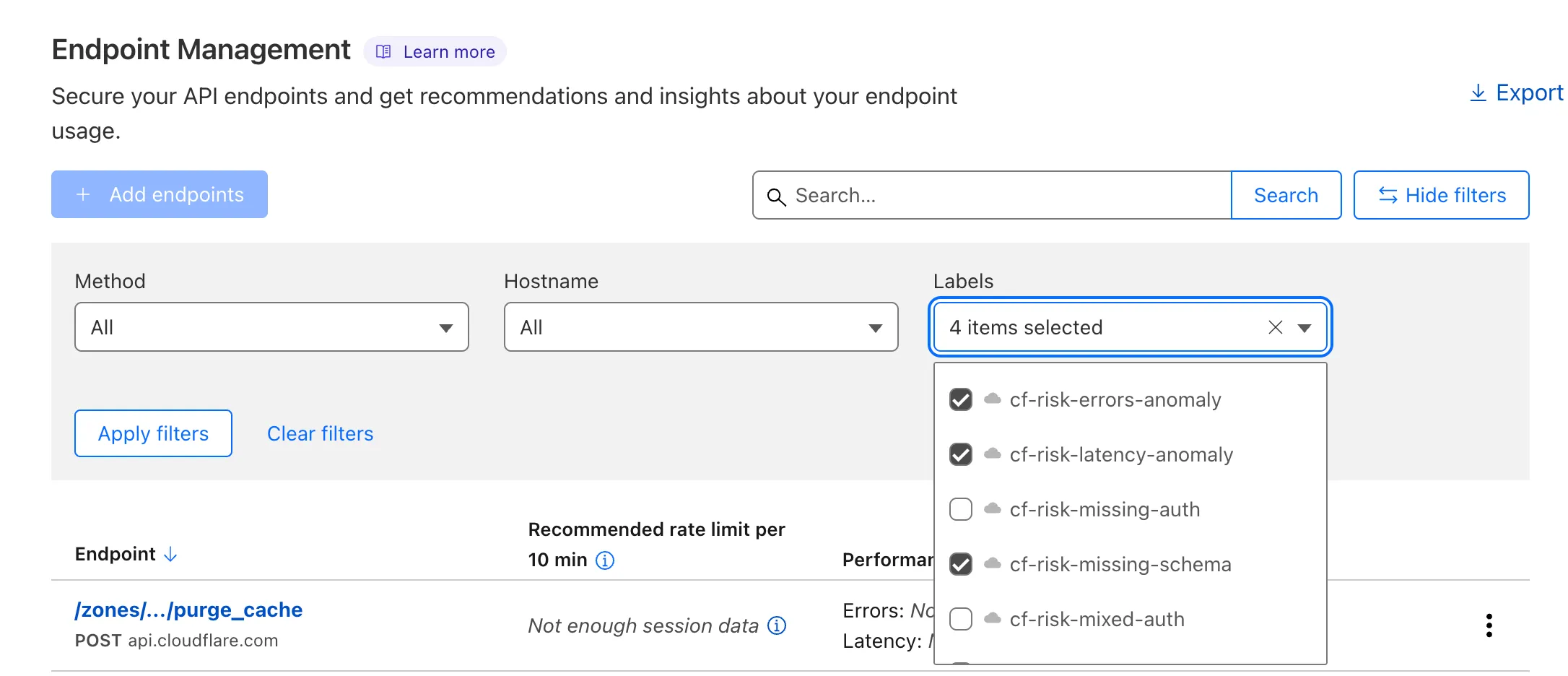
...or in Security Center Insights:
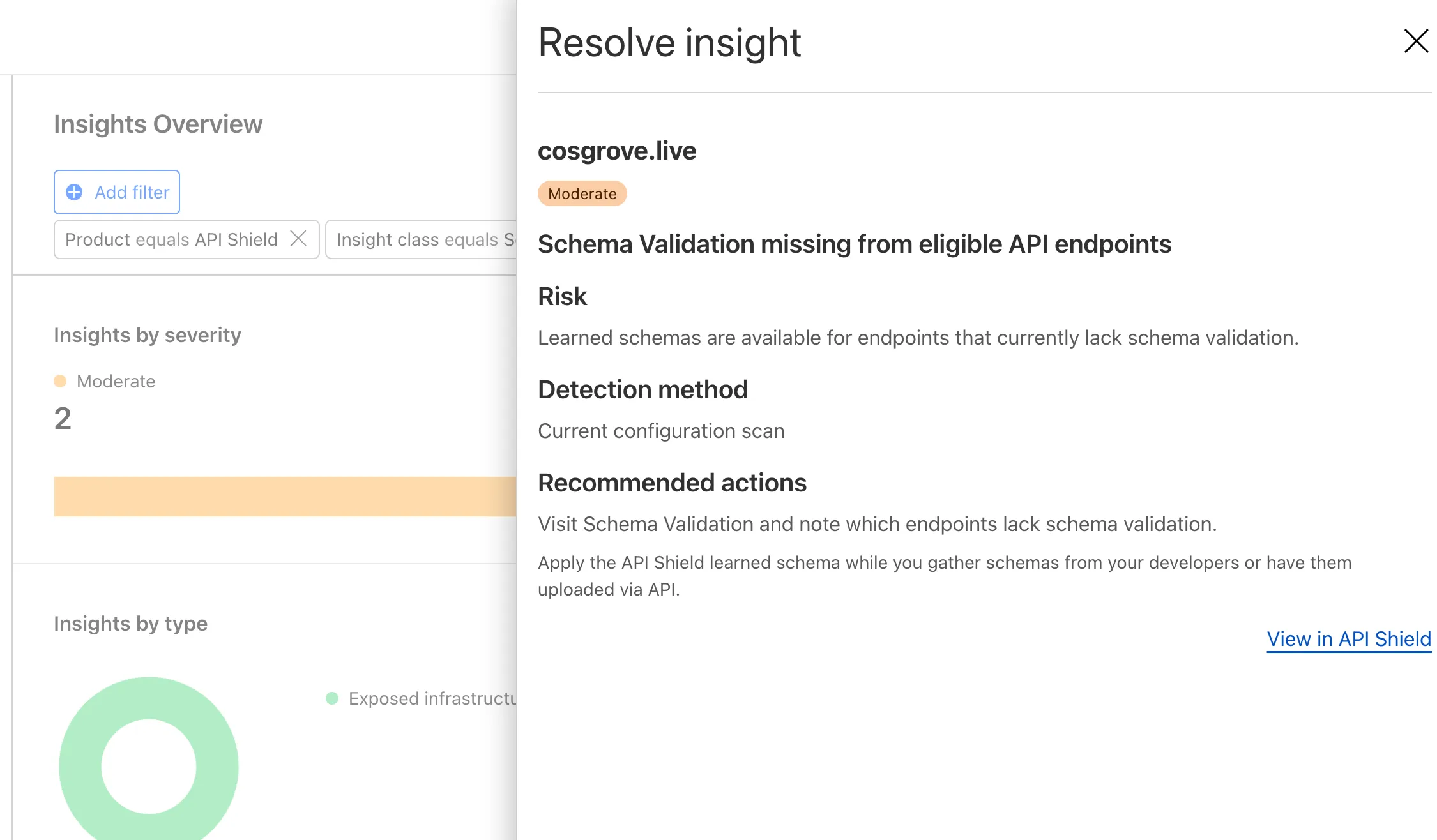
API Shield will scan for risks on your API inventory daily. Here are the new risks we're scanning for and automatically labelling:
- cf-risk-sensitive: applied if the customer is subscribed to the sensitive data detection ruleset and the WAF detects sensitive data returned on an endpoint in the last seven days.
- cf-risk-missing-auth: applied if the customer has configured a session ID and no successful requests to the endpoint contain the session ID.
- cf-risk-mixed-auth: applied if the customer has configured a session ID and some successful requests to the endpoint contain the session ID while some lack the session ID.
- cf-risk-missing-schema: added when a learned schema is available for an endpoint that has no active schema.
- cf-risk-error-anomaly: added when an endpoint experiences a recent increase in response errors over the last 24 hours.
- cf-risk-latency-anomaly: added when an endpoint experiences a recent increase in response latency over the last 24 hours.
- cf-risk-size-anomaly: added when an endpoint experiences a spike in response body size over the last 24 hours.
In addition, API Shield has two new 'beta' scans for Broken Object Level Authorization (BOLA) attacks. If you're in the beta, you will see the following two labels when API Shield suspects an endpoint is suffering from a BOLA vulnerability:
- cf-risk-bola-enumeration: added when an endpoint experiences successful responses with drastic differences in the number of unique elements requested by different user sessions.
- cf-risk-bola-pollution: added when an endpoint experiences successful responses where parameters are found in multiple places in the request.
We are currently accepting more customers into our beta. Contact your account team if you are interested in BOLA attack detection for your API.
Refer to the blog post ↗ for more information about Cloudflare's expanded posture management capabilities.
Radar has expanded its security insights, providing visibility into aggregate trends in authentication requests, including the detection of leaked credentials through leaked credentials detection scans.
We have now introduced the following endpoints:
/leaked_credential_checks/summary/{dimension}: Retrieves summaries of HTTP authentication requests distribution across two different dimensions./leaked_credential_checks/timeseries_groups/{dimension}: Retrieves timeseries data for HTTP authentication requests distribution across two different dimensions.
The following dimensions are available, displaying the distribution of HTTP authentication requests based on:
compromised: Credential status (clean vs. compromised).bot_class: Bot class (human vs. bot).
Dive deeper into leaked credential detection in this blog post ↗ and learn more about the expanded Radar security insights in our blog post ↗.
Workers AI is excited to add 4 new models to the catalog, including 2 brand new classes of models with a text-to-speech and reranker model. Introducing:
- @cf/baai/bge-m3 - a multi-lingual embeddings model that supports over 100 languages. It can also simultaneously perform dense retrieval, multi-vector retrieval, and sparse retrieval, with the ability to process inputs of different granularities.
- @cf/baai/bge-reranker-base - our first reranker model! Rerankers are a type of text classification model that takes a query and context, and outputs a similarity score between the two. When used in RAG systems, you can use a reranker after the initial vector search to find the most relevant documents to return to a user by reranking the outputs.
- @cf/openai/whisper-large-v3-turbo - a faster, more accurate speech-to-text model. This model was added earlier but is graduating out of beta with pricing included today.
- @cf/myshell-ai/melotts - our first text-to-speech model that allows users to generate an MP3 with voice audio from inputted text.
Pricing is available for each of these models on the Workers AI pricing page.
This docs update includes a few minor bug fixes to the model schema for llama-guard, llama-3.2-1b, which you can review on the product changelog.
Try it out and let us know what you think! Stay tuned for more models in the coming days.
Ruleset Rule ID Legacy Rule ID Description Previous Action New Action Comments Cloudflare Managed Ruleset 100725 Fortinet FortiManager - Remote Code Execution - CVE:CVE-2023-42791, CVE:CVE-2024-23666
Log Block Cloudflare Managed Ruleset 100726 Ivanti - Remote Code Execution - CVE:CVE-2024-8190 Log Block Cloudflare Managed Ruleset 100727 Cisco IOS XE - Remote Code Execution - CVE:CVE-2023-20198 Log Block Cloudflare Managed Ruleset 100728 Sitecore - Remote Code Execution - CVE:CVE-2024-46938 Log Block Cloudflare Managed Ruleset 100729 Microsoft SharePoint - Remote Code Execution - CVE:CVE-2023-33160 Log Block Cloudflare Managed Ruleset 100730 Pentaho - Template Injection - CVE:CVE-2022-43769, CVE:CVE-2022-43939
Log Block Cloudflare Managed Ruleset 100700 Apache SSRF vulnerability CVE-2021-40438 N/A Block
A new GA release for the Android Cloudflare One Agent is now available in the Google Play Store ↗. This release includes a new feature allowing team name insertion by URL during enrollment, as well as fixes and minor improvements.
Changes and improvements
- Improved in-app error messages.
- Improved mobile client login with support for team name insertion by URL.
- Fixed an issue preventing admin split tunnel settings taking priority for traffic from certain applications.
A new GA release for the iOS Cloudflare One Agent is now available in the iOS App Store ↗. This release includes a new feature allowing team name insertion by URL during enrollment, as well as fixes and minor improvements.
Changes and improvements
- Improved in-app error messages.
- Improved mobile client login with support for team name insertion by URL.
- Bug fixes and performance improvements.
You can now access bindings from anywhere in your Worker by importing the
envobject fromcloudflare:workers.Previously,
envcould only be accessed during a request. This meant that bindings could not be used in the top-level context of a Worker.Now, you can import
envand access bindings such as secrets or environment variables in the initial setup for your Worker:JavaScript import { env } from "cloudflare:workers";import ApiClient from "example-api-client";// API_KEY and LOG_LEVEL now usable in top-level scopeconst apiClient = ApiClient.new({ apiKey: env.API_KEY });const LOG_LEVEL = env.LOG_LEVEL || "info";export default {fetch(req) {// you can use apiClient or LOG_LEVEL, configured before any request is handled},};Additionally,
envwas normally accessed as a argument to a Worker's entrypoint handler, such asfetch. This meant that if you needed to access a binding from a deeply nested function, you had to passenvas an argument through many functions to get it to the right spot. This could be cumbersome in complex codebases.Now, you can access the bindings from anywhere in your codebase without passing
envas an argument:JavaScript // helpers.jsimport { env } from "cloudflare:workers";// env is *not* an argument to this functionexport async function getValue(key) {let prefix = env.KV_PREFIX;return await env.KV.get(`${prefix}-${key}`);}For more information, see documentation on accessing
env.
You can now retry your Cloudflare Pages and Workers builds directly from GitHub. No need to switch to the Cloudflare Dashboard for a simple retry!

Let’s say you push a commit, but your build fails due to a spurious error like a network timeout. Instead of going to the Cloudflare Dashboard to manually retry, you can now rerun the build with just a few clicks inside GitHub, keeping you inside your workflow.
For Pages and Workers projects connected to a GitHub repository:
- When a build fails, go to your GitHub repository or pull request
- Select the failed Check Run for the build
- Select "Details" on the Check Run
- Select "Rerun" to trigger a retry build for that commit
Learn more about Pages Builds and Workers Builds.
A new Beta release for the macOS WARP client is now available on the beta releases downloads page.
This release contains significant improvements to our captive portal / public Wi-Fi detection logic. If you have experienced captive portal issues in the past, re-test and give this version a try.
Changes and improvements
- Improved captive portal detection to make more public networks compatible and have faster detection.
- Improved error messages shown in the app.
- WARP tunnel protocol details can now be viewed using the
warp-cli tunnel statscommand. - Fixed issue with device revocation and re-registration when switching configurations.
Known issues
- macOS Sequoia: Due to changes Apple introduced in macOS 15.0.x, the WARP client may not behave as expected. Cloudflare recommends the use of macOS 15.3 or later.
A new Beta release for the Windows WARP client is now available on the beta releases downloads page.
This release contains significant improvements to our captive portal / public Wi-Fi detection logic. If you have experienced captive portal issues in the past, re-test and give this version a try.
Changes and improvements
- Improved captive portal detection to make more public networks compatible and have faster detection.
- Improved error messages shown in the app.
- Added the ability to control if the WARP interface IPs are registered with DNS servers or not.
- Removed DNS logs view from the Windows client GUI. DNS logs can be viewed as part of
warp-diagor by viewing the log file on the user's local directory. - Fixed issue that would result in a user receiving multiple re-authentication requests when waking their device from sleep.
- WARP tunnel protocol details can now be viewed using the
warp-cli tunnel statscommand. - Improvements to Windows multi-user including support for fast user switching. If you are interested in testing this feature, reach out to your Cloudflare account team.
- Fixed issue with device revocation and re-registration when switching configurations.
- Fixed issue where DEX tests would run during certain sleep states where the networking stack was not fully up. This would result in failures that would be ignored.
Known issues
DNS resolution may be broken when the following conditions are all true:
- WARP is in Secure Web Gateway without DNS filtering (tunnel-only) mode.
- A custom DNS server address is configured on the primary network adapter.
- The custom DNS server address on the primary network adapter is changed while WARP is connected.
To work around this issue, reconnect the WARP client by toggling off and back on.
Magic Firewall now supports a new managed list of Cloudflare IP ranges. This list is available as an option when creating a Magic Firewall policy based on IP source/destination addresses. When selecting "is in list" or "is not in list", the option "Cloudflare IP Ranges" will appear in the dropdown menu.
This list is based on the IPs listed in the Cloudflare IP ranges ↗. Updates to this managed list are applied automatically.
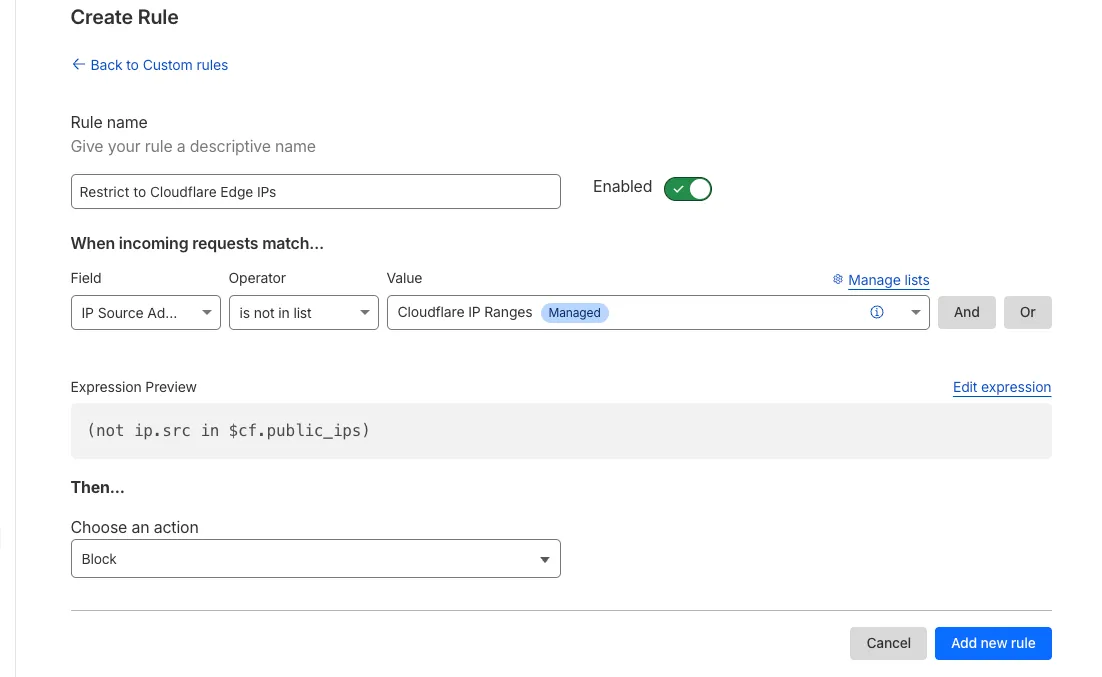
Note: IP Lists require a Cloudflare Advanced Network Firewall subscription. For more details about Cloudflare Network Firewall plans, refer to Plans.
We've released the next major version of Wrangler, the CLI for Cloudflare Workers —
wrangler@4.0.0. Wrangler v4 is a major release focused on updates to underlying systems and dependencies, along with improvements to keep Wrangler commands consistent and clear.You can run the following command to install it in your projects:
Terminal window npm i wrangler@latestTerminal window yarn add wrangler@latestTerminal window pnpm add wrangler@latestUnlike previous major versions of Wrangler, which were foundational rewrites ↗ and rearchitectures ↗ — Version 4 of Wrangler includes a much smaller set of changes. If you use Wrangler today, your workflow is very unlikely to change.
A detailed migration guide is available and if you find a bug or hit a roadblock when upgrading to Wrangler v4, open an issue on the
cloudflare/workers-sdkrepository on GitHub ↗.Going forward, we'll continue supporting Wrangler v3 with bug fixes and security updates until Q1 2026, and with critical security updates until Q1 2027, at which point it will be out of support.
You can now debug your Workers tests with our Vitest integration by running the following command:
Terminal window vitest --inspect --no-file-parallelismAttach a debugger to the port 9229 and you can start stepping through your Workers tests. This is available with
@cloudflare/vitest-pool-workersv0.7.5 or later.Learn more in our documentation.
We’re removing some of the restrictions in Email Routing so that AI Agents and task automation can better handle email workflows, including how Workers can reply to incoming emails.
It's now possible to keep a threaded email conversation with an Email Worker script as long as:
- The incoming email has to have valid DMARC ↗.
- The email can only be replied to once in the same
EmailMessageevent. - The recipient in the reply must match the incoming sender.
- The outgoing sender domain must match the same domain that received the email.
- Every time an email passes through Email Routing or another MTA, an entry is added to the
Referenceslist. We stop accepting replies to emails with more than 100Referencesentries to prevent abuse or accidental loops.
Here's an example of a Worker responding to Emails using a Workers AI model:
AI model responding to emails import PostalMime from "postal-mime";import { createMimeMessage } from "mimetext";import { EmailMessage } from "cloudflare:email";export default {async email(message, env, ctx) {const email = await PostalMime.parse(message.raw);const res = await env.AI.run("@cf/meta/llama-2-7b-chat-fp16", {messages: [{role: "user",content: email.text ?? "",},],});// message-id is generated by mimetextconst response = createMimeMessage();response.setHeader("In-Reply-To", message.headers.get("Message-ID")!);response.setSender("agent@example.com");response.setRecipient(message.from);response.setSubject("Llama response");response.addMessage({contentType: "text/plain",data:res instanceof ReadableStream? await new Response(res).text(): res.response!,});const replyMessage = new EmailMessage("<email>",message.from,response.asRaw(),);await message.reply(replyMessage);},} satisfies ExportedHandler<Env>;See Reply to emails from Workers for more information.
Ruleset Rule ID Legacy Rule ID Description Previous Action New Action Comments Cloudflare Managed Ruleset 100731 Apache Camel - Code Injection - CVE:CVE-2025-27636 N/A Block This is a New Detection