

R2 SQL now supports five approximate aggregation functions for fast analysis of large datasets. These functions trade minor precision for improved performance on high-cardinality data.
APPROX_PERCENTILE_CONT(column, percentile)— Returns the approximate value at a given percentile (0.0 to 1.0). Works on integer and decimal columns.APPROX_PERCENTILE_CONT_WITH_WEIGHT(column, weight, percentile)— Weighted percentile calculation where each row contributes proportionally to its weight column value.APPROX_MEDIAN(column)— Returns the approximate median. Equivalent toAPPROX_PERCENTILE_CONT(column, 0.5).APPROX_DISTINCT(column)— Returns the approximate number of distinct values. Works on any column type.APPROX_TOP_K(column, k)— Returns thekmost frequent values with their counts as a JSON array.
All functions support
WHEREfilters. All exceptAPPROX_TOP_KsupportGROUP BY.-- Percentile analysis on revenue dataSELECT approx_percentile_cont(total_amount, 0.25),approx_percentile_cont(total_amount, 0.5),approx_percentile_cont(total_amount, 0.75)FROM my_namespace.sales_data-- Median per departmentSELECT department, approx_median(total_amount)FROM my_namespace.sales_dataGROUP BY department-- Approximate distinct customers by regionSELECT region, approx_distinct(customer_id)FROM my_namespace.sales_dataGROUP BY region-- Top 5 most frequent departmentsSELECT approx_top_k(department, 5)FROM my_namespace.sales_data-- Combine approximate and standard aggregationsSELECT COUNT(*),AVG(total_amount),approx_percentile_cont(total_amount, 0.5),approx_distinct(customer_id)FROM my_namespace.sales_dataWHERE region = 'North'For the full syntax and additional examples, refer to the SQL reference.
The Workers Observability dashboard ↗ has some major updates to make it easier to debug your application's issues and share findings with your team.
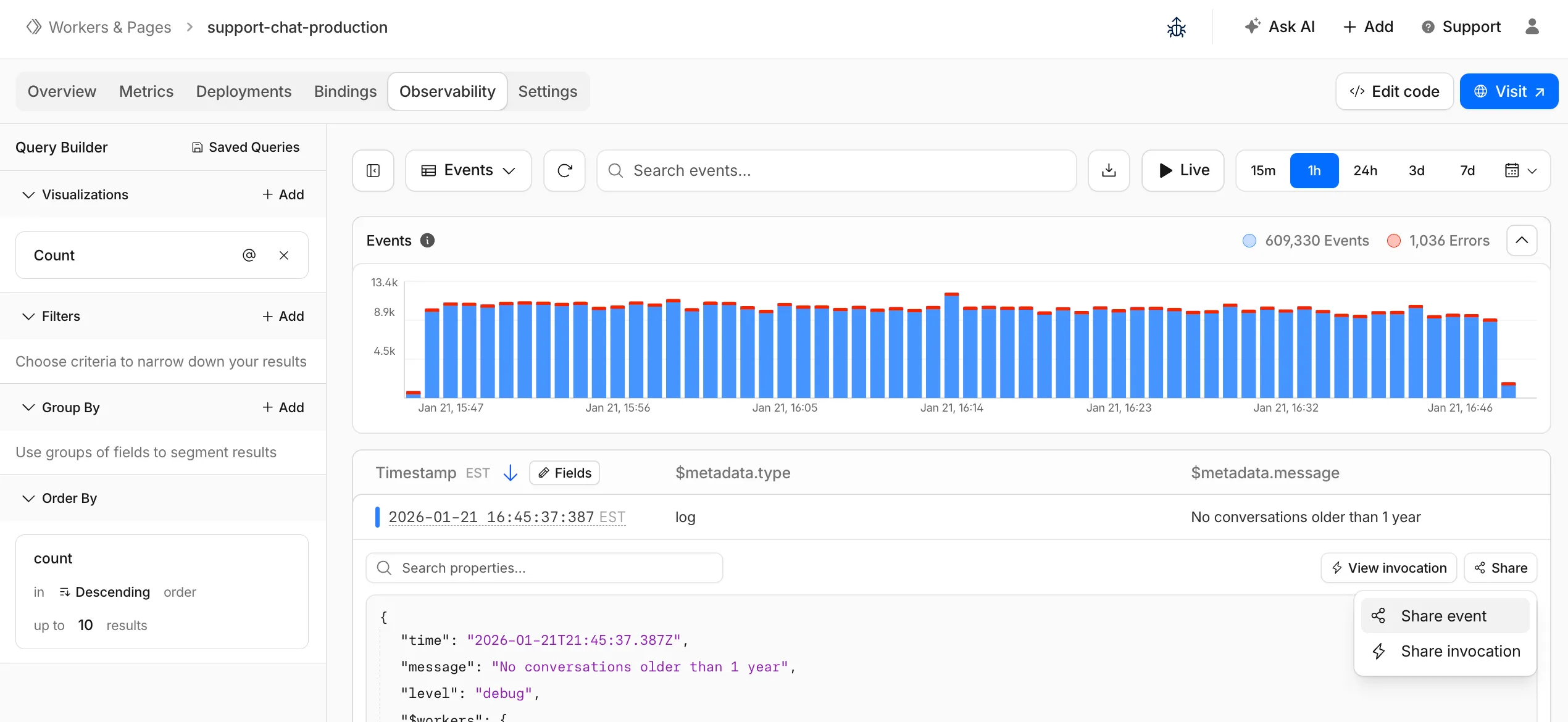
You can now:
- Create visualizations — Build charts from your Worker data directly in a Worker's Observability tab
- Export data as JSON or CSV — Download logs and traces for offline analysis or to share with teammates
- Share events and traces — Generate direct URLs to specific events, invocations, and traces that open standalone pages with full context
- Customize table columns — Improved field picker to add, remove, and reorder columns in the events table
- Expandable event details — Expand events inline to view full details without leaving the table
- Keyboard shortcuts — Navigate the dashboard with hotkey support
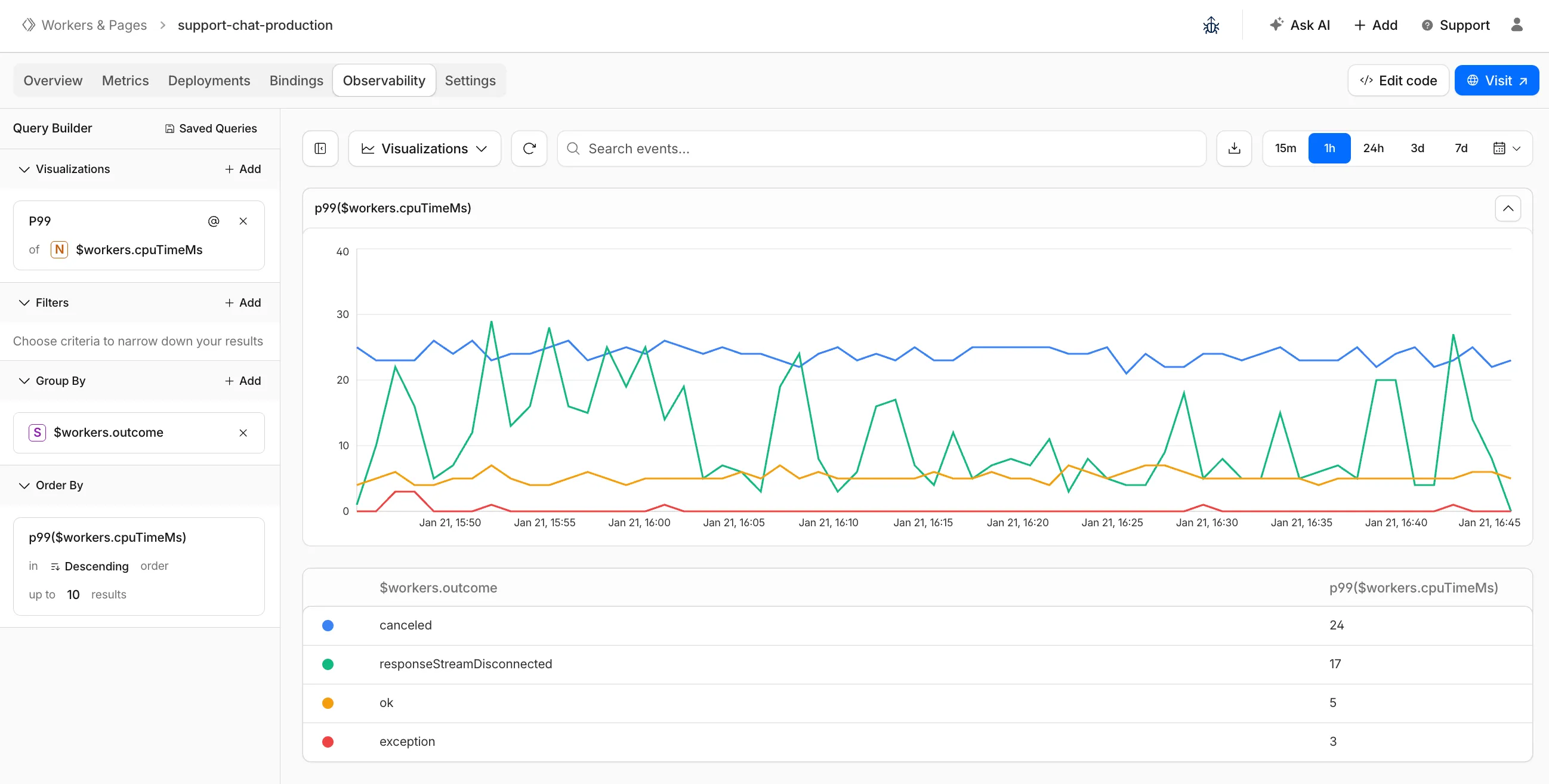
These updates are now live in the Cloudflare dashboard, both in a Worker's Observability tab and in the account-level Observability dashboard for a unified experience. To get started, go to Workers & Pages > select your Worker > Observability.
New reference documentation is now available for AI Crawl Control:
- GraphQL API reference — Query examples for crawler requests, top paths, referral traffic, and data transfer. Includes key filters for detection IDs, user agents, and referrer domains.
- Bot reference — Detection IDs and user agents for major AI crawlers from OpenAI, Anthropic, Google, Meta, and others.
- Worker templates — Deploy the x402 Payment-Gated Proxy to monetize crawler access or charge bots while letting humans through free.
Cloudflare Queues is now part of the Workers free plan, offering guaranteed message delivery across up to 10,000 queues to either Cloudflare Workers or HTTP pull consumers. Every Cloudflare account now includes 10,000 operations per day across reads, writes, and deletes. For more details on how each operation is defined, refer to Queues pricing ↗.
All features of the existing Queues functionality are available on the free plan, including unlimited event subscriptions. Note that the maximum retention period on the free tier, however, is 24 hours rather than 14 days.
If you are new to Cloudflare Queues, follow this guide ↗ or try one of our tutorials to get started.
Cloudflare Workflows now automatically generates visual diagrams from your code
Your Workflow is parsed to provide a visual map of the Workflow structure, allowing you to:
- Understand how steps connect and execute
- Visualize loops and nested logic
- Follow branching paths for conditional logic
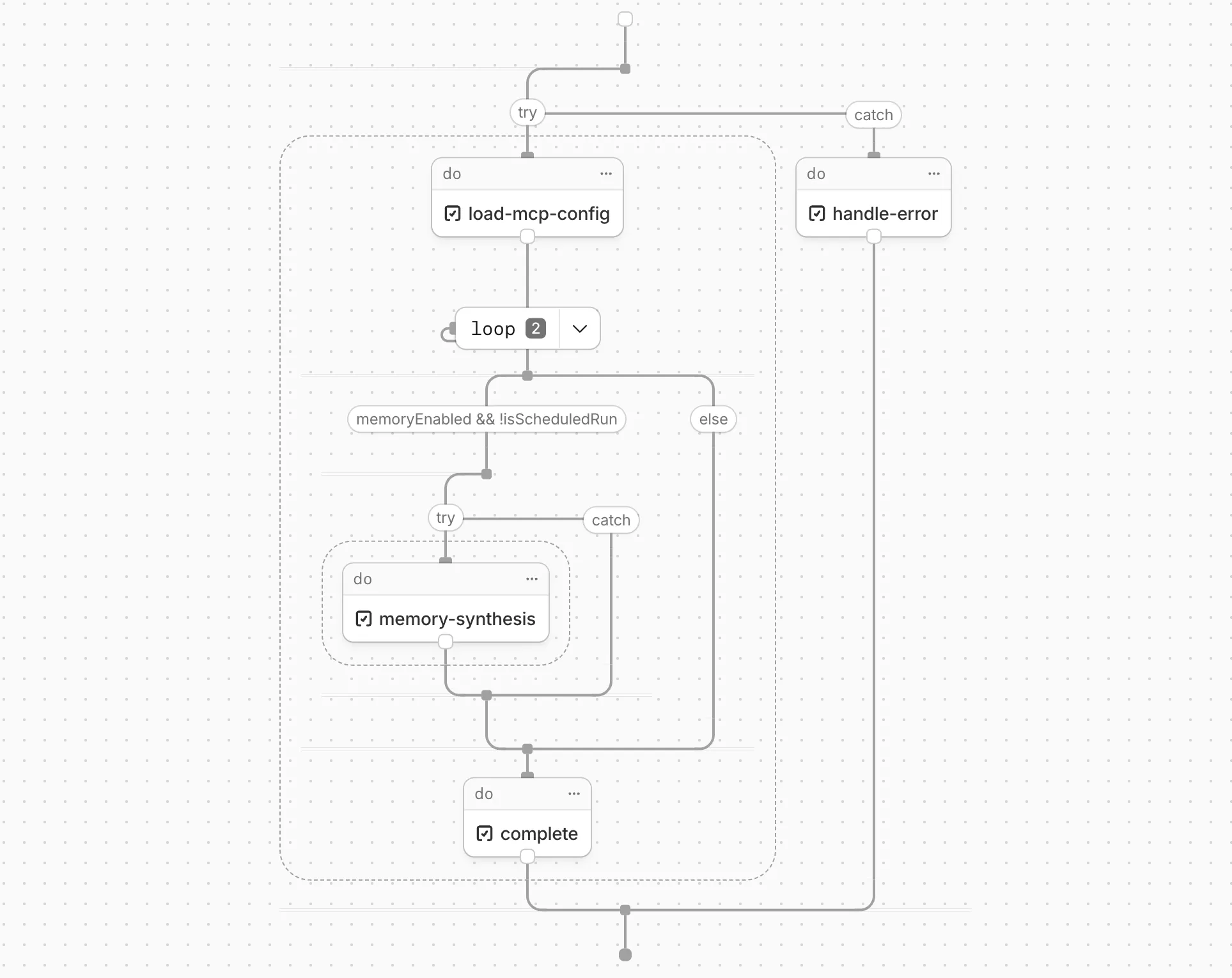
You can collapse loops and nested logic to see the high-level flow, or expand them to see every step.
Workflow diagrams are available in beta for all JavaScript and TypeScript Workflows. Find your Workflows in the Cloudflare dashboard ↗ to see their diagrams.
The latest release of the Agents SDK ↗ brings first-class support for Cloudflare Workflows, synchronous state management, and new scheduling capabilities.
Agents excel at real-time communication and state management. Workflows excel at durable execution. Together, they enable powerful patterns where Agents handle WebSocket connections while Workflows handle long-running tasks, retries, and human-in-the-loop flows.
Use the new
AgentWorkflowclass to define workflows with typed access to your Agent:JavaScript import { AgentWorkflow } from "agents/workflows";export class ProcessingWorkflow extends AgentWorkflow {async run(event, step) {// Call Agent methods via RPCawait this.agent.updateStatus(event.payload.taskId, "processing");// Non-durable: progress reporting to clientsawait this.reportProgress({ step: "process", percent: 0.5 });this.broadcastToClients({ type: "update", taskId: event.payload.taskId });// Durable via step: idempotent, won't repeat on retryawait step.mergeAgentState({ taskProgress: 0.5 });const result = await step.do("process", async () => {return processData(event.payload.data);});await step.reportComplete(result);return result;}}TypeScript import { AgentWorkflow } from "agents/workflows";import type { AgentWorkflowEvent, AgentWorkflowStep } from "agents/workflows";export class ProcessingWorkflow extends AgentWorkflow<MyAgent, TaskParams> {async run(event: AgentWorkflowEvent<TaskParams>, step: AgentWorkflowStep) {// Call Agent methods via RPCawait this.agent.updateStatus(event.payload.taskId, "processing");// Non-durable: progress reporting to clientsawait this.reportProgress({ step: "process", percent: 0.5 });this.broadcastToClients({ type: "update", taskId: event.payload.taskId });// Durable via step: idempotent, won't repeat on retryawait step.mergeAgentState({ taskProgress: 0.5 });const result = await step.do("process", async () => {return processData(event.payload.data);});await step.reportComplete(result);return result;}}Start workflows from your Agent with
runWorkflow()and handle lifecycle events:JavaScript export class MyAgent extends Agent {async startTask(taskId, data) {const instanceId = await this.runWorkflow("PROCESSING_WORKFLOW", {taskId,data,});return { instanceId };}async onWorkflowProgress(workflowName, instanceId, progress) {this.broadcast(JSON.stringify({ type: "progress", progress }));}async onWorkflowComplete(workflowName, instanceId, result) {console.log(`Workflow ${instanceId} completed`);}async onWorkflowError(workflowName, instanceId, error) {console.error(`Workflow ${instanceId} failed:`, error);}}TypeScript export class MyAgent extends Agent {async startTask(taskId: string, data: string) {const instanceId = await this.runWorkflow("PROCESSING_WORKFLOW", {taskId,data,});return { instanceId };}async onWorkflowProgress(workflowName: string,instanceId: string,progress: unknown,) {this.broadcast(JSON.stringify({ type: "progress", progress }));}async onWorkflowComplete(workflowName: string,instanceId: string,result?: unknown,) {console.log(`Workflow ${instanceId} completed`);}async onWorkflowError(workflowName: string,instanceId: string,error: unknown,) {console.error(`Workflow ${instanceId} failed:`, error);}}Key workflow methods on your Agent:
runWorkflow(workflowName, params, options?)— Start a workflow with optional metadatagetWorkflow(workflowId)/getWorkflows(criteria?)— Query workflows with cursor-based paginationapproveWorkflow(workflowId)/rejectWorkflow(workflowId)— Human-in-the-loop approval flowspauseWorkflow(),resumeWorkflow(),terminateWorkflow()— Workflow control
State updates are now synchronous with a new
validateStateChange()validation hook:JavaScript export class MyAgent extends Agent {validateStateChange(oldState, newState) {// Return false to reject the changeif (newState.count < 0) return false;// Return modified state to transformreturn { ...newState, lastUpdated: Date.now() };}}TypeScript export class MyAgent extends Agent<Env, State> {validateStateChange(oldState: State, newState: State): State | false {// Return false to reject the changeif (newState.count < 0) return false;// Return modified state to transformreturn { ...newState, lastUpdated: Date.now() };}}The new
scheduleEvery()method enables fixed-interval recurring tasks with built-in overlap prevention:JavaScript // Run every 5 minutesawait this.scheduleEvery("syncData", 5 * 60 * 1000, { source: "api" });TypeScript // Run every 5 minutesawait this.scheduleEvery("syncData", 5 * 60 * 1000, { source: "api" });- Client-side RPC timeout — Set timeouts on callable method invocations
StreamingResponse.error(message)— Graceful stream error signalinggetCallableMethods()— Introspection API for discovering callable methods- Connection close handling — Pending calls are automatically rejected on disconnect
JavaScript await agent.call("method", [args], {timeout: 5000,stream: { onChunk, onDone, onError },});TypeScript await agent.call("method", [args], {timeout: 5000,stream: { onChunk, onDone, onError },});Secure email reply routing — Email replies are now secured with HMAC-SHA256 signed headers, preventing unauthorized routing of emails to agent instances.
Routing improvements:
basePathoption to bypass default URL construction for custom routing- Server-sent identity — Agents send
nameandagenttype on connect - New
onIdentityandonIdentityChangecallbacks on the client
JavaScript const agent = useAgent({basePath: "user",onIdentity: (name, agentType) => console.log(`Connected to ${name}`),});TypeScript const agent = useAgent({basePath: "user",onIdentity: (name, agentType) => console.log(`Connected to ${name}`),});To update to the latest version:
Terminal window npm i agents@latestFor the complete Workflows API reference and patterns, see Run Workflows.
Local Uploads is now available in open beta. Enable it on your R2 bucket to improve upload performance when clients upload data from a different region than your bucket. With Local Uploads enabled, object data is written to storage infrastructure near the client, then asynchronously replicated to your bucket. The object is immediately accessible and remains strongly consistent throughout. Refer to How R2 works for details on how data is written to your bucket.
In our tests, we observed up to 75% reduction in Time to Last Byte (TTLB) for upload requests when Local Uploads is enabled.
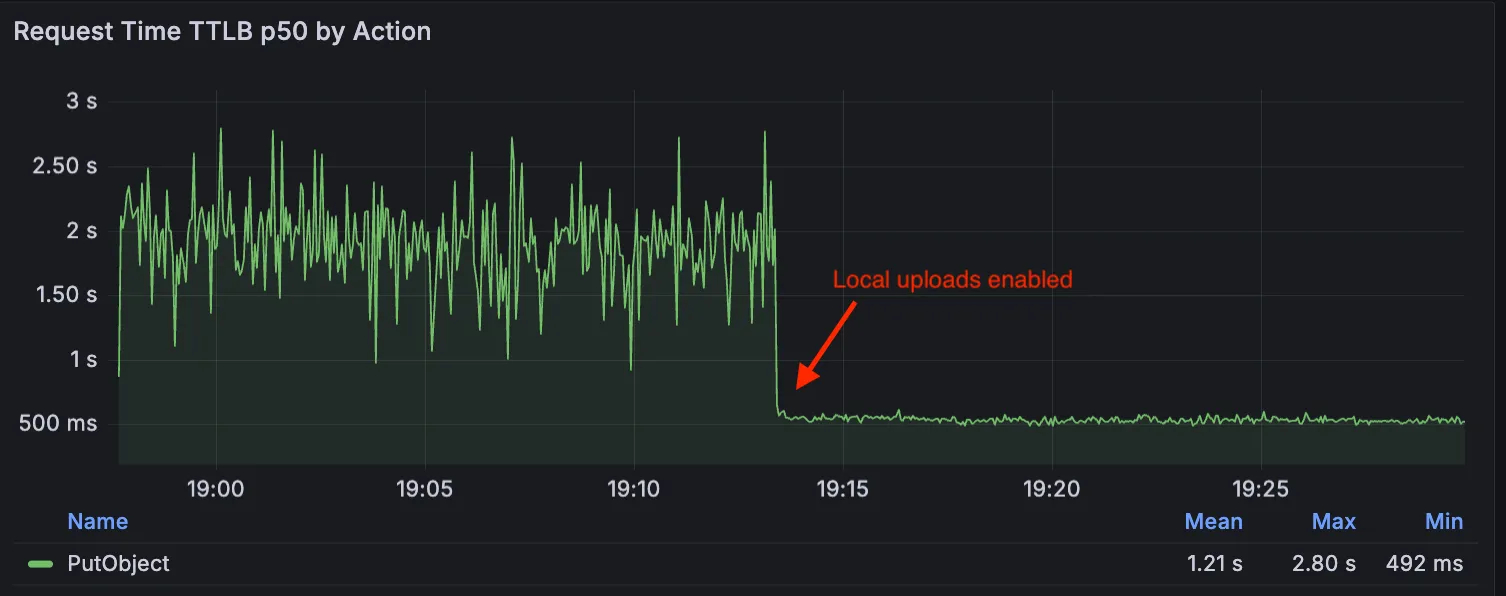
This feature is ideal when:
- Your users are globally distributed
- Upload performance and reliability is critical to your application
- You want to optimize write performance without changing your bucket's primary location
To enable Local Uploads on your bucket, find Local Uploads in your bucket settings in the Cloudflare Dashboard ↗, or run:
Terminal window npx wrangler r2 bucket local-uploads enable <BUCKET_NAME>Enabling Local Uploads on a bucket is seamless: existing uploads will complete as expected and there’s no interruption to traffic. There is no additional cost to enable Local Uploads. Upload requests incur the standard Class A operation costs same as upload requests made without Local Uploads.
For more information, refer to Local Uploads.
Identifying threat actors can be challenging, because naming conventions often vary across the security industry. To simplify your research, Cloudflare Threat Events now include an Also known as field, providing a list of common aliases and industry-standard names for the groups we track.
This new field is available in both the Cloudflare dashboard and via the API. In the dashboard, you can view these aliases by expanding the event details side panel (under the Attacker field) or by adding it as a column in your configurable table view.
- Easily map Cloudflare-tracked actors to the naming conventions used by other vendors without manual cross-referencing.
- Quickly identify if a detected threat actor matches a group your team is already monitoring via other intelligence feeds.
For more information on how to access this data, refer to the Threat Events API documentation ↗.
We have updated the Monitoring page to provide a more streamlined and insightful experience for administrators, improving both data visualization and dashboard accessibility.
- Enhanced Visual Layout: Optimized contrast and the introduction of stacked bar charts for clearer data visualization and trend analysis.
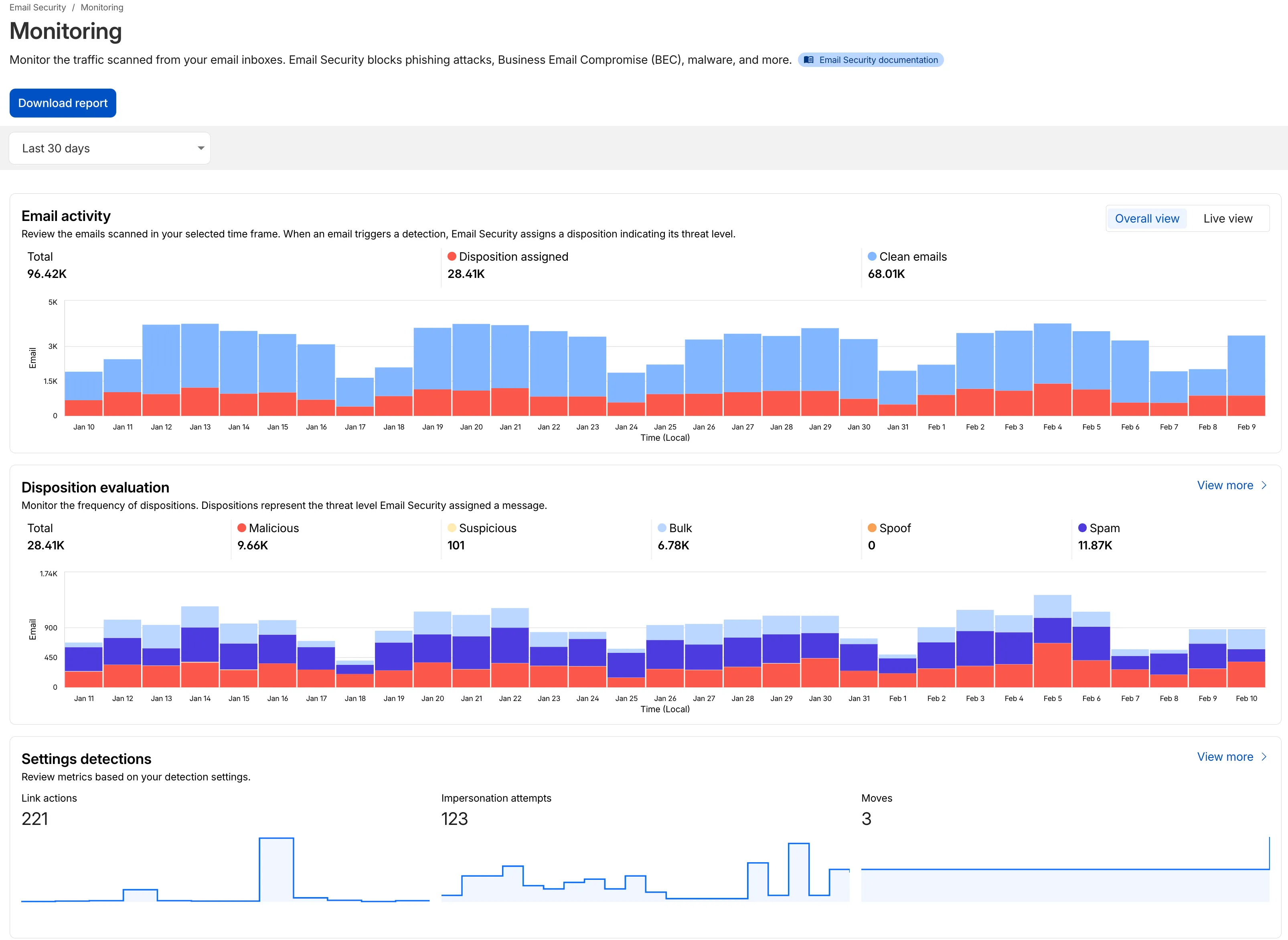
- Improved Accessibility & Usability:
- Widget Search: Added search functionality to multiple widgets, including Policies, Submitters, and Impersonation.
- Actionable UI: All available actions are now accessible via dedicated buttons.
- State Indicators: Improved UI states to clearly communicate loading, empty datasets, and error conditions.
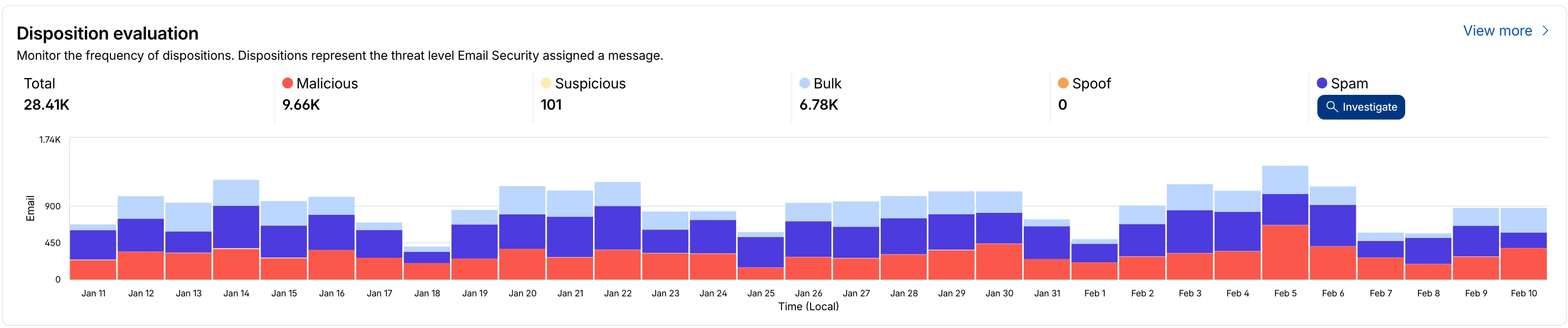
- Granular Data Breakdowns: New views for dispositions by month, malicious email details, link actions, and impersonations.
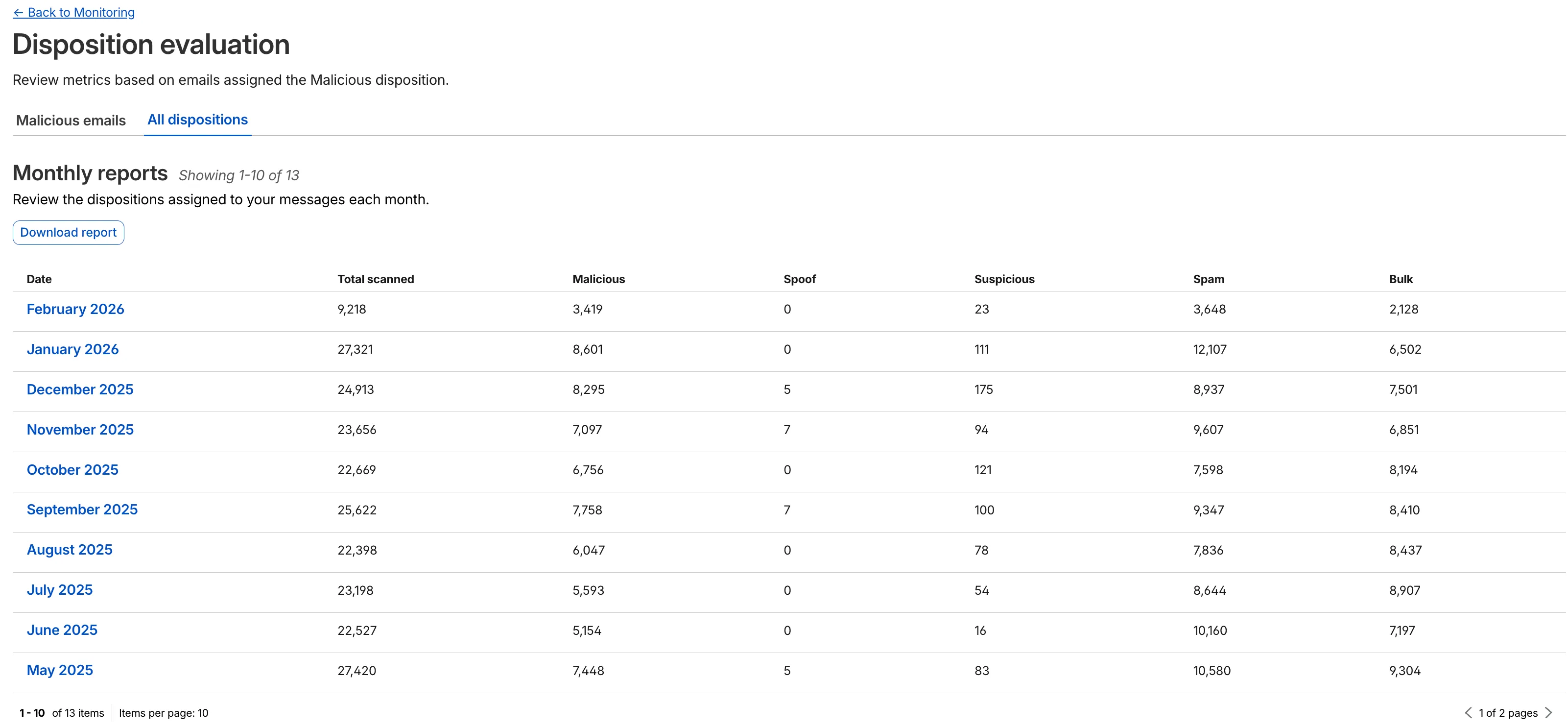
This applies to all Email Security packages:
- Advantage
- Enterprise
- Enterprise + PhishGuard
- Enhanced Visual Layout: Optimized contrast and the introduction of stacked bar charts for clearer data visualization and trend analysis.
This week’s release introduces new detections for CVE-2025-64459 and CVE-2025-24893.
Key Findings
- CVE-2025-64459: Django versions prior to 5.1.14, 5.2.8, and 4.2.26 are vulnerable to SQL injection via crafted dictionaries passed to QuerySet methods and the
Q()class. - CVE-2025-24893: XWiki allows unauthenticated remote code execution through crafted requests to the SolrSearch endpoint, affecting the entire installation.
Ruleset Rule ID Legacy Rule ID Description Previous Action New Action Comments Cloudflare Managed Ruleset N/A XWiki - Remote Code Execution - CVE:CVE-2025-24893 2 Log Block This is a new detection. Cloudflare Managed Ruleset N/A Django SQLI - CVE:CVE-2025-64459 Log Block This is a new detection. Cloudflare Managed Ruleset N/A NoSQL, MongoDB - SQLi - Comparison - 2 Block Block Rule metadata description refined. Detection unchanged. - CVE-2025-64459: Django versions prior to 5.1.14, 5.2.8, and 4.2.26 are vulnerable to SQL injection via crafted dictionaries passed to QuerySet methods and the
The minimum
cacheTtlparameter for Workers KV has been reduced from 60 seconds to 30 seconds. This change applies to bothget()andgetWithMetadata()methods.This reduction allows you to maintain more up-to-date cached data and have finer-grained control over cache behavior. Applications requiring faster data refresh rates can now configure cache durations as low as 30 seconds instead of the previous 60-second minimum.
The
cacheTtlparameter defines how long a KV result is cached at the global network location it is accessed from:JavaScript // Read with custom cache TTLconst value = await env.NAMESPACE.get("my-key", {cacheTtl: 30, // Cache for minimum 30 seconds (previously 60)});// getWithMetadata also supports the reduced cache TTLconst valueWithMetadata = await env.NAMESPACE.getWithMetadata("my-key", {cacheTtl: 30, // Cache for minimum 30 seconds});The default cache TTL remains unchanged at 60 seconds. Upgrade to the latest version of Wrangler to be able to use 30 seconds
cacheTtl.This change affects all KV read operations using the binding API. For more information, consult the Workers KV cache TTL documentation.
Magic WAN and Magic Transit customers can use the Cloudflare dashboard to configure and manage BGP peering between their networks and their Magic routing table when using IPsec and GRE tunnel on-ramps (beta).
Using BGP peering allows customers to:
- Automate the process of adding or removing networks and subnets.
- Take advantage of failure detection and session recovery features.
With this functionality, customers can:
- Establish an eBGP session between their devices and the Magic WAN / Magic Transit service when connected via IPsec and GRE tunnel on-ramps.
- Secure the session by MD5 authentication to prevent misconfigurations.
- Exchange routes dynamically between their devices and their Magic routing table.
For configuration details, refer to:
We have partnered with Black Forest Labs (BFL) again to bring their optimized FLUX.2 [klein] 9B model to Workers AI. This distilled model offers enhanced quality compared to the 4B variant, while maintaining cost-effective pricing. With a fixed 4-step inference process, Klein 9B is ideal for rapid prototyping and real-time applications where both speed and quality matter.
Read the BFL blog ↗ to learn more about the model itself, or try it out yourself on our multi modal playground ↗.
Pricing documentation is available on the model page or pricing page.
The model hosted on Workers AI is optimized for speed with a fixed 4-step inference process and supports up to 4 image inputs. Since this is a distilled model, the
stepsparameter is fixed at 4 and cannot be adjusted. Like FLUX.2 [dev] and FLUX.2 [klein] 4B, this image model uses multipart form data inputs, even if you just have a prompt.With the REST API, the multipart form data input looks like this:
Terminal window curl --request POST \--url 'https://api.cloudflare.com/client/v4/accounts/{ACCOUNT}/ai/run/@cf/black-forest-labs/flux-2-klein-9b' \--header 'Authorization: Bearer {TOKEN}' \--header 'Content-Type: multipart/form-data' \--form 'prompt=a sunset at the alps' \--form width=1024 \--form height=1024With the Workers AI binding, you can use it as such:
JavaScript const form = new FormData();form.append("prompt", "a sunset with a dog");form.append("width", "1024");form.append("height", "1024");// FormData doesn't expose its serialized body or boundary. Passing it to a// Request (or Response) constructor serializes it and generates the Content-Type// header with the boundary, which is required for the server to parse the multipart fields.const formResponse = new Response(form);const formStream = formResponse.body;const formContentType = formResponse.headers.get('content-type');const resp = await env.AI.run("@cf/black-forest-labs/flux-2-klein-9b", {multipart: {body: formStream,contentType: formContentType,},});The parameters you can send to the model are detailed here:
JSON Schema for Model
Required Parametersprompt(string) - Text description of the image to generate
Optional Parameters
input_image_0(string) - Binary imageinput_image_1(string) - Binary imageinput_image_2(string) - Binary imageinput_image_3(string) - Binary imageguidance(float) - Guidance scale for generation. Higher values follow the prompt more closelywidth(integer) - Width of the image, default1024Range: 256-1920height(integer) - Height of the image, default768Range: 256-1920seed(integer) - Seed for reproducibility
Note: Since this is a distilled model, the
stepsparameter is fixed at 4 and cannot be adjusted.The FLUX.2 klein-9b model supports generating images based on reference images, just like FLUX.2 [dev] and FLUX.2 [klein] 4B. You can use this feature to apply the style of one image to another, add a new character to an image, or iterate on past generated images. You would use it with the same multipart form data structure, with the input images in binary. The model supports up to 4 input images.
For the prompt, you can reference the images based on the index, like
take the subject of image 1 and style it like image 0or even use natural language likeplace the dog beside the woman.You must name the input parameter as
input_image_0,input_image_1,input_image_2,input_image_3for it to work correctly. All input images must be smaller than 512x512.Terminal window curl --request POST \--url 'https://api.cloudflare.com/client/v4/accounts/{ACCOUNT}/ai/run/@cf/black-forest-labs/flux-2-klein-9b' \--header 'Authorization: Bearer {TOKEN}' \--header 'Content-Type: multipart/form-data' \--form 'prompt=take the subject of image 1 and style it like image 0' \--form input_image_0=@/Users/johndoe/Desktop/icedoutkeanu.png \--form input_image_1=@/Users/johndoe/Desktop/me.png \--form width=1024 \--form height=1024Through Workers AI Binding:
JavaScript //helper function to convert ReadableStream to Blobasync function streamToBlob(stream: ReadableStream, contentType: string): Promise<Blob> {const reader = stream.getReader();const chunks = [];while (true) {const { done, value } = await reader.read();if (done) break;chunks.push(value);}return new Blob(chunks, { type: contentType });}const image0 = await fetch("http://image-url");const image1 = await fetch("http://image-url");const form = new FormData();const image_blob0 = await streamToBlob(image0.body, "image/png");const image_blob1 = await streamToBlob(image1.body, "image/png");form.append('input_image_0', image_blob0)form.append('input_image_1', image_blob1)form.append('prompt', 'take the subject of image 1 and style it like image 0')// FormData doesn't expose its serialized body or boundary. Passing it to a// Request (or Response) constructor serializes it and generates the Content-Type// header with the boundary, which is required for the server to parse the multipart fields.const formResponse = new Response(form);const formStream = formResponse.body;const formContentType = formResponse.headers.get('content-type');const resp = await env.AI.run("@cf/black-forest-labs/flux-2-klein-9b", {multipart: {body: formStream,contentType: formContentType}})
A new Beta release for the Windows WARP client is now available on the beta releases downloads page.
This release contains minor fixes, improvements, and new features.
Changes and improvements
- Improvements to multi-user mode. Fixed an issue where when switching from a pre-login registration to a user registration, Mobile Device Management (MDM) configuration association could be lost.
- Added a new feature to manage NetBIOS over TCP/IP functionality on the Windows client. NetBIOS over TCP/IP on the Windows client is now disabled by default and can be enabled in device profile settings.
- Fixed an issue causing failure of the local network exclusion feature when configured with a timeout of
0. - Improvement for the Windows client certificate posture check to ensure logged results are from checks that run once users log in.
- Improvement for more accurate reporting of device colocation information in the Cloudflare One dashboard.
Known issues
For Windows 11 24H2 users, Microsoft has confirmed a regression that may lead to performance issues like mouse lag, audio cracking, or other slowdowns. Cloudflare recommends users experiencing these issues upgrade to a minimum Windows 11 24H2 KB5062553 or higher for resolution.
Devices with KB5055523 installed may receive a warning about
Win32/ClickFix.ABAbeing present in the installer. To resolve this false positive, update Microsoft Security Intelligence to version 1.429.19.0 or later.DNS resolution may be broken when the following conditions are all true:
- WARP is in Secure Web Gateway without DNS filtering (tunnel-only) mode.
- A custom DNS server address is configured on the primary network adapter.
- The custom DNS server address on the primary network adapter is changed while WARP is connected.
To work around this issue, reconnect the WARP client by toggling off and back on.
A new Beta release for the macOS WARP client is now available on the beta releases downloads page.
This release contains minor fixes and improvements.
Changes and improvements
- Fixed an issue causing failure of the local network exclusion feature when configured with a timeout of
0. - Improvement for more accurate reporting of device colocation information in the Cloudflare One dashboard.
- Fixed an issue causing failure of the local network exclusion feature when configured with a timeout of
Cloudflare source IPs are the IP addresses used by Cloudflare services (such as Load Balancing, Gateway, and Browser Isolation) when sending traffic to your private networks.
For customers using legacy mode routing, traffic to private networks is sourced from public Cloudflare IPs, which may cause IP conflicts. For customers using Unified Routing mode (beta), traffic to private networks is sourced from dedicated, non-Internet-routable private IPv4 range to ensure:
- Symmetric routing over private network connections
- Proper firewall state preservation
- Private traffic stays on secure paths
Key details:
- IPv4: Sourced from
100.64.0.0/12by default, configurable to any/12CIDR - IPv6: Sourced from
2606:4700:cf1:5000::/64(not configurable) - Affected connectors: GRE, IPsec, CNI, WARP Connector, and WARP Client (Cloudflare Tunnel is not affected)
Configuring Cloudflare source IPs requires Unified Routing (beta) and the
Cloudflare One Networks Writepermission.For configuration details, refer to Configure Cloudflare source IPs.
You can now set the timezone in the Cloudflare dashboard as Coordinated Universal Time (UTC) or your browser or system's timezone.
Unless otherwise specified in the user interface, all dates and times in the Cloudflare dashboard are now displayed in the selected timezone.
You can change the timezone setting from the user profile dropdown.
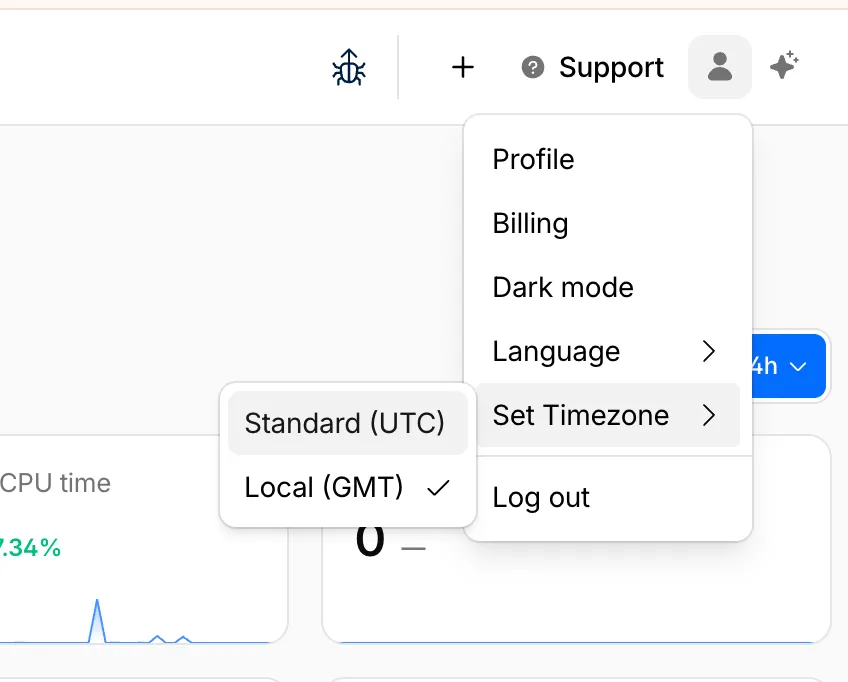
The page will reload to apply the new timezone setting.
You can now control how Cloudflare buffers HTTP request and response bodies using two new settings in Configuration Rules.
Controls how Cloudflare buffers HTTP request bodies before forwarding them to your origin server:
Mode Behavior Standard (default) Cloudflare can inspect a prefix of the request body for enabled functionality such as WAF and Bot Management. Full Buffers the entire request body before sending to origin. None No buffering — the request body streams directly to origin without inspection. Controls how Cloudflare buffers HTTP response bodies before forwarding them to the client:
Mode Behavior Standard (default) Cloudflare can inspect a prefix of the response body for enabled functionality. None No buffering — the response body streams directly to the client without inspection. {"action": "set_config","action_parameters": {"request_body_buffering": "standard","response_body_buffering": "none"}}For more information, refer to Configuration Rules.
This week’s release introduces new detections for denial-of-service attempts targeting React CVE-2026-23864 (https://www.cve.org/CVERecord?id=CVE-2026-23864 ↗).
Key Findings
- CVE-2026-23864 (https://www.cve.org/CVERecord?id=CVE-2026-23864 ↗) affects
react-server-dom-parcel,react-server-dom-turbopack, andreact-server-dom-webpackpackages. - Attackers can send crafted HTTP requests to Server Function endpoints, causing server crashes, out-of-memory exceptions, or excessive CPU usage.
Ruleset Rule ID Legacy Rule ID Description Previous Action New Action Comments Cloudflare Managed Ruleset N/A React Server - DOS - CVE:CVE-2026-23864 - 1 N/A Block This is a new detection. Cloudflare Managed Ruleset N/A React Server - DOS - CVE:CVE-2026-23864 - 2 N/A Block This is a new detection. Cloudflare Managed Ruleset N/A React Server - DOS - CVE:CVE-2026-23864 - 3 N/A Block This is a new detection. - CVE-2026-23864 (https://www.cve.org/CVERecord?id=CVE-2026-23864 ↗) affects
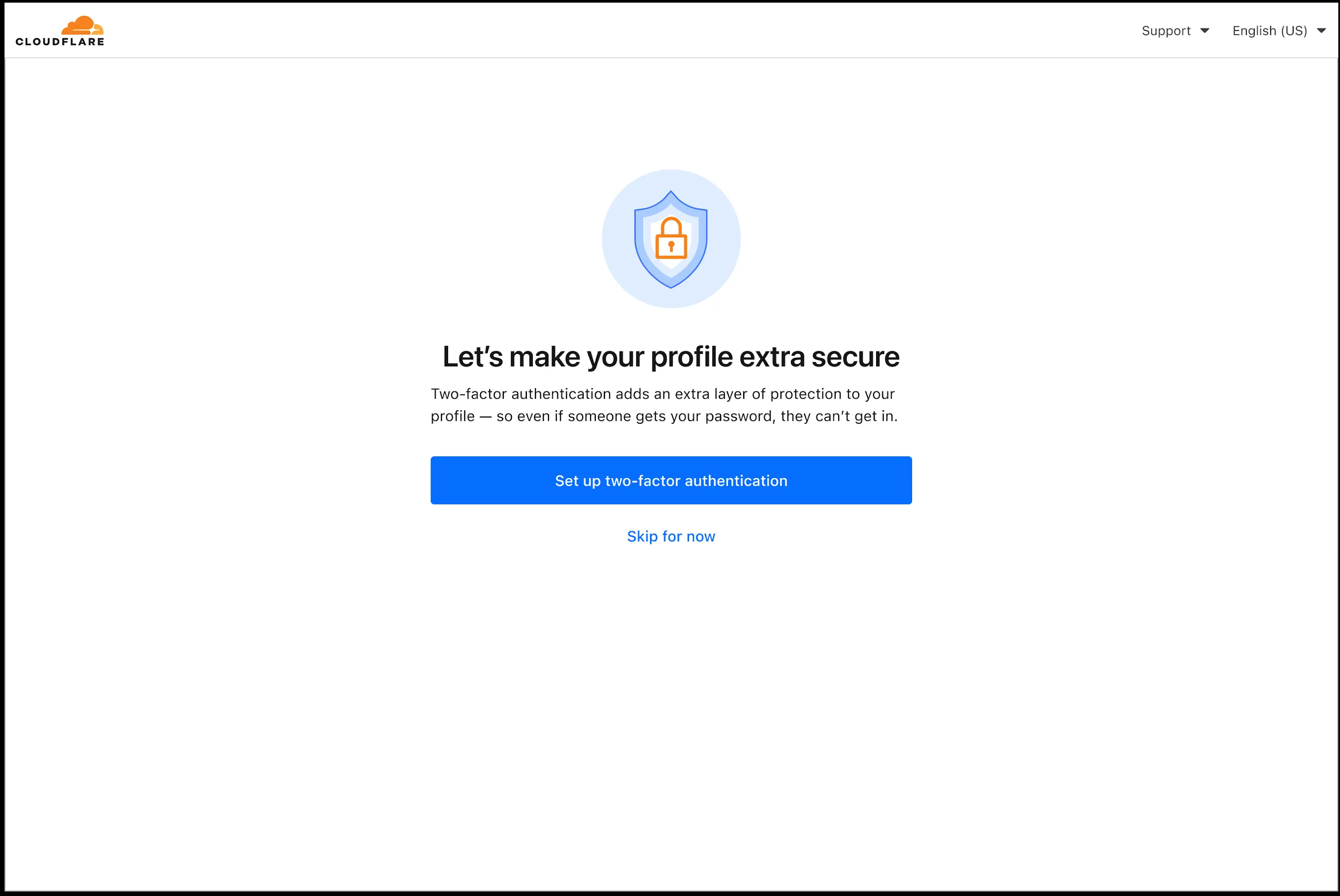
In an effort to improve overall user security, users without 2FA will be prompted upon login to enroll in email 2FA. This will improve user security posture while minimizing friction. Users without email 2FA enabled will see a prompt to secure their account with additional factors upon logging in. Enrolling in 2FA remains optional, but strongly encouraged as it is the best way to prevent account takeovers.
We also made changes to existing 2FA screens to improve the user experience. Now we have distinct experiences for each 2FA factor type, reflective of the way that factor works.
Paid plans can now have up to 100,000 files per Pages site, increased from the previous limit of 20,000 files.
To enable this increased limit, set the environment variable
PAGES_WRANGLER_MAJOR_VERSION=4in your Pages project settings.The Free plan remains at 20,000 files per site.
For more details, refer to the Pages limits documentation.
You can now store up to 10 million vectors in a single Vectorize index, doubling the previous limit of 5 million vectors. This enables larger-scale semantic search, recommendation systems, and retrieval-augmented generation (RAG) applications without splitting data across multiple indexes.
Vectorize continues to support indexes with up to 1,536 dimensions per vector at 32-bit precision. Refer to the Vectorize limits documentation for complete details.
Cloudflare Rulesets now includes
encode_base64()andsha256()functions, enabling you to generate signed request headers directly in rule expressions. These functions support common patterns like constructing a canonical string from request attributes, computing a SHA256 digest, and Base64-encoding the result.
Function Description Availability encode_base64(input, flags)Encodes a string to Base64 format. Optional flagsparameter:ufor URL-safe encoding,pfor padding (adds=characters to make the output length a multiple of 4, as required by some systems). By default, output is standard Base64 without padding.All plans (in header transform rules) sha256(input)Computes a SHA256 hash of the input string. Requires enablement
Encode a string to Base64 format:
encode_base64("hello world")Returns:
aGVsbG8gd29ybGQEncode a string to Base64 format with padding:
encode_base64("hello world", "p")Returns:
aGVsbG8gd29ybGQ=Perform a URL-safe Base64 encoding of a string:
encode_base64("hello world", "u")Returns:
aGVsbG8gd29ybGQCompute the SHA256 hash of a secret token:
sha256("my-token")Returns a hash that your origin can validate to authenticate requests.
Compute the SHA256 hash of a string and encode the result to Base64 format:
encode_base64(sha256("my-token"))Combines hashing and encoding for systems that expect Base64-encoded signatures.
For more information, refer to the Functions reference.
You can now configure Workers to run close to infrastructure in legacy cloud regions to minimize latency to existing services and databases. This is most useful when your Worker makes multiple round trips.
To set a placement hint, set the
placement.regionproperty in your Wrangler configuration file:{"placement": {"region": "aws:us-east-1",},}[placement]region = "aws:us-east-1"Placement hints support Amazon Web Services (AWS), Google Cloud Platform (GCP), and Microsoft Azure region identifiers. Workers run in the Cloudflare data center ↗ with the lowest latency to the specified cloud region.
If your existing infrastructure is not in these cloud providers, expose it to placement probes with
placement.hostfor layer 4 checks orplacement.hostnamefor layer 7 checks. These probes are designed to locate single-homed infrastructure and are not suitable for anycasted or multicasted resources.{"placement": {"host": "my_database_host.com:5432",},}[placement]host = "my_database_host.com:5432"{"placement": {"hostname": "my_api_server.com",},}[placement]hostname = "my_api_server.com"This is an extension of Smart Placement, which automatically places your Workers closer to back-end APIs based on measured latency. When you do not know the location of your back-end APIs or have multiple back-end APIs, set
mode: "smart":{"placement": {"mode": "smart",},}[placement]mode = "smart"
AI Search now includes path filtering for both website and R2 data sources. You can now control which content gets indexed by defining include and exclude rules for paths.
By controlling what gets indexed, you can improve the relevance and quality of your search results. You can also use path filtering to split a single data source across multiple AI Search instances for specialized search experiences.
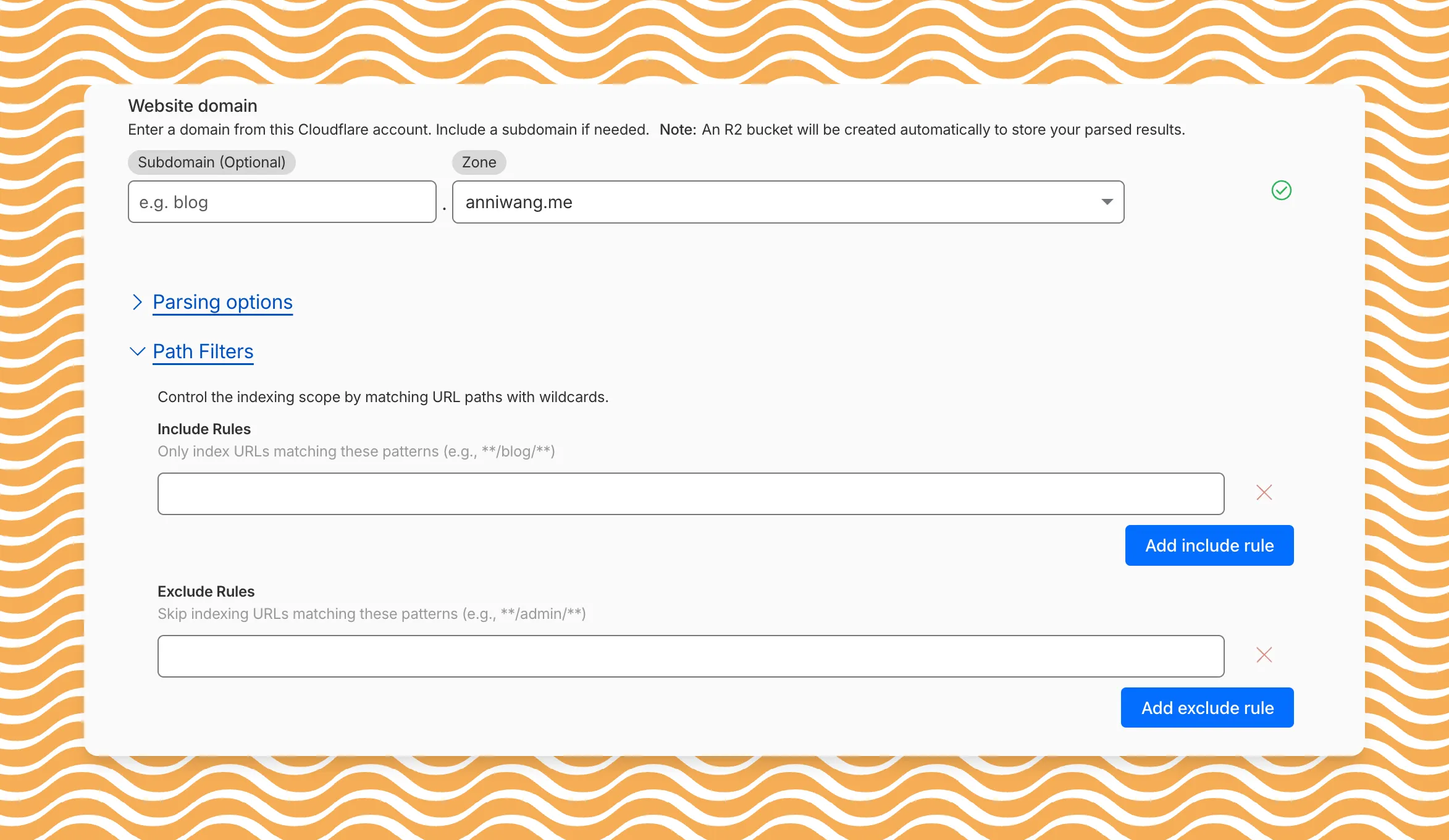
Path filtering uses micromatch ↗ patterns, so you can use
*to match within a directory and**to match across directories.Use case Include Exclude Index docs but skip drafts **/docs/****/docs/drafts/**Keep admin pages out of results — **/admin/**Index only English content **/en/**— Configure path filters when creating a new instance or update them anytime from Settings. Check out path filtering to learn more.