

Dropped event metrics, typed Pipelines bindings, and improved setup
Cloudflare Pipelines ingests streaming data via Workers or HTTP endpoints, transforms it with SQL, and writes it to R2 as Apache Iceberg tables. Today we're shipping three improvements to help you understand why streaming events get dropped, catch data quality issues early, and set up Pipelines faster.
When stream events don't match the expected schema, Pipelines accepts them during ingestion but drops them when attempting to deliver them to the sink. To help you identify the root cause of these issues, we are introducing a new dashboard and metrics that surface dropped events with detailed error messages.
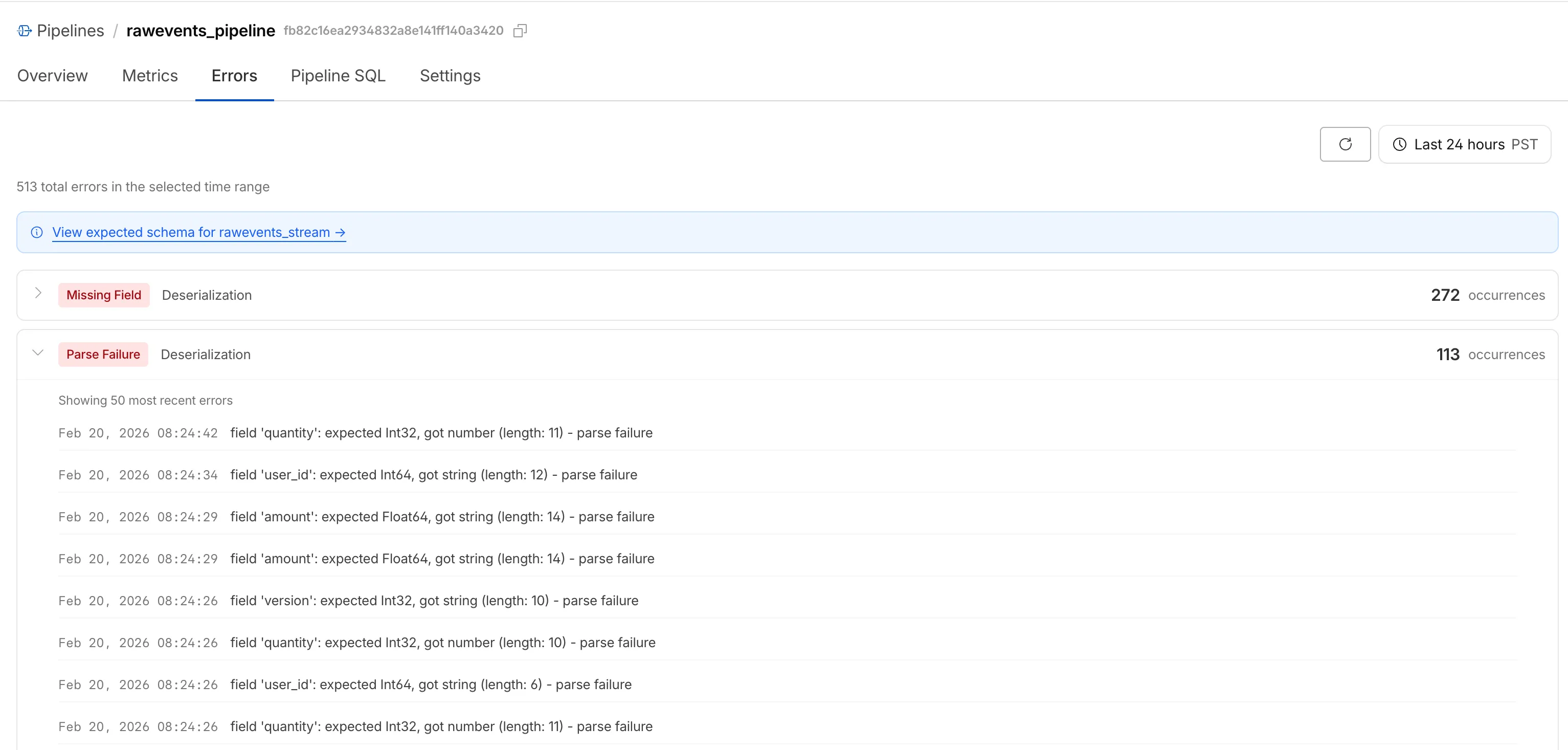
Dropped events can also be queried programmatically via the new pipelinesUserErrorsAdaptiveGroups GraphQL dataset. The dataset breaks down failures by specific error type (missing_field, type_mismatch, parse_failure, or null_value) so you can trace issues back to the source.
query GetPipelineUserErrors( $accountTag: String! $pipelineId: String! $datetimeStart: Time! $datetimeEnd: Time!) { viewer { accounts(filter: { accountTag: $accountTag }) { pipelinesUserErrorsAdaptiveGroups( limit: 100 filter: { pipelineId: $pipelineId datetime_geq: $datetimeStart datetime_leq: $datetimeEnd } orderBy: [count_DESC] ) { count dimensions { errorFamily errorType } } } }}For the full list of dimensions, error types, and additional query examples, refer to User error metrics.
Sending data to a Pipeline from a Worker previously used a generic Pipeline<PipelineRecord> type, which meant schema mismatches (wrong field names, incorrect types) were only caught at runtime as dropped events.
Running wrangler types now generates schema-specific TypeScript types for your Pipeline bindings. TypeScript catches missing required fields and incorrect field types at compile time, before your code is deployed.
declare namespace Cloudflare { type EcommerceStreamRecord = { user_id: string; event_type: string; product_id?: string; amount?: number; }; interface Env { STREAM: import("cloudflare:pipelines").Pipeline<Cloudflare.EcommerceStreamRecord>; }}For more information, refer to Typed Pipeline bindings.
Setting up a new Pipeline previously required multiple manual steps: creating an R2 bucket, enabling R2 Data Catalog, generating an API token, and configuring format, compression, and rolling policies individually.
The wrangler pipelines setup command now offers a Simple setup mode that applies recommended defaults and automatically creates the R2 bucket and enables R2 Data Catalog if they do not already exist. Validation errors during setup prompt you to retry inline rather than restarting the entire process.
For a full walkthrough, refer to the Getting started guide.