

We're excited to partner with NVIDIA to bring
@cf/nvidia/nemotron-3-120b-a12bto Workers AI. NVIDIA Nemotron 3 Super is a Mixture-of-Experts (MoE) model with a hybrid Mamba-transformer architecture, 120B total parameters, and 12B active parameters per forward pass.The model is optimized for running many collaborating agents per application. It delivers high accuracy for reasoning, tool calling, and instruction following across complex multi-step tasks.
Key capabilities:
- Hybrid Mamba-transformer architecture delivers over 50% higher token generation throughput compared to leading open models, reducing latency for real-world applications
- Tool calling support for building AI agents that invoke tools across multiple conversation turns
- Multi-Token Prediction (MTP) accelerates long-form text generation by predicting several future tokens simultaneously in a single forward pass
- 32,000 token context window for retaining conversation history and plan states across multi-step agent workflows
Use Nemotron 3 Super through the Workers AI binding (
env.AI.run()), the REST API, or the OpenAI-compatible endpoint.For more information, refer to the Nemotron 3 Super model page.
Edit: this post has been edited to clarify crawling behavior with respect to site guidance.
You can now crawl an entire website with a single API call using Browser Rendering's new
/crawlendpoint, available in open beta. Submit a starting URL, and pages are automatically discovered, rendered in a headless browser, and returned in multiple formats, including HTML, Markdown, and structured JSON. The endpoint is a signed-agent ↗ that respects robots.txt and AI Crawl Control ↗ by default, making it easy for developers to comply with website rules, and making it less likely for crawlers to ignore web-owner guidance. This is great for training models, building RAG pipelines, and researching or monitoring content across a site.Crawl jobs run asynchronously. You submit a URL, receive a job ID, and check back for results as pages are processed.
Terminal window # Initiate a crawlcurl -X POST 'https://api.cloudflare.com/client/v4/accounts/{account_id}/browser-rendering/crawl' \-H 'Authorization: Bearer <apiToken>' \-H 'Content-Type: application/json' \-d '{"url": "https://blog.cloudflare.com/"}'# Check resultscurl -X GET 'https://api.cloudflare.com/client/v4/accounts/{account_id}/browser-rendering/crawl/{job_id}' \-H 'Authorization: Bearer <apiToken>'Key features:
- Multiple output formats - Return crawled content as HTML, Markdown, and structured JSON (powered by Workers AI)
- Crawl scope controls - Configure crawl depth, page limits, and wildcard patterns to include or exclude specific URL paths
- Automatic page discovery - Discovers URLs from sitemaps, page links, or both
- Incremental crawling - Use
modifiedSinceandmaxAgeto skip pages that haven't changed or were recently fetched, saving time and cost on repeated crawls - Static mode - Set
render: falseto fetch static HTML without spinning up a browser, for faster crawling of static sites - Well-behaved bot - Honors
robots.txtdirectives, includingcrawl-delay
Available on both the Workers Free and Paid plans.
Note: the /crawl endpoint cannot bypass Cloudflare bot detection or captchas, and self-identifies as a bot.
To get started, refer to the crawl endpoint documentation. If you are setting up your own site to be crawled, review the robots.txt and sitemaps best practices.
Real-time transcription in RealtimeKit now supports 10 languages with regional variants, powered by Deepgram Nova-3 running on Workers AI.
During a meeting, participant audio is routed through AI Gateway to Nova-3 on Workers AI — so transcription runs on Cloudflare's network end-to-end, reducing latency compared to routing through external speech-to-text services.
Set the language when creating a meeting via
ai_config.transcription.language:{"ai_config": {"transcription": {"language": "fr"}}}Supported languages include English, Spanish, French, German, Hindi, Russian, Portuguese, Japanese, Italian, and Dutch — with regional variants like
en-AU,en-GB,en-IN,en-NZ,es-419,fr-CA,de-CH,pt-BR, andpt-PT. Usemultifor automatic multilingual detection.If you are building voice agents or real-time translation workflows, your agent can now transcribe in the caller's language natively — no extra services or routing logic needed.
Browser Rendering REST API rate limits for Workers Paid plans have been increased from 3 requests per second (180/min) to 10 requests per second (600/min). No action is needed to benefit from the higher limit.

The REST API lets you perform common browser tasks with a single API call, and you can now do it at a higher rate.
- /content - Fetch HTML
- /screenshot - Capture screenshot
- /pdf - Render PDF
- /markdown - Extract Markdown from a webpage
- /snapshot - Take a webpage snapshot
- /scrape - Scrape HTML elements
- /json - Capture structured data using AI
- /links - Retrieve links from a webpage
If you use the Workers Bindings method, increases to concurrent browser and new browser limits are coming soon. Stay tuned.
For full details, refer to the Browser Rendering limits page.
You can now customize how the Markdown Conversion service processes different file types by passing a
conversionOptionsobject.Available options:
- Images: Set the language for AI-generated image descriptions
- HTML: Use CSS selectors to extract specific content, or provide a hostname to resolve relative links
- PDF: Exclude metadata from the output
Use the
env.AIbinding:JavaScript await env.AI.toMarkdown({ name: "page.html", blob: new Blob([html]) },{conversionOptions: {html: { cssSelector: "article.content" },image: { descriptionLanguage: "es" },},},);TypeScript await env.AI.toMarkdown({ name: "page.html", blob: new Blob([html]) },{conversionOptions: {html: { cssSelector: "article.content" },image: { descriptionLanguage: "es" },},},);Or call the REST API:
Terminal window curl https://api.cloudflare.com/client/v4/accounts/{ACCOUNT_ID}/ai/tomarkdown \-H 'Authorization: Bearer {API_TOKEN}' \-F 'files=@index.html' \-F 'conversionOptions={"html": {"cssSelector": "article.content"}}'For more details, refer to Conversion Options.
Sandboxes now support real-time filesystem watching via
sandbox.watch(). The method returns a Server-Sent Events ↗ stream backed by native inotify, so your Worker receivescreate,modify,delete, andmoveevents as they happen inside the container.Pass a directory path and optional filters. The returned stream is a standard
ReadableStreamyou can proxy directly to a browser client or consume server-side.JavaScript // Stream events to a browser clientconst stream = await sandbox.watch("/workspace/src", {recursive: true,include: ["*.ts", "*.js"],});return new Response(stream, {headers: { "Content-Type": "text/event-stream" },});TypeScript // Stream events to a browser clientconst stream = await sandbox.watch("/workspace/src", {recursive: true,include: ["*.ts", "*.js"],});return new Response(stream, {headers: { "Content-Type": "text/event-stream" },});Use
parseSSEStreamto iterate over events inside a Worker without forwarding them to a client.JavaScript import { parseSSEStream } from "@cloudflare/sandbox";const stream = await sandbox.watch("/workspace/src", { recursive: true });for await (const event of parseSSEStream(stream)) {console.log(event.type, event.path);}TypeScript import { parseSSEStream } from "@cloudflare/sandbox";import type { FileWatchSSEEvent } from "@cloudflare/sandbox";const stream = await sandbox.watch("/workspace/src", { recursive: true });for await (const event of parseSSEStream<FileWatchSSEEvent>(stream)) {console.log(event.type, event.path);}Each event includes a
typefield (create,modify,delete, ormove) and the affectedpath. Move events also include afromfield with the original path.Option Type Description recursivebooleanWatch subdirectories. Defaults to false.includestring[]Glob patterns to filter events. Omit to receive all events. To update to the latest version:
Terminal window npm i @cloudflare/sandbox@latestFor full API details, refer to the Sandbox file watching reference.
The latest release of the Agents SDK ↗ rewrites observability from scratch with
diagnostics_channel, addskeepAlive()to prevent Durable Object eviction during long-running work, and introduceswaitForMcpConnectionsso MCP tools are always available whenonChatMessageruns.The previous observability system used
console.log()with a customObservability.emit()interface. v0.7.0 replaces it with structured events published to diagnostics channels — silent by default, zero overhead when nobody is listening.Every event has a
type,payload, andtimestamp. Events are routed to seven named channels:Channel Event types agents:statestate:updateagents:rpcrpc,rpc:erroragents:messagemessage:request,message:response,message:clear,message:cancel,message:error,tool:result,tool:approvalagents:scheduleschedule:create,schedule:execute,schedule:cancel,schedule:retry,schedule:error,queue:retry,queue:erroragents:lifecycleconnect,destroyagents:workflowworkflow:start,workflow:event,workflow:approved,workflow:rejected,workflow:terminated,workflow:paused,workflow:resumed,workflow:restartedagents:mcpmcp:client:preconnect,mcp:client:connect,mcp:client:authorize,mcp:client:discoverUse the typed
subscribe()helper fromagents/observabilityfor type-safe access:JavaScript import { subscribe } from "agents/observability";const unsub = subscribe("rpc", (event) => {if (event.type === "rpc") {console.log(`RPC call: ${event.payload.method}`);}if (event.type === "rpc:error") {console.error(`RPC failed: ${event.payload.method} — ${event.payload.error}`,);}});// Clean up when doneunsub();TypeScript import { subscribe } from "agents/observability";const unsub = subscribe("rpc", (event) => {if (event.type === "rpc") {console.log(`RPC call: ${event.payload.method}`);}if (event.type === "rpc:error") {console.error(`RPC failed: ${event.payload.method} — ${event.payload.error}`,);}});// Clean up when doneunsub();In production, all diagnostics channel messages are automatically forwarded to Tail Workers — no subscription code needed in the agent itself:
JavaScript export default {async tail(events) {for (const event of events) {for (const msg of event.diagnosticsChannelEvents) {// msg.channel is "agents:rpc", "agents:workflow", etc.console.log(msg.timestamp, msg.channel, msg.message);}}},};TypeScript export default {async tail(events) {for (const event of events) {for (const msg of event.diagnosticsChannelEvents) {// msg.channel is "agents:rpc", "agents:workflow", etc.console.log(msg.timestamp, msg.channel, msg.message);}}},};The custom
Observabilityoverride interface is still supported for users who need to filter or forward events to external services.For the full event reference, refer to the Observability documentation.
Durable Objects are evicted after a period of inactivity (typically 70-140 seconds with no incoming requests, WebSocket messages, or alarms). During long-running operations — streaming LLM responses, waiting on external APIs, running multi-step computations — the agent can be evicted mid-flight.
keepAlive()prevents this by creating a 30-second heartbeat schedule. The alarm firing resets the inactivity timer. Returns a disposer function that cancels the heartbeat when called.JavaScript const dispose = await this.keepAlive();try {const result = await longRunningComputation();await sendResults(result);} finally {dispose();}TypeScript const dispose = await this.keepAlive();try {const result = await longRunningComputation();await sendResults(result);} finally {dispose();}keepAliveWhile()wraps an async function with automatic cleanup — the heartbeat starts before the function runs and stops when it completes:JavaScript const result = await this.keepAliveWhile(async () => {const data = await longRunningComputation();return data;});TypeScript const result = await this.keepAliveWhile(async () => {const data = await longRunningComputation();return data;});Key details:
- Multiple concurrent callers — Each
keepAlive()call returns an independent disposer. Disposing one does not affect others. - AIChatAgent built-in —
AIChatAgentautomatically callskeepAlive()during streaming responses. You do not need to add it yourself. - Uses the scheduling system — The heartbeat does not conflict with your own schedules. It shows up in
getSchedules()if you need to inspect it.
For the full API reference and when-to-use guidance, refer to Schedule tasks — Keeping the agent alive.
AIChatAgentnow waits for MCP server connections to settle before callingonChatMessage. This ensuresthis.mcp.getAITools()returns the full set of tools, especially after Durable Object hibernation when connections are being restored in the background.JavaScript export class ChatAgent extends AIChatAgent {// Default — waits up to 10 seconds// waitForMcpConnections = { timeout: 10_000 };// Wait foreverwaitForMcpConnections = true;// Disable waitingwaitForMcpConnections = false;}TypeScript export class ChatAgent extends AIChatAgent {// Default — waits up to 10 seconds// waitForMcpConnections = { timeout: 10_000 };// Wait foreverwaitForMcpConnections = true;// Disable waitingwaitForMcpConnections = false;}Value Behavior { timeout: 10_000 }Wait up to 10 seconds (default) { timeout: N }Wait up to NmillisecondstrueWait indefinitely until all connections ready falseDo not wait (old behavior before 0.2.0) For lower-level control, call
this.mcp.waitForConnections()directly insideonChatMessageinstead.- MCP deduplication by name and URL —
addMcpServerwith HTTP transport now deduplicates on both server name and URL. Calling it with the same name but a different URL creates a new connection. URLs are normalized before comparison (trailing slashes, default ports, hostname case). callbackHostoptional for non-OAuth servers —addMcpServerno longer requirescallbackHostwhen connecting to MCP servers that do not use OAuth.- MCP URL security — Server URLs are validated before connection to prevent SSRF. Private IP ranges, loopback addresses, link-local addresses, and cloud metadata endpoints are blocked.
- Custom denial messages —
addToolOutputnow supportsstate: "output-error"witherrorTextfor custom denial messages in human-in-the-loop tool approval flows. requestIdin chat options —onChatMessageoptions now include arequestIdfor logging and correlating events.
To update to the latest version:
Terminal window npm i agents@latest @cloudflare/ai-chat@latest- Multiple concurrent callers — Each
You can now start using AI Gateway with a single API call — no setup required. Use
defaultas your gateway ID, and AI Gateway creates one for you automatically on the first request.To try it out, create an API token with
AI Gateway - Read,AI Gateway - Edit, andWorkers AI - Readpermissions, then run:Terminal window curl -X POST https://gateway.ai.cloudflare.com/v1/$CLOUDFLARE_ACCOUNT_ID/default/compat/chat/completions \--header "cf-aig-authorization: Bearer $CLOUDFLARE_API_TOKEN" \--header 'Content-Type: application/json' \--data '{"model": "workers-ai/@cf/meta/llama-3.3-70b-instruct-fp8-fast","messages": [{"role": "user","content": "What is Cloudflare?"}]}'AI Gateway gives you logging, caching, rate limiting, and access to multiple AI providers through a single endpoint. For more information, refer to Get started.
The latest release of the Agents SDK ↗ lets you define an Agent and an McpAgent in the same Worker and connect them over RPC — no HTTP, no network overhead. It also makes OAuth opt-in for simple MCP connections, hardens the schema converter for production workloads, and ships a batch of
@cloudflare/ai-chatreliability fixes.You can now connect an Agent to an McpAgent in the same Worker using a Durable Object binding instead of an HTTP URL. The connection stays entirely within the Cloudflare runtime — no network round-trips, no serialization overhead.
Pass the Durable Object namespace directly to
addMcpServer:JavaScript import { Agent } from "agents";export class MyAgent extends Agent {async onStart() {// Connect via DO binding — no HTTP, no network overheadawait this.addMcpServer("counter", env.MY_MCP);// With props for per-user contextawait this.addMcpServer("counter", env.MY_MCP, {props: { userId: "user-123", role: "admin" },});}}TypeScript import { Agent } from "agents";export class MyAgent extends Agent {async onStart() {// Connect via DO binding — no HTTP, no network overheadawait this.addMcpServer("counter", env.MY_MCP);// With props for per-user contextawait this.addMcpServer("counter", env.MY_MCP, {props: { userId: "user-123", role: "admin" },});}}The
addMcpServermethod now acceptsstring | DurableObjectNamespaceas the second parameter with full TypeScript overloads, so HTTP and RPC paths are type-safe and cannot be mixed.Key capabilities:
- Hibernation support — RPC connections survive Durable Object hibernation automatically. The binding name and props are persisted to storage and restored on wake-up, matching the behavior of HTTP MCP connections.
- Deduplication — Calling
addMcpServerwith the same server name returns the existing connection instead of creating duplicates. Connection IDs are stable across hibernation restore. - Smaller surface area — The RPC transport internals have been rewritten and reduced from 609 lines to 245 lines.
RPCServerTransportnow usesJSONRPCMessageSchemafrom the MCP SDK for validation instead of hand-written checks.
addMcpServer()no longer eagerly creates an OAuth provider for every connection. For servers that do not require authentication, a simple call is all you need:JavaScript // No callbackHost, no OAuth config — just worksawait this.addMcpServer("my-server", "https://mcp.example.com");TypeScript // No callbackHost, no OAuth config — just worksawait this.addMcpServer("my-server", "https://mcp.example.com");If the server responds with a 401, the SDK throws a clear error:
"This MCP server requires OAuth authentication. Provide callbackHost in addMcpServer options to enable the OAuth flow."The restore-from-storage flow also handles missing callback URLs gracefully, skipping auth provider creation for non-OAuth servers.The schema converter used by
generateTypes()andgetAITools()now handles edge cases that previously caused crashes in production:- Depth and circular reference guards — Prevents stack overflows on recursive or deeply nested schemas
$refresolution — Supports internal JSON Pointers (#/definitions/...,#/$defs/...,#)- Tuple support —
prefixItems(JSON Schema 2020-12) and arrayitems(draft-07) - OpenAPI 3.0
nullable: true— Supported across all schema branches - Per-tool error isolation — One malformed schema cannot crash the full pipeline in
generateTypes()orgetAITools() - Missing
inputSchemafallback —getAITools()falls back to{ type: "object" }instead of throwing
- Tool denial flow — Denied tool approvals (
approved: false) now transition tooutput-deniedwith atool_result, fixing Anthropic provider compatibility. Custom denial messages are supported viastate: "output-error"anderrorText. - Abort/cancel support — Streaming responses now properly cancel the reader loop when the abort signal fires and send a done signal to the client.
- Duplicate message persistence —
persistMessages()now reconciles assistant messages by content and order, preventing duplicate rows when clients resend full history. requestIdinOnChatMessageOptions— Handlers can now send properly-tagged error responses for pre-stream failures.redacted_thinkingpreservation — The message sanitizer no longer strips Anthropicredacted_thinkingblocks./get-messagesreliability — Endpoint handling moved from a prototypeonRequest()override to a constructor wrapper, so it works even when users overrideonRequestwithout callingsuper.onRequest().- Client tool APIs undeprecated —
createToolsFromClientSchemas,clientTools,AITool,extractClientToolSchemas, and thetoolsoption onuseAgentChatare restored for SDK use cases where tools are defined dynamically at runtime. jsonSchemainitialization — FixedjsonSchema not initializederror when callinggetAITools()inonChatMessage.
To update to the latest version:
Terminal window npm i agents@latest @cloudflare/ai-chat@latest
Sandboxes now support
createBackup()andrestoreBackup()methods for creating and restoring point-in-time snapshots of directories.This allows you to restore environments quickly. For instance, in order to develop in a sandbox, you may need to include a user's codebase and run a build step. Unfortunately
git cloneandnpm installcan take minutes, and you don't want to run these steps every time the user starts their sandbox.Now, after the initial setup, you can just call
createBackup(), thenrestoreBackup()the next time this environment is needed. This makes it practical to pick up exactly where a user left off, even after days of inactivity, without repeating expensive setup steps.TypeScript const sandbox = getSandbox(env.Sandbox, "my-sandbox");// Make non-trivial changes to the file systemawait sandbox.gitCheckout(endUserRepo, { targetDir: "/workspace" });await sandbox.exec("npm install", { cwd: "/workspace" });// Create a point-in-time backup of the directoryconst backup = await sandbox.createBackup({ dir: "/workspace" });// Store the handle for later useawait env.KV.put(`backup:${userId}`, JSON.stringify(backup));// ... in a future session...// Restore instead of re-cloning and reinstallingawait sandbox.restoreBackup(backup);Backups are stored in R2 and can take advantage of R2 object lifecycle rules to ensure they do not persist forever.
Key capabilities:
- Persist and reuse across sandbox sessions — Easily store backup handles in KV, D1, or Durable Object storage for use in subsequent sessions
- Usable across multiple instances — Fork a backup across many sandboxes for parallel work
- Named backups — Provide optional human-readable labels for easier management
- TTLs — Set time-to-live durations so backups are automatically removed from storage once they are no longer neeeded
To get started, refer to the backup and restore guide for setup instructions and usage patterns, or the Backups API reference for full method documentation.
The
@cloudflare/codemode↗ package has been rewritten into a modular, runtime-agnostic SDK.Code Mode ↗ enables LLMs to write and execute code that orchestrates your tools, instead of calling them one at a time. This can (and does) yield significant token savings, reduces context window pressure and improves overall model performance on a task.
The new
Executorinterface is runtime agnostic and comes with a prebuiltDynamicWorkerExecutorto run generated code in a Dynamic Worker Loader.- Removed
experimental_codemode()andCodeModeProxy— the package no longer owns an LLM call or model choice - New import path:
createCodeTool()is now exported from@cloudflare/codemode/ai
createCodeTool()— Returns a standard AI SDKToolto use in your AI agents.Executorinterface — Minimalexecute(code, fns)contract. Implement for any code sandboxing primitive or runtime.
Runs code in a Dynamic Worker. It comes with the following features:
- Network isolation —
fetch()andconnect()blocked by default (globalOutbound: null) when usingDynamicWorkerExecutor - Console capture —
console.log/warn/errorcaptured and returned inExecuteResult.logs - Execution timeout — Configurable via
timeoutoption (default 30s)
JavaScript import { createCodeTool } from "@cloudflare/codemode/ai";import { DynamicWorkerExecutor } from "@cloudflare/codemode";import { streamText } from "ai";const executor = new DynamicWorkerExecutor({ loader: env.LOADER });const codemode = createCodeTool({ tools: myTools, executor });const result = streamText({model,tools: { codemode },messages,});TypeScript import { createCodeTool } from "@cloudflare/codemode/ai";import { DynamicWorkerExecutor } from "@cloudflare/codemode";import { streamText } from "ai";const executor = new DynamicWorkerExecutor({ loader: env.LOADER });const codemode = createCodeTool({ tools: myTools, executor });const result = streamText({model,tools: { codemode },messages,});{"worker_loaders": [{ "binding": "LOADER" }],}[[worker_loaders]]binding = "LOADER"See the Code Mode documentation for full API reference and examples.
Terminal window npm i @cloudflare/codemode@latest- Removed
Workers AI and AI Gateway have received a series of dashboard improvements to help you get started faster and manage your AI workloads more easily.
Navigation and discoverability
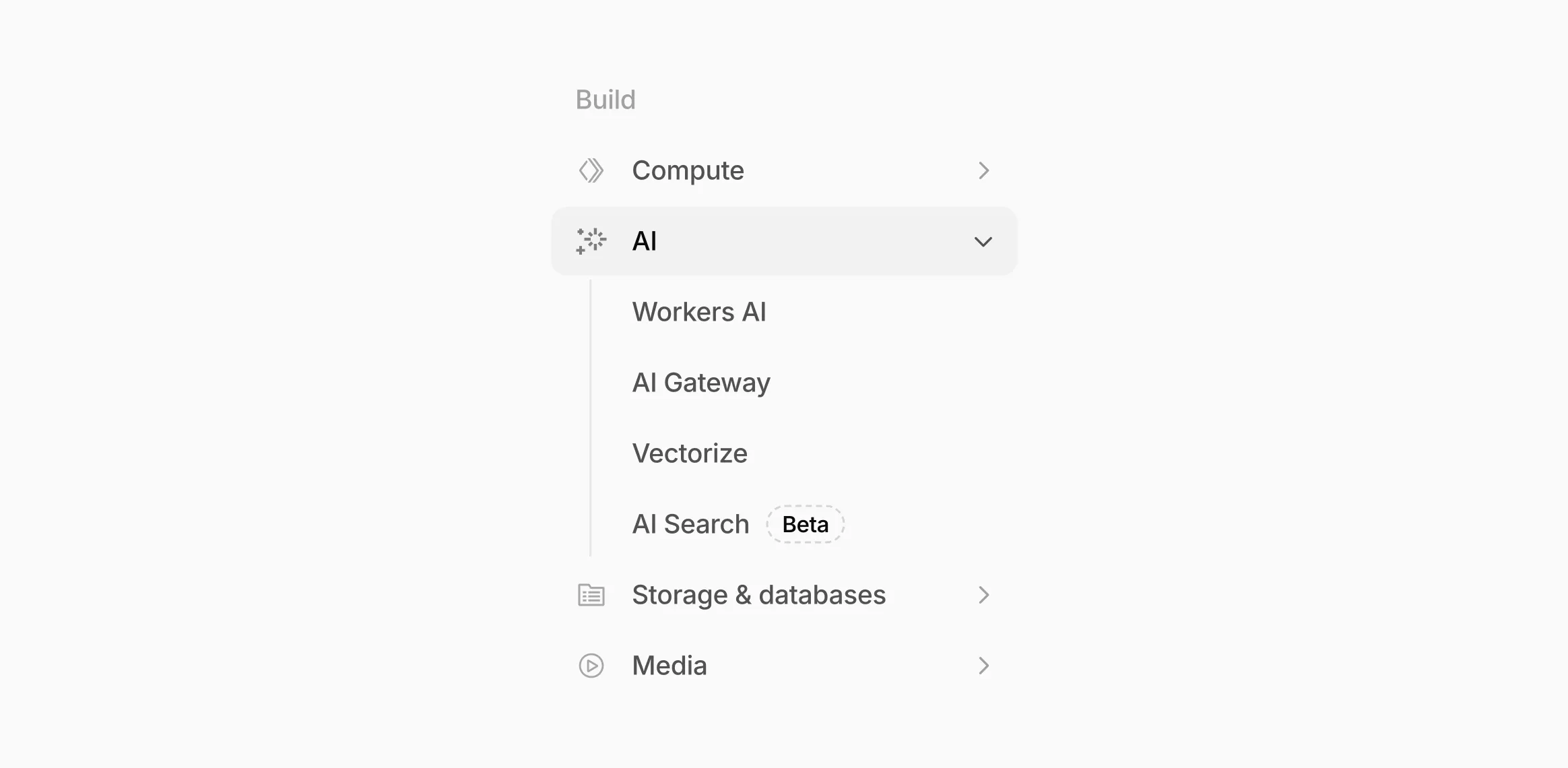
AI now has its own top-level section in the Cloudflare dashboard sidebar, so you can find AI features without digging through menus.
Onboarding and getting started
Getting started with AI Gateway is now simpler. When you create your first gateway, we now show your gateway's OpenAI-compatible endpoint and step-by-step guidance to help you configure it. The Playground also includes helpful prompts, and usage pages have clear next steps if you have not made any requests yet.
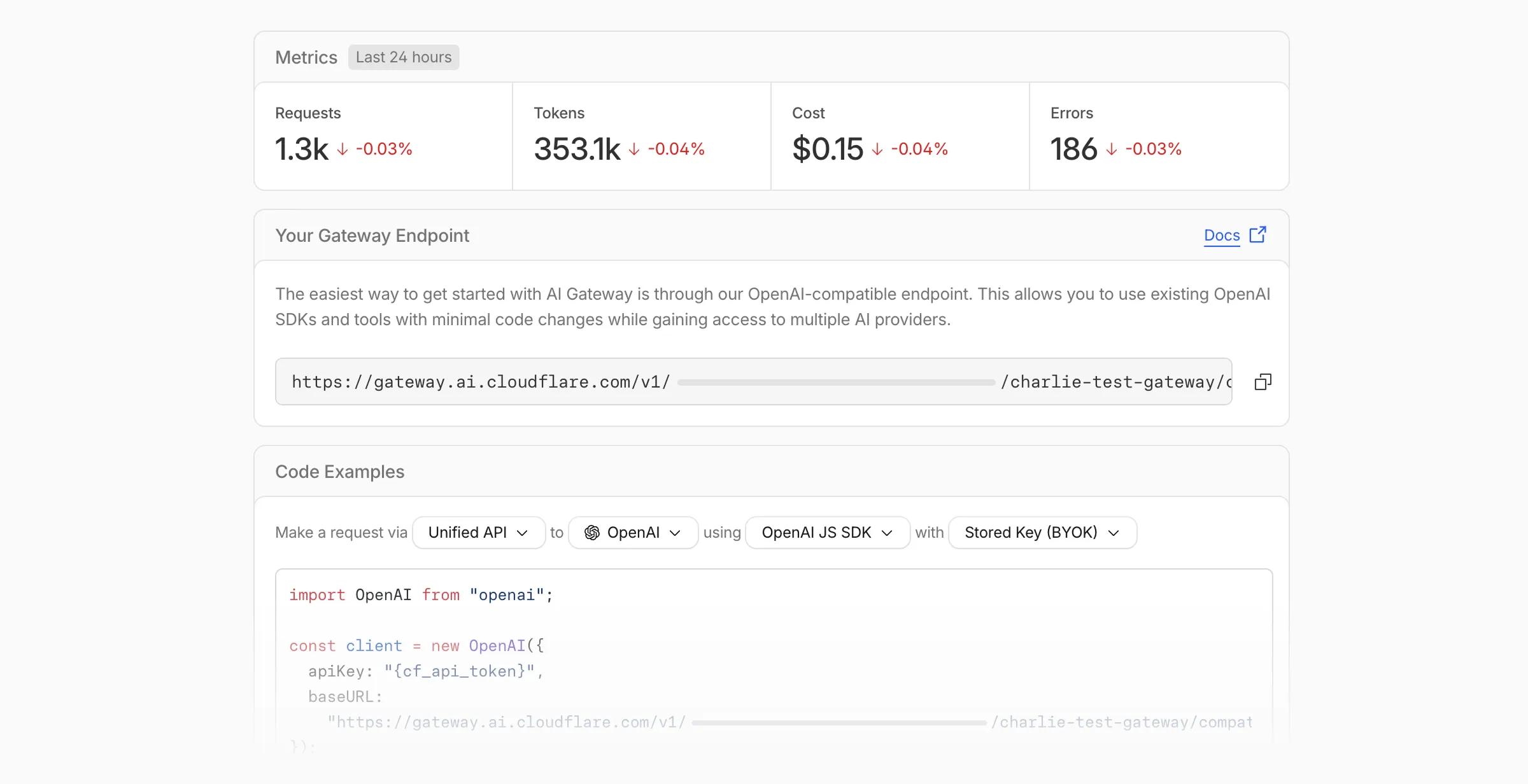
We've also combined the previously separate code example sections into one view with dropdown selectors for API type, provider, SDK, and authentication method so you can now customize the exact code snippet you need from one place.
Dynamic Routing
- The route builder is now more performant and responsive.
- You can now copy route names to your clipboard with a single click.
- Code examples use the Universal Endpoint format, making it easier to integrate routes into your application.
Observability and analytics
- Small monetary values now display correctly in cost analytics charts, so you can accurately track spending at any scale.
Accessibility
- Improvements to keyboard navigation within the AI Gateway, specifically when exploring usage by provider.
- Improvements to sorting and filtering components on the Workers AI models page.
For more information, refer to the AI Gateway documentation.
The latest release of the Agents SDK ↗ adds built-in retry utilities, per-connection protocol message control, and a fully rewritten
@cloudflare/ai-chatwith data parts, tool approval persistence, and zero breaking changes.A new
this.retry()method lets you retry any async operation with exponential backoff and jitter. You can pass an optionalshouldRetrypredicate to bail early on non-retryable errors.JavaScript class MyAgent extends Agent {async onRequest(request) {const data = await this.retry(() => callUnreliableService(), {maxAttempts: 4,shouldRetry: (err) => !(err instanceof PermanentError),});return Response.json(data);}}TypeScript class MyAgent extends Agent {async onRequest(request: Request) {const data = await this.retry(() => callUnreliableService(), {maxAttempts: 4,shouldRetry: (err) => !(err instanceof PermanentError),});return Response.json(data);}}Retry options are also available per-task on
queue(),schedule(),scheduleEvery(), andaddMcpServer():JavaScript // Per-task retry configuration, persisted in SQLite alongside the taskawait this.schedule(Date.now() + 60_000,"sendReport",{ userId: "abc" },{retry: { maxAttempts: 5 },},);// Class-level retry defaultsclass MyAgent extends Agent {static options = {retry: { maxAttempts: 3 },};}TypeScript // Per-task retry configuration, persisted in SQLite alongside the taskawait this.schedule(Date.now() + 60_000, "sendReport", { userId: "abc" }, {retry: { maxAttempts: 5 },});// Class-level retry defaultsclass MyAgent extends Agent {static options = {retry: { maxAttempts: 3 },};}Retry options are validated eagerly at enqueue/schedule time, and invalid values throw immediately. Internal retries have also been added for workflow operations (
terminateWorkflow,pauseWorkflow, and others) with Durable Object-aware error detection.Agents automatically send JSON text frames (identity, state, MCP server lists) to every WebSocket connection. You can now suppress these per-connection for clients that cannot handle them — binary-only devices, MQTT clients, or lightweight embedded systems.
JavaScript class MyAgent extends Agent {shouldSendProtocolMessages(connection, ctx) {// Suppress protocol messages for MQTT clientsconst subprotocol = ctx.request.headers.get("Sec-WebSocket-Protocol");return subprotocol !== "mqtt";}}TypeScript class MyAgent extends Agent {shouldSendProtocolMessages(connection: Connection, ctx: ConnectionContext) {// Suppress protocol messages for MQTT clientsconst subprotocol = ctx.request.headers.get("Sec-WebSocket-Protocol");return subprotocol !== "mqtt";}}Connections with protocol messages disabled still fully participate in RPC and regular messaging. Use
isConnectionProtocolEnabled(connection)to check a connection's status at any time. The flag persists across Durable Object hibernation.See Protocol messages for full documentation.
The first stable release of
@cloudflare/ai-chatships alongside this release with a major refactor ofAIChatAgentinternals — newResumableStreamclass, WebSocketChatTransport, and simplified SSE parsing — with zero breaking changes. Existing code usingAIChatAgentanduseAgentChatworks as-is.Key new features:
- Data parts — Attach typed JSON blobs (
data-*) to messages alongside text. Supports reconciliation (type+id updates in-place), append, and transient parts (ephemeral viaonDatacallback). See Data parts. - Tool approval persistence — The
needsApprovalapproval UI now survives page refresh and DO hibernation. The streaming message is persisted to SQLite when a tool entersapproval-requestedstate. maxPersistedMessages— Cap SQLite message storage with automatic oldest-message deletion.bodyoption onuseAgentChat— Send custom data with every request (static or dynamic).- Incremental persistence — Hash-based cache to skip redundant SQL writes.
- Row size guard — Automatic two-pass compaction when messages approach the SQLite 2 MB limit.
autoContinueAfterToolResultdefaults totrue— Client-side tool results and tool approvals now automatically trigger a server continuation, matching server-executed tool behavior. SetautoContinueAfterToolResult: falseinuseAgentChatto restore the previous behavior.
Notable bug fixes:
- Resolved stream resumption race conditions
- Resolved an issue where
setMessagesfunctional updater sent empty arrays - Resolved an issue where client tool schemas were lost after DO hibernation
- Resolved
InvalidPromptErrorafter tool approval (approval.idwas dropped) - Resolved an issue where message metadata was not propagated on broadcast/resume paths
- Resolved an issue where
clearAll()did not clear in-memory chunk buffers - Resolved an issue where
reasoning-deltasilently dropped data whenreasoning-startwas missed during stream resumption
getQueue(),getQueues(),getSchedule(),dequeue(),dequeueAll(), anddequeueAllByCallback()were unnecessarilyasyncdespite only performing synchronous SQL operations. They now return values directly instead of wrapping them in Promises. This is backward compatible — existing code usingawaiton these methods will continue to work.- Fix TypeScript "excessively deep" error — A depth counter on
CanSerializeandIsSerializableParamtypes bails out totrueafter 10 levels of recursion, preventing the "Type instantiation is excessively deep" error with deeply nested types like AI SDKCoreMessage[]. - POST SSE keepalive — The POST SSE handler now sends
event: pingevery 30 seconds to keep the connection alive, matching the existing GET SSE handler behavior. This prevents POST response streams from being silently dropped by proxies during long-running tool calls. - Widened peer dependency ranges — Peer dependency ranges across packages have been widened to prevent cascading major bumps during 0.x minor releases.
@cloudflare/ai-chatand@cloudflare/codemodeare now marked as optional peer dependencies.
To update to the latest version:
Terminal window npm i agents@latest @cloudflare/ai-chat@latest- Data parts — Attach typed JSON blobs (
We're excited to announce GLM-4.7-Flash on Workers AI, a fast and efficient text generation model optimized for multilingual dialogue and instruction-following tasks, along with the brand-new @cloudflare/tanstack-ai ↗ package and workers-ai-provider v3.1.1 ↗.
You can now run AI agents entirely on Cloudflare. With GLM-4.7-Flash's multi-turn tool calling support, plus full compatibility with TanStack AI and the Vercel AI SDK, you have everything you need to build agentic applications that run completely at the edge.
@cf/zai-org/glm-4.7-flashis a multilingual model with a 131,072 token context window, making it ideal for long-form content generation, complex reasoning tasks, and multilingual applications.Key Features and Use Cases:
- Multi-turn Tool Calling for Agents: Build AI agents that can call functions and tools across multiple conversation turns
- Multilingual Support: Built to handle content generation in multiple languages effectively
- Large Context Window: 131,072 tokens for long-form writing, complex reasoning, and processing long documents
- Fast Inference: Optimized for low-latency responses in chatbots and virtual assistants
- Instruction Following: Excellent at following complex instructions for code generation and structured tasks
Use GLM-4.7-Flash through the Workers AI binding (
env.AI.run()), the REST API at/runor/v1/chat/completions, AI Gateway, or via workers-ai-provider for the Vercel AI SDK.Pricing is available on the model page or pricing page.
We've released
@cloudflare/tanstack-ai, a new package that brings Workers AI and AI Gateway support to TanStack AI ↗. This provides a framework-agnostic alternative for developers who prefer TanStack's approach to building AI applications.Workers AI adapters support four configuration modes — plain binding (
env.AI), plain REST, AI Gateway binding (env.AI.gateway(id)), and AI Gateway REST — across all capabilities:- Chat (
createWorkersAiChat) — Streaming chat completions with tool calling, structured output, and reasoning text streaming. - Image generation (
createWorkersAiImage) — Text-to-image models. - Transcription (
createWorkersAiTranscription) — Speech-to-text. - Text-to-speech (
createWorkersAiTts) — Audio generation. - Summarization (
createWorkersAiSummarize) — Text summarization.
AI Gateway adapters route requests from third-party providers — OpenAI, Anthropic, Gemini, Grok, and OpenRouter — through Cloudflare AI Gateway for caching, rate limiting, and unified billing.
To get started:
Terminal window npm install @cloudflare/tanstack-ai @tanstack/aiThe Workers AI provider for the Vercel AI SDK ↗ now supports three new capabilities beyond chat and image generation:
- Transcription (
provider.transcription(model)) — Speech-to-text with automatic handling of model-specific input formats across binding and REST paths. - Text-to-speech (
provider.speech(model)) — Audio generation with support for voice and speed options. - Reranking (
provider.reranking(model)) — Document reranking for RAG pipelines and search result ordering.
TypeScript import { createWorkersAI } from "workers-ai-provider";import {experimental_transcribe,experimental_generateSpeech,rerank,} from "ai";const workersai = createWorkersAI({ binding: env.AI });const transcript = await experimental_transcribe({model: workersai.transcription("@cf/openai/whisper-large-v3-turbo"),audio: audioData,mediaType: "audio/wav",});const speech = await experimental_generateSpeech({model: workersai.speech("@cf/deepgram/aura-1"),text: "Hello world",voice: "asteria",});const ranked = await rerank({model: workersai.reranking("@cf/baai/bge-reranker-base"),query: "What is machine learning?",documents: ["ML is a branch of AI.", "The weather is sunny."],});This release also includes a comprehensive reliability overhaul (v3.0.5):
- Fixed streaming — Responses now stream token-by-token instead of buffering all chunks, using a proper
TransformStreampipeline with backpressure. - Fixed tool calling — Resolved issues with tool call ID sanitization, conversation history preservation, and a heuristic that silently fell back to non-streaming mode when tools were defined.
- Premature stream termination detection — Streams that end unexpectedly now report
finishReason: "error"instead of silently reporting"stop". - AI Search support — Added
createAISearchas the canonical export (renamed from AutoRAG).createAutoRAGstill works with a deprecation warning.
To upgrade:
Terminal window npm install workers-ai-provider@latest ai
AI Crawl Control metrics have been enhanced with new views, improved filtering, and better data visualization.
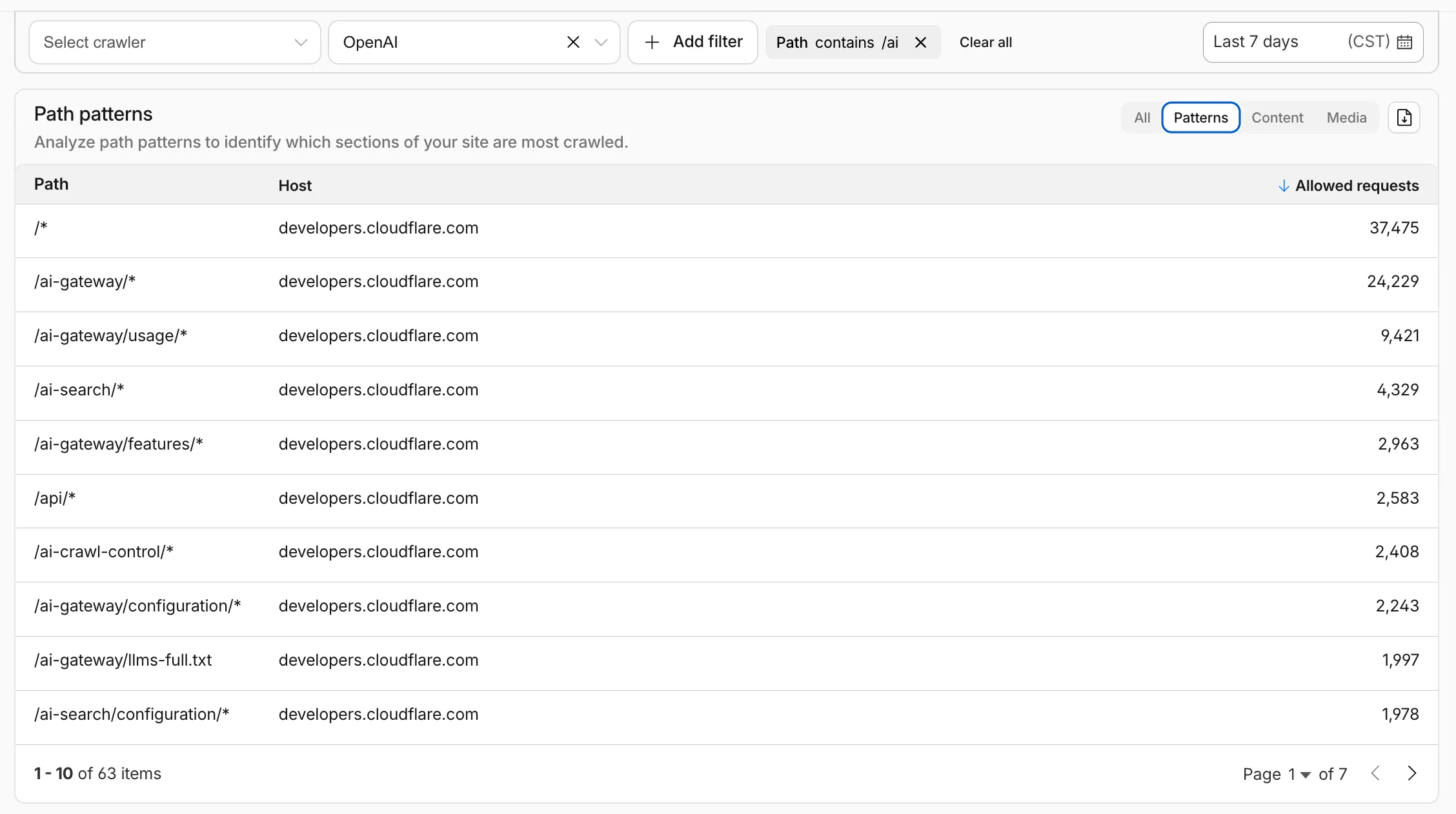
Path pattern grouping
- In the Metrics tab > Most popular paths table, use the new Patterns tab that groups requests by URI pattern (
/blog/*,/api/v1/*,/docs/*) to identify which site areas crawlers target most. Refer to the screenshot above.
Enhanced referral analytics
- Destination patterns show which site areas receive AI-driven referral traffic.
- In the Metrics tab, a new Referrals over time chart shows trends by operator or source.
Data transfer metrics
- In the Metrics tab > Allowed requests over time chart, toggle Bytes to show bandwidth consumption.
- In the Crawlers tab, a new Bytes Transferred column shows bandwidth per crawler.
Image exports
- Export charts and tables as images for reports and presentations.
Learn more about analyzing AI traffic.
- In the Metrics tab > Most popular paths table, use the new Patterns tab that groups requests by URI pattern (
The latest release of the Agents SDK ↗ brings readonly connections, MCP protocol and security improvements, x402 payment protocol v2 migration, and the ability to customize OAuth for MCP server connections.
Agents can now restrict WebSocket clients to read-only access, preventing them from modifying agent state. This is useful for dashboards, spectator views, or any scenario where clients should observe but not mutate.
New hooks:
shouldConnectionBeReadonly,setConnectionReadonly,isConnectionReadonly. Readonly connections block both client-sidesetState()and mutating@callable()methods, and the readonly flag survives hibernation.JavaScript class MyAgent extends Agent {shouldConnectionBeReadonly(connection) {// Make spectators readonlyreturn connection.url.includes("spectator");}}TypeScript class MyAgent extends Agent {shouldConnectionBeReadonly(connection) {// Make spectators readonlyreturn connection.url.includes("spectator");}}The new
createMcpOAuthProvidermethod on theAgentclass allows subclasses to override the default OAuth provider used when connecting to MCP servers. This enables custom authentication strategies such as pre-registered client credentials or mTLS, beyond the built-in dynamic client registration.JavaScript class MyAgent extends Agent {createMcpOAuthProvider(callbackUrl) {return new MyCustomOAuthProvider(this.ctx.storage, this.name, callbackUrl);}}TypeScript class MyAgent extends Agent {createMcpOAuthProvider(callbackUrl: string): AgentMcpOAuthProvider {return new MyCustomOAuthProvider(this.ctx.storage, this.name, callbackUrl);}}Upgraded the MCP SDK to 1.26.0 to prevent cross-client response leakage. Stateless MCP Servers should now create a new
McpServerinstance per request instead of sharing a single instance. A guard is added in this version of the MCP SDK which will prevent connection to a Server instance that has already been connected to a transport. Developers will need to modify their code if they declare theirMcpServerinstance as a global variable.Added
callbackPathoption toaddMcpServerto prevent instance name leakage in MCP OAuth callback URLs. WhensendIdentityOnConnectisfalse,callbackPathis now required — the default callback URL would expose the instance name, undermining the security intent. Also fixes callback request detection to match via thestateparameter instead of a loose/callbackURL substring check, enabling custom callback paths.onStateChangedis a drop-in rename ofonStateUpdate(same signature, same behavior).onStateUpdatestill works but emits a one-time console warning per class.validateStateChangerejections now propagate aCF_AGENT_STATE_ERRORmessage back to the client.Migrated the x402 MCP payment integration from the legacy
x402package to@x402/coreand@x402/evmv2.Breaking changes for x402 users:
- Peer dependencies changed: replace
x402with@x402/coreand@x402/evm PaymentRequirementstype now uses v2 fields (e.g.amountinstead ofmaxAmountRequired)X402ClientConfig.accounttype changed fromviem.AccounttoClientEvmSigner(structurally compatible withprivateKeyToAccount())
Terminal window npm uninstall x402npm install @x402/core @x402/evmNetwork identifiers now accept both legacy names and CAIP-2 format:
TypeScript // Legacy name (auto-converted){network: "base-sepolia",}// CAIP-2 format (preferred){network: "eip155:84532",}Other x402 changes:
X402ClientConfig.networkis now optional — the client auto-selects from available payment requirements- Server-side lazy initialization: facilitator connection is deferred until the first paid tool invocation
- Payment tokens support both v2 (
PAYMENT-SIGNATURE) and v1 (X-PAYMENT) HTTP headers - Added
normalizeNetworkexport for converting legacy network names to CAIP-2 format - Re-exports
PaymentRequirements,PaymentRequired,Network,FacilitatorConfig, andClientEvmSignerfromagents/x402
- Fix
useAgentandAgentClientcrashing when usingbasePathrouting - CORS handling delegated to partyserver's native support (simpler, more reliable)
- Client-side
onStateUpdateErrorcallback for handling rejected state updates
To update to the latest version:
Terminal window npm i agents@latest- Peer dependencies changed: replace
The Sandbox SDK ↗ now supports PTY (pseudo-terminal) passthrough, enabling browser-based terminal UIs to connect to sandbox shells via WebSocket.
The new
terminal()method proxies a WebSocket upgrade to the container's PTY endpoint, with output buffering for replay on reconnect.JavaScript // Worker: proxy WebSocket to container terminalreturn sandbox.terminal(request, { cols: 80, rows: 24 });TypeScript // Worker: proxy WebSocket to container terminalreturn sandbox.terminal(request, { cols: 80, rows: 24 });Each session can have its own terminal with an isolated working directory and environment, so users can run separate shells side-by-side in the same container.
JavaScript // Multiple isolated terminals in the same sandboxconst dev = await sandbox.getSession("dev");return dev.terminal(request);TypeScript // Multiple isolated terminals in the same sandboxconst dev = await sandbox.getSession("dev");return dev.terminal(request);The new
@cloudflare/sandbox/xtermexport provides aSandboxAddonfor xterm.js ↗ with automatic reconnection (exponential backoff + jitter), buffered output replay, and resize forwarding.JavaScript import { SandboxAddon } from "@cloudflare/sandbox/xterm";const addon = new SandboxAddon({getWebSocketUrl: ({ sandboxId, origin }) =>`${origin}/ws/terminal?id=${sandboxId}`,onStateChange: (state, error) => updateUI(state),});terminal.loadAddon(addon);addon.connect({ sandboxId: "my-sandbox" });TypeScript import { SandboxAddon } from "@cloudflare/sandbox/xterm";const addon = new SandboxAddon({getWebSocketUrl: ({ sandboxId, origin }) =>`${origin}/ws/terminal?id=${sandboxId}`,onStateChange: (state, error) => updateUI(state),});terminal.loadAddon(addon);addon.connect({ sandboxId: "my-sandbox" });To update to the latest version:
Terminal window npm i @cloudflare/sandbox@latest
Get your content updates into AI Search faster and avoid a full rescan when you do not need it.
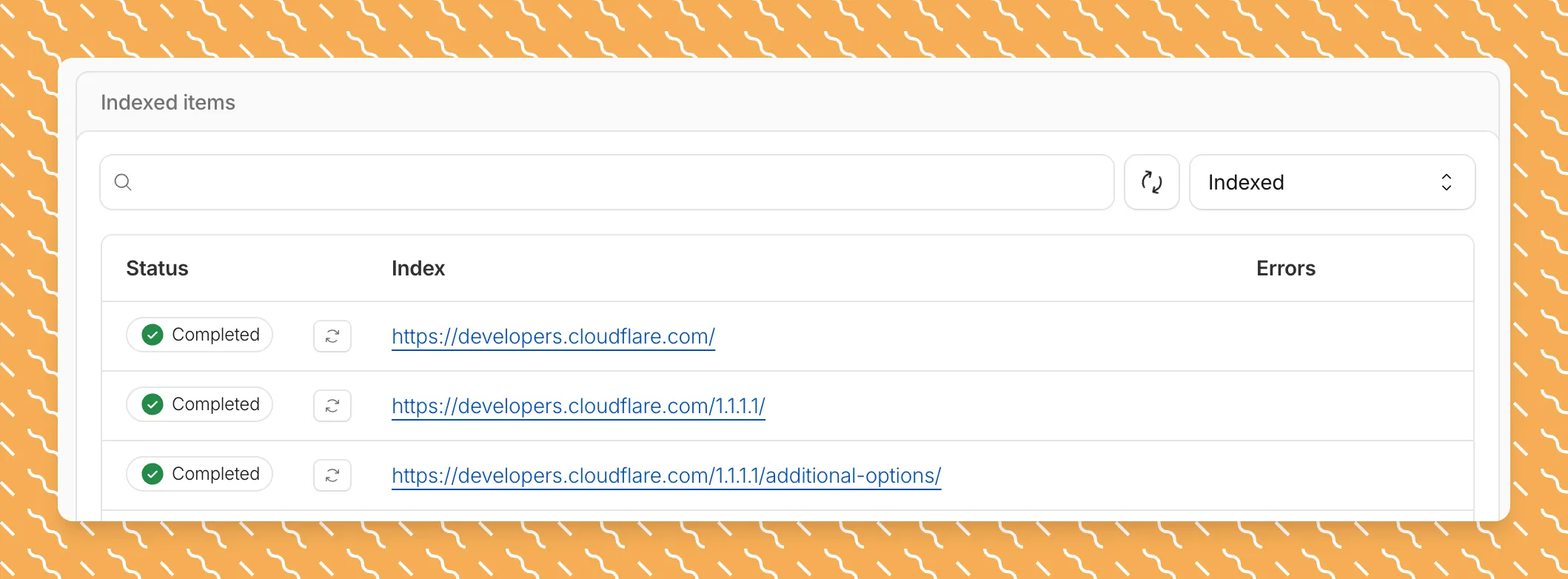
Updated a file or need to retry one that errored? When you know exactly which file changed, you can now reindex it directly instead of rescanning your entire data source.
Go to Overview > Indexed Items and select the sync icon next to any file to reindex it immediately.
By default, AI Search crawls all sitemaps listed in your
robots.txt, up to the maximum files per index limit. If your site has multiple sitemaps but you only want to index a specific set, you can now specify a single sitemap URL to limit what the crawler visits.For example, if your
robots.txtlists bothblog-sitemap.xmlanddocs-sitemap.xml, you can specify justhttps://example.com/docs-sitemap.xmlto index only your documentation.Configure your selection anytime in Settings > Parsing options > Specific sitemaps, then trigger a sync to apply the changes.

Learn more about indexing controls and website crawling configuration.
New reference documentation is now available for AI Crawl Control:
- GraphQL API reference — Query examples for crawler requests, top paths, referral traffic, and data transfer. Includes key filters for detection IDs, user agents, and referrer domains.
- Bot reference — Detection IDs and user agents for major AI crawlers from OpenAI, Anthropic, Google, Meta, and others.
- Worker templates — Deploy the x402 Payment-Gated Proxy to monetize crawler access or charge bots while letting humans through free.
The latest release of the Agents SDK ↗ brings first-class support for Cloudflare Workflows, synchronous state management, and new scheduling capabilities.
Agents excel at real-time communication and state management. Workflows excel at durable execution. Together, they enable powerful patterns where Agents handle WebSocket connections while Workflows handle long-running tasks, retries, and human-in-the-loop flows.
Use the new
AgentWorkflowclass to define workflows with typed access to your Agent:JavaScript import { AgentWorkflow } from "agents/workflows";export class ProcessingWorkflow extends AgentWorkflow {async run(event, step) {// Call Agent methods via RPCawait this.agent.updateStatus(event.payload.taskId, "processing");// Non-durable: progress reporting to clientsawait this.reportProgress({ step: "process", percent: 0.5 });this.broadcastToClients({ type: "update", taskId: event.payload.taskId });// Durable via step: idempotent, won't repeat on retryawait step.mergeAgentState({ taskProgress: 0.5 });const result = await step.do("process", async () => {return processData(event.payload.data);});await step.reportComplete(result);return result;}}TypeScript import { AgentWorkflow } from "agents/workflows";import type { AgentWorkflowEvent, AgentWorkflowStep } from "agents/workflows";export class ProcessingWorkflow extends AgentWorkflow<MyAgent, TaskParams> {async run(event: AgentWorkflowEvent<TaskParams>, step: AgentWorkflowStep) {// Call Agent methods via RPCawait this.agent.updateStatus(event.payload.taskId, "processing");// Non-durable: progress reporting to clientsawait this.reportProgress({ step: "process", percent: 0.5 });this.broadcastToClients({ type: "update", taskId: event.payload.taskId });// Durable via step: idempotent, won't repeat on retryawait step.mergeAgentState({ taskProgress: 0.5 });const result = await step.do("process", async () => {return processData(event.payload.data);});await step.reportComplete(result);return result;}}Start workflows from your Agent with
runWorkflow()and handle lifecycle events:JavaScript export class MyAgent extends Agent {async startTask(taskId, data) {const instanceId = await this.runWorkflow("PROCESSING_WORKFLOW", {taskId,data,});return { instanceId };}async onWorkflowProgress(workflowName, instanceId, progress) {this.broadcast(JSON.stringify({ type: "progress", progress }));}async onWorkflowComplete(workflowName, instanceId, result) {console.log(`Workflow ${instanceId} completed`);}async onWorkflowError(workflowName, instanceId, error) {console.error(`Workflow ${instanceId} failed:`, error);}}TypeScript export class MyAgent extends Agent {async startTask(taskId: string, data: string) {const instanceId = await this.runWorkflow("PROCESSING_WORKFLOW", {taskId,data,});return { instanceId };}async onWorkflowProgress(workflowName: string,instanceId: string,progress: unknown,) {this.broadcast(JSON.stringify({ type: "progress", progress }));}async onWorkflowComplete(workflowName: string,instanceId: string,result?: unknown,) {console.log(`Workflow ${instanceId} completed`);}async onWorkflowError(workflowName: string,instanceId: string,error: unknown,) {console.error(`Workflow ${instanceId} failed:`, error);}}Key workflow methods on your Agent:
runWorkflow(workflowName, params, options?)— Start a workflow with optional metadatagetWorkflow(workflowId)/getWorkflows(criteria?)— Query workflows with cursor-based paginationapproveWorkflow(workflowId)/rejectWorkflow(workflowId)— Human-in-the-loop approval flowspauseWorkflow(),resumeWorkflow(),terminateWorkflow()— Workflow control
State updates are now synchronous with a new
validateStateChange()validation hook:JavaScript export class MyAgent extends Agent {validateStateChange(oldState, newState) {// Return false to reject the changeif (newState.count < 0) return false;// Return modified state to transformreturn { ...newState, lastUpdated: Date.now() };}}TypeScript export class MyAgent extends Agent<Env, State> {validateStateChange(oldState: State, newState: State): State | false {// Return false to reject the changeif (newState.count < 0) return false;// Return modified state to transformreturn { ...newState, lastUpdated: Date.now() };}}The new
scheduleEvery()method enables fixed-interval recurring tasks with built-in overlap prevention:JavaScript // Run every 5 minutesawait this.scheduleEvery("syncData", 5 * 60 * 1000, { source: "api" });TypeScript // Run every 5 minutesawait this.scheduleEvery("syncData", 5 * 60 * 1000, { source: "api" });- Client-side RPC timeout — Set timeouts on callable method invocations
StreamingResponse.error(message)— Graceful stream error signalinggetCallableMethods()— Introspection API for discovering callable methods- Connection close handling — Pending calls are automatically rejected on disconnect
JavaScript await agent.call("method", [args], {timeout: 5000,stream: { onChunk, onDone, onError },});TypeScript await agent.call("method", [args], {timeout: 5000,stream: { onChunk, onDone, onError },});Secure email reply routing — Email replies are now secured with HMAC-SHA256 signed headers, preventing unauthorized routing of emails to agent instances.
Routing improvements:
basePathoption to bypass default URL construction for custom routing- Server-sent identity — Agents send
nameandagenttype on connect - New
onIdentityandonIdentityChangecallbacks on the client
JavaScript const agent = useAgent({basePath: "user",onIdentity: (name, agentType) => console.log(`Connected to ${name}`),});TypeScript const agent = useAgent({basePath: "user",onIdentity: (name, agentType) => console.log(`Connected to ${name}`),});To update to the latest version:
Terminal window npm i agents@latestFor the complete Workflows API reference and patterns, see Run Workflows.
We have partnered with Black Forest Labs (BFL) again to bring their optimized FLUX.2 [klein] 9B model to Workers AI. This distilled model offers enhanced quality compared to the 4B variant, while maintaining cost-effective pricing. With a fixed 4-step inference process, Klein 9B is ideal for rapid prototyping and real-time applications where both speed and quality matter.
Read the BFL blog ↗ to learn more about the model itself, or try it out yourself on our multi modal playground ↗.
Pricing documentation is available on the model page or pricing page.
The model hosted on Workers AI is optimized for speed with a fixed 4-step inference process and supports up to 4 image inputs. Since this is a distilled model, the
stepsparameter is fixed at 4 and cannot be adjusted. Like FLUX.2 [dev] and FLUX.2 [klein] 4B, this image model uses multipart form data inputs, even if you just have a prompt.With the REST API, the multipart form data input looks like this:
Terminal window curl --request POST \--url 'https://api.cloudflare.com/client/v4/accounts/{ACCOUNT}/ai/run/@cf/black-forest-labs/flux-2-klein-9b' \--header 'Authorization: Bearer {TOKEN}' \--header 'Content-Type: multipart/form-data' \--form 'prompt=a sunset at the alps' \--form width=1024 \--form height=1024With the Workers AI binding, you can use it as such:
JavaScript const form = new FormData();form.append("prompt", "a sunset with a dog");form.append("width", "1024");form.append("height", "1024");// FormData doesn't expose its serialized body or boundary. Passing it to a// Request (or Response) constructor serializes it and generates the Content-Type// header with the boundary, which is required for the server to parse the multipart fields.const formResponse = new Response(form);const formStream = formResponse.body;const formContentType = formResponse.headers.get('content-type');const resp = await env.AI.run("@cf/black-forest-labs/flux-2-klein-9b", {multipart: {body: formStream,contentType: formContentType,},});The parameters you can send to the model are detailed here:
JSON Schema for Model
Required Parametersprompt(string) - Text description of the image to generate
Optional Parameters
input_image_0(string) - Binary imageinput_image_1(string) - Binary imageinput_image_2(string) - Binary imageinput_image_3(string) - Binary imageguidance(float) - Guidance scale for generation. Higher values follow the prompt more closelywidth(integer) - Width of the image, default1024Range: 256-1920height(integer) - Height of the image, default768Range: 256-1920seed(integer) - Seed for reproducibility
Note: Since this is a distilled model, the
stepsparameter is fixed at 4 and cannot be adjusted.The FLUX.2 klein-9b model supports generating images based on reference images, just like FLUX.2 [dev] and FLUX.2 [klein] 4B. You can use this feature to apply the style of one image to another, add a new character to an image, or iterate on past generated images. You would use it with the same multipart form data structure, with the input images in binary. The model supports up to 4 input images.
For the prompt, you can reference the images based on the index, like
take the subject of image 1 and style it like image 0or even use natural language likeplace the dog beside the woman.You must name the input parameter as
input_image_0,input_image_1,input_image_2,input_image_3for it to work correctly. All input images must be smaller than 512x512.Terminal window curl --request POST \--url 'https://api.cloudflare.com/client/v4/accounts/{ACCOUNT}/ai/run/@cf/black-forest-labs/flux-2-klein-9b' \--header 'Authorization: Bearer {TOKEN}' \--header 'Content-Type: multipart/form-data' \--form 'prompt=take the subject of image 1 and style it like image 0' \--form input_image_0=@/Users/johndoe/Desktop/icedoutkeanu.png \--form input_image_1=@/Users/johndoe/Desktop/me.png \--form width=1024 \--form height=1024Through Workers AI Binding:
JavaScript //helper function to convert ReadableStream to Blobasync function streamToBlob(stream: ReadableStream, contentType: string): Promise<Blob> {const reader = stream.getReader();const chunks = [];while (true) {const { done, value } = await reader.read();if (done) break;chunks.push(value);}return new Blob(chunks, { type: contentType });}const image0 = await fetch("http://image-url");const image1 = await fetch("http://image-url");const form = new FormData();const image_blob0 = await streamToBlob(image0.body, "image/png");const image_blob1 = await streamToBlob(image1.body, "image/png");form.append('input_image_0', image_blob0)form.append('input_image_1', image_blob1)form.append('prompt', 'take the subject of image 1 and style it like image 0')// FormData doesn't expose its serialized body or boundary. Passing it to a// Request (or Response) constructor serializes it and generates the Content-Type// header with the boundary, which is required for the server to parse the multipart fields.const formResponse = new Response(form);const formStream = formResponse.body;const formContentType = formResponse.headers.get('content-type');const resp = await env.AI.run("@cf/black-forest-labs/flux-2-klein-9b", {multipart: {body: formStream,contentType: formContentType}})
You can now store up to 10 million vectors in a single Vectorize index, doubling the previous limit of 5 million vectors. This enables larger-scale semantic search, recommendation systems, and retrieval-augmented generation (RAG) applications without splitting data across multiple indexes.
Vectorize continues to support indexes with up to 1,536 dimensions per vector at 32-bit precision. Refer to the Vectorize limits documentation for complete details.
AI Search now includes path filtering for both website and R2 data sources. You can now control which content gets indexed by defining include and exclude rules for paths.
By controlling what gets indexed, you can improve the relevance and quality of your search results. You can also use path filtering to split a single data source across multiple AI Search instances for specialized search experiences.
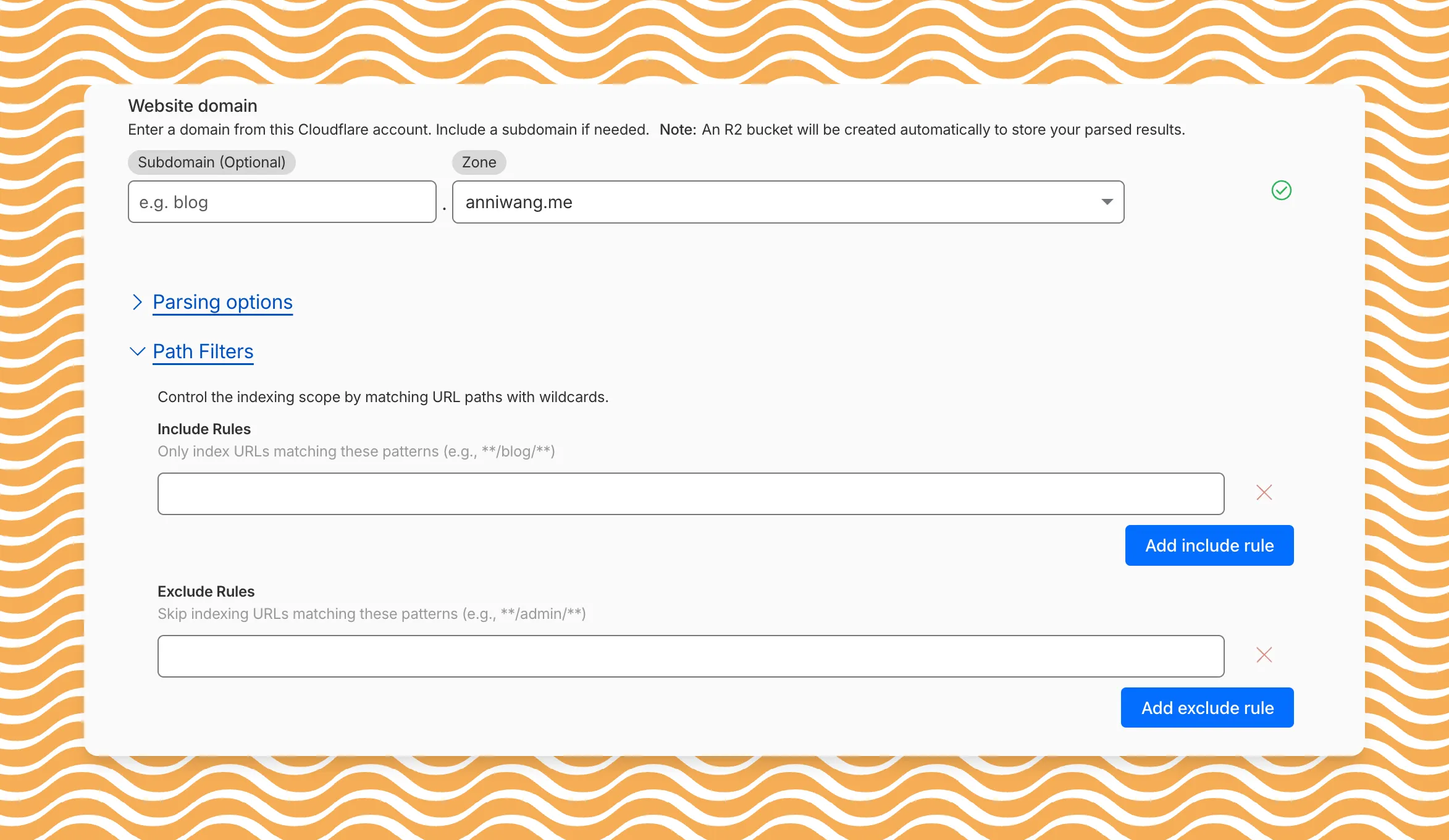
Path filtering uses micromatch ↗ patterns, so you can use
*to match within a directory and**to match across directories.Use case Include Exclude Index docs but skip drafts **/docs/****/docs/drafts/**Keep admin pages out of results — **/admin/**Index only English content **/en/**— Configure path filters when creating a new instance or update them anytime from Settings. Check out path filtering to learn more.
You can now create AI Search instances programmatically using the API. For example, use the API to create instances for each customer in a multi-tenant application or manage AI Search alongside your other infrastructure.
If you have created an AI Search instance via the dashboard before, you already have a service API token registered and can start creating instances programmatically right away. If not, follow the API guide to set up your first instance.
For example, you can now create separate search instances for each language on your website:
Terminal window for lang in en fr es de; docurl -X POST "https://api.cloudflare.com/client/v4/accounts/$ACCOUNT_ID/ai-search/instances" \-H "Authorization: Bearer $API_TOKEN" \-H "Content-Type: application/json" \--data '{"id": "docs-'"$lang"'","type": "web-crawler","source": "example.com","source_params": {"path_include": ["**/'"$lang"'/**"]}}'doneRefer to the REST API reference for additional configuration options.
We've partnered with Black Forest Labs (BFL) again to bring their optimized FLUX.2 [klein] 4B model to Workers AI! This distilled model offers faster generation and cost-effective pricing, while maintaining great output quality. With a fixed 4-step inference process, Klein 4B is ideal for rapid prototyping and real-time applications where speed matters.
Read the BFL blog ↗ to learn more about the model itself, or try it out yourself on our multi modal playground ↗.
Pricing documentation is available on the model page or pricing page.
The model hosted on Workers AI is optimized for speed with a fixed 4-step inference process and supports up to 4 image inputs. Since this is a distilled model, the
stepsparameter is fixed at 4 and cannot be adjusted. Like FLUX.2 [dev], this image model uses multipart form data inputs, even if you just have a prompt.With the REST API, the multipart form data input looks like this:
Terminal window curl --request POST \--url 'https://api.cloudflare.com/client/v4/accounts/{ACCOUNT}/ai/run/@cf/black-forest-labs/flux-2-klein-4b' \--header 'Authorization: Bearer {TOKEN}' \--header 'Content-Type: multipart/form-data' \--form 'prompt=a sunset at the alps' \--form width=1024 \--form height=1024With the Workers AI binding, you can use it as such:
JavaScript const form = new FormData();form.append("prompt", "a sunset with a dog");form.append("width", "1024");form.append("height", "1024");// FormData doesn't expose its serialized body or boundary. Passing it to a// Request (or Response) constructor serializes it and generates the Content-Type// header with the boundary, which is required for the server to parse the multipart fields.const formResponse = new Response(form);const formStream = formResponse.body;const formContentType = formResponse.headers.get('content-type');const resp = await env.AI.run("@cf/black-forest-labs/flux-2-klein-4b", {multipart: {body: formStream,contentType: formContentType,},});The parameters you can send to the model are detailed here:
JSON Schema for Model
Required Parametersprompt(string) - Text description of the image to generate
Optional Parameters
input_image_0(string) - Binary imageinput_image_1(string) - Binary imageinput_image_2(string) - Binary imageinput_image_3(string) - Binary imageguidance(float) - Guidance scale for generation. Higher values follow the prompt more closelywidth(integer) - Width of the image, default1024Range: 256-1920height(integer) - Height of the image, default768Range: 256-1920seed(integer) - Seed for reproducibility
Note: Since this is a distilled model, the
stepsparameter is fixed at 4 and cannot be adjusted.## Multi-Reference ImagesThe FLUX.2 klein-4b model supports generating images based on reference images, just like FLUX.2 [dev]. You can use this feature to apply the style of one image to another, add a new character to an image, or iterate on past generated images. You would use it with the same multipart form data structure, with the input images in binary. The model supports up to 4 input images.For the prompt, you can reference the images based on the index, like `take the subject of image 1 and style it like image 0` or even use natural language like `place the dog beside the woman`.Note: you have to name the input parameter as `input_image_0`, `input_image_1`, `input_image_2`, `input_image_3` for it to work correctly. All input images must be smaller than 512x512.```bashcurl --request POST \--url 'https://api.cloudflare.com/client/v4/accounts/{ACCOUNT}/ai/run/@cf/black-forest-labs/flux-2-klein-4b' \--header 'Authorization: Bearer {TOKEN}' \--header 'Content-Type: multipart/form-data' \--form 'prompt=take the subject of image 1 and style it like image 0' \--form input_image_0=@/Users/johndoe/Desktop/icedoutkeanu.png \--form input_image_1=@/Users/johndoe/Desktop/me.png \--form width=1024 \--form height=1024Through Workers AI Binding:
JavaScript //helper function to convert ReadableStream to Blobasync function streamToBlob(stream: ReadableStream, contentType: string): Promise<Blob> {const reader = stream.getReader();const chunks = [];while (true) {const { done, value } = await reader.read();if (done) break;chunks.push(value);}return new Blob(chunks, { type: contentType });}const image0 = await fetch("http://image-url");const image1 = await fetch("http://image-url");const form = new FormData();const image_blob0 = await streamToBlob(image0.body, "image/png");const image_blob1 = await streamToBlob(image1.body, "image/png");form.append('input_image_0', image_blob0)form.append('input_image_1', image_blob1)form.append('prompt', 'take the subject of image 1 and style it like image 0')// FormData doesn't expose its serialized body or boundary. Passing it to a// Request (or Response) constructor serializes it and generates the Content-Type// header with the boundary, which is required for the server to parse the multipart fields.const formResponse = new Response(form);const formStream = formResponse.body;const formContentType = formResponse.headers.get('content-type');const resp = await env.AI.run("@cf/black-forest-labs/flux-2-klein-4b", {multipart: {body: formStream,contentType: formContentType}})