

Audit Logs v2 is now generally available to all Cloudflare customers.

Audit Logs v2 provides a unified and standardized system for tracking and recording all user and system actions across Cloudflare products. Built on Cloudflare's API Shield / OpenAPI gateway, logs are generated automatically without requiring manual instrumentation from individual product teams, ensuring consistency across ~95% of Cloudflare products.
What's available at GA:
- Standardized logging — Audit logs follow a consistent format across all Cloudflare products, making it easier to search, filter, and investigate activity.
- Expanded product coverage — ~95% of Cloudflare products covered, up from ~75% in v1.
- Granular filtering — Filter by actor, action type, action result, resource, raw HTTP method, zone, and more. Over 20 filter parameters available via the API.
- Enhanced context — Each log entry includes authentication method, interface (API or dashboard), Cloudflare Ray ID, and actor token details.
- 18-month retention — Logs are retained for 18 months. Full history is accessible via the API or Logpush.
Access:
- Dashboard: Go to Manage Account > Audit Logs. Audit Logs v2 is shown by default.
- API:
GET https://api.cloudflare.com/client/v4/accounts/{account_id}/logs/audit - Logpush: Available via the
audit_logs_v2account-scoped dataset.
Important notes:
- Approximately 30 days of logs from the Beta period (back to ~February 8, 2026) are available at GA. These Beta logs will expire on ~April 9, 2026. Logs generated after GA will be retained for the full 18 months. Older logs remain available in Audit Logs v1.
- The UI query window is limited to 90 days for performance reasons. Use the API or Logpush for access to the full 18-month history.
GETrequests (view actions) and4xxerror responses are not logged at GA.GETlogging will be selectively re-enabled for sensitive read operations in a future release.- Audit Logs v1 continues to run in parallel. A deprecation timeline will be communicated separately.
- Before and after values — the ability to see what a value changed from and to — is a highly requested feature and is on our roadmap for a post-GA release. In the meantime, we recommend using Audit Logs v1 for before and after values. Audit Logs v1 will continue to run in parallel until this feature is available in v2.
For more details, refer to the Audit Logs v2 documentation.
Audit Logs v2 dataset is now available via Logpush.
This expands on earlier releases of Audit Logs v2 in the API and Dashboard UI.
We recommend creating a new Logpush job for the Audit Logs v2 dataset.
Timelines for General Availability (GA) of Audit Logs v2 and the retirement of Audit Logs v1 will be shared in upcoming updates.
For more details on Audit Logs v2, refer to the Audit Logs documentation ↗.
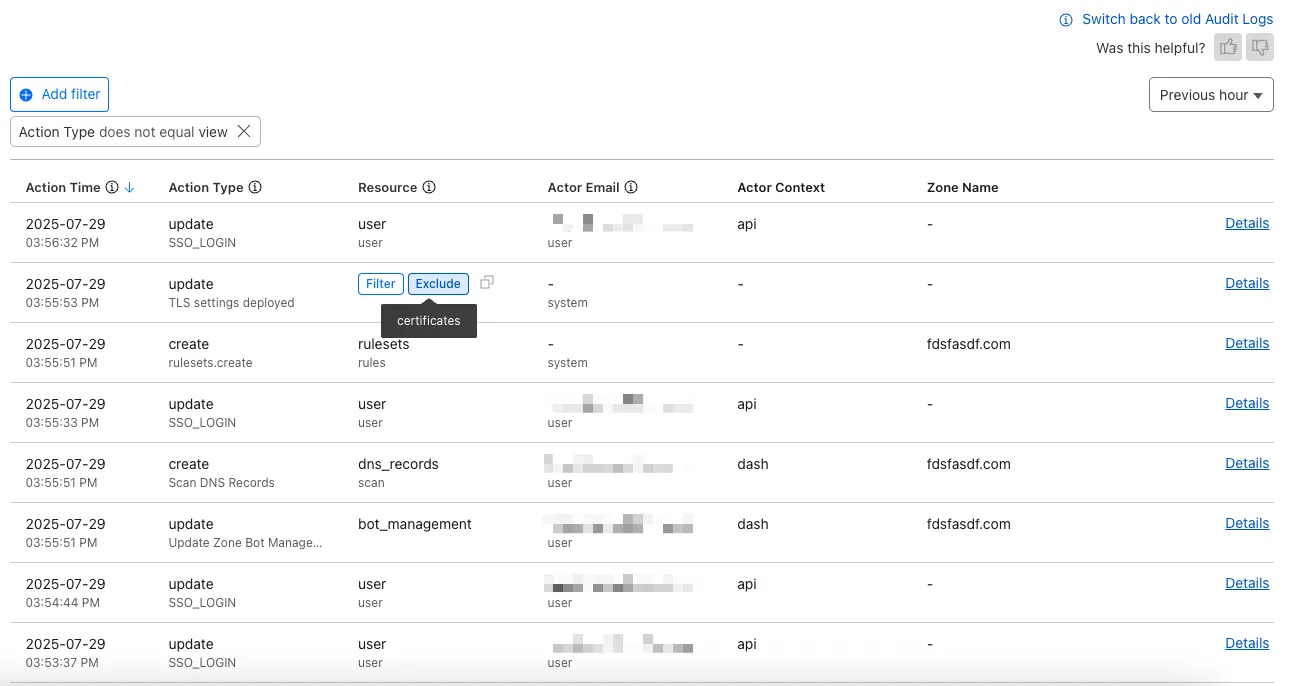
The Audit Logs v2 UI is now available to all Cloudflare customers in Beta. This release builds on the public Beta of the Audit Logs v2 API and introduces a redesigned user interface with powerful new capabilities to make it easier to investigate account activity.
Enabling the new UI
To try the new user interface, go to Manage Account > Audit Logs. The previous version of Audit Logs remains available and can be re-enabled at any time using the Switch back to old Audit Logs link in the banner at the top of the page.
New Features:
- Advanced Filtering: Filter logs by actor, resource, method, and more for faster insights.
- On-hover filter controls: Easily include or exclude values in queries by hovering over fields within a log entry.
- Detailed Log Sidebar: View rich context for each log entry without leaving the main view.
- JSON Log View: Inspect the raw log data in a structured JSON format.
- Custom Time Ranges: Define your own time windows to view historical activity.
- Infinite Scroll: Seamlessly browse logs without clicking through pages.
For more details on Audit Logs v2, see the Audit Logs documentation ↗.
Known issues
- A small number of audit logs may currently be unavailable in Audit Logs v2. In some cases, certain fields such as actor information may be missing in certain audit logs. We are actively working to improve coverage and completeness for General Availability.
- Export to CSV is not supported in the new UI.
We are actively refining the Audit Logs v2 experience and welcome your feedback. You can share overall feedback by clicking the thumbs up or thumbs down icons at the top of the page, or provide feedback on specific audit log entries using the thumbs icons next to each audit log line or by filling out our feedback form ↗.
The latest version of audit logs streamlines audit logging by automatically capturing all user and system actions performed through the Cloudflare Dashboard or public APIs. This update leverages Cloudflare’s existing API Shield to generate audit logs based on OpenAPI schemas, ensuring a more consistent and automated logging process.
Availability: Audit logs (version 2) is now in Beta, with support limited to API access.
Use the following API endpoint to retrieve audit logs:
JavaScript GET https://api.cloudflare.com/client/v4/accounts/<account_id>/logs/audit?since=<date>&before=<date>You can access detailed documentation for audit logs (version 2) Beta API release here ↗.
Key Improvements in the Beta Release:
-
Automated & standardized logging: Logs are now generated automatically using a standardized system, replacing manual, team-dependent logging. This ensures consistency across all Cloudflare services.
-
Expanded product coverage: Increased audit log coverage from 75% to 95%. Key API endpoints such as
/accounts,/zones, and/organizationsare now included. -
Granular filtering: Logs now follow a uniform format, enabling precise filtering by actions, users, methods, and resources—allowing for faster and more efficient investigations.
-
Enhanced context and traceability: Each log entry now includes detailed context, such as the authentication method used, the interface (API or Dashboard) through which the action was performed, and mappings to Cloudflare Ray IDs for better traceability.
-
Comprehensive activity capture: Expanded logging to include GET requests and failed attempts, ensuring that all critical activities are recorded.
Known Limitations in Beta
- Error handling for the API is not implemented.
- There may be gaps or missing entries in the available audit logs.
- UI is unavailable in this Beta release.
- System-level logs and User-Activity logs are not included.
Support for these features is coming as part of the GA release later this year. For more details, including a sample audit log, check out our blog post: Introducing Automatic Audit Logs ↗
-