
DNS records
When you create a tunnel, Cloudflare generates a subdomain at <UUID>.cfargotunnel.com. You point a CNAME record at this subdomain to route traffic from your hostname to the tunnel.
The cfargotunnel.com subdomain only proxies traffic for DNS records in the same Cloudflare account. If someone discovers your tunnel UUID, they cannot create a DNS record in another account to proxy traffic through it.
To create a DNS record for a Cloudflare Tunnel:
-
Log in to the Cloudflare dashboard ↗ and go to DNS Records for your domain.
Go to Records -
Select Add record.
-
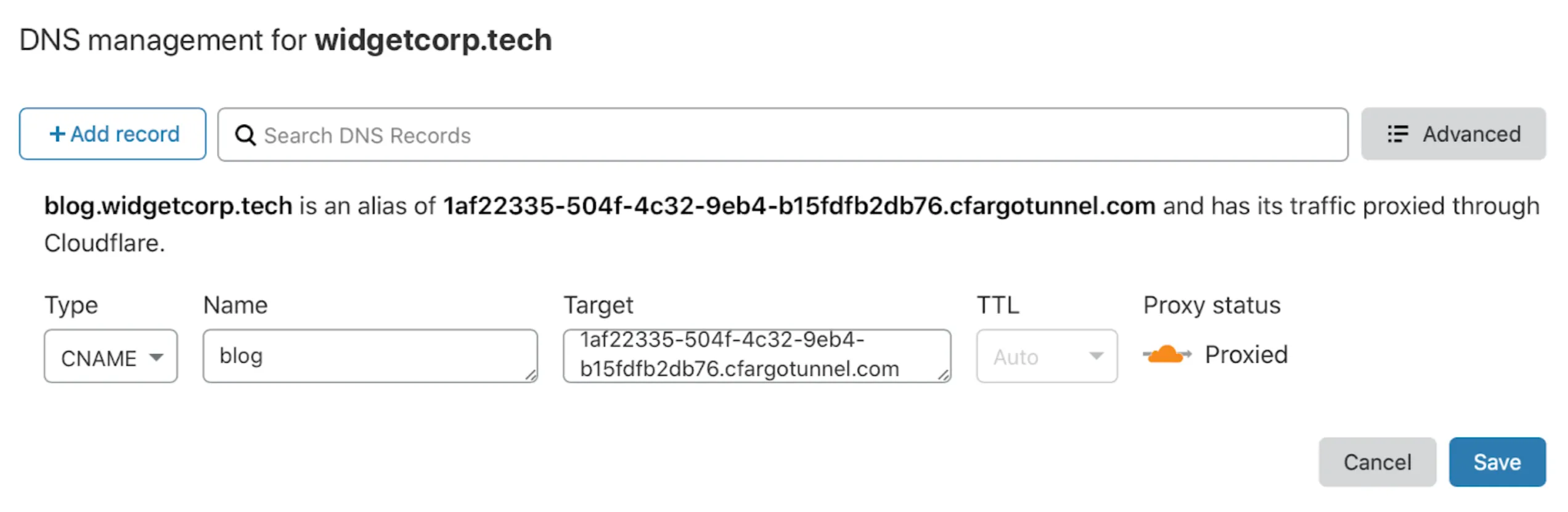
Enter the following values:
- Type: CNAME
- Name: Subdomain of your application
- Target:
<UUID>.cfargotunnel.com
-
Select Save.
For locally-managed tunnels, run the following command to create a CNAME record pointing to your tunnel subdomain:
cloudflared tunnel route dns <UUID or NAME> www.app.comThis creates a CNAME record but does not proxy traffic unless the tunnel is running.
The DNS record and the tunnel are independent. You can create DNS records that point to a tunnel that is not running. If a tunnel stops, the DNS record is not deleted — visitors will see a 1016 error.
You can also create multiple DNS records pointing to the same tunnel subdomain. If you route traffic from multiple hostnames to multiple services, create a CNAME entry for each hostname. All entries share the same target.
Published applications inherit the Cloudflare settings for their hostname, including cache rules, WAF rules, and other Rules configurations. You can change these settings for each hostname in the Cloudflare dashboard ↗.
If you use a load balancer, settings are applied to the load balancer hostname instead.