
We've updated the Workers AI text generation models to include context windows and limits definitions and changed our APIs to estimate and validate the number of tokens in the input prompt, not the number of characters.
This update allows developers to use larger context windows when interacting with Workers AI models, which can lead to better and more accurate results.
Our catalog page provides more information about each model's supported context window.
We've updated the Workers AI pricing to include the latest models and how model usage maps to Neurons.
- Each model's core input format(s) (tokens, audio seconds, images, etc) now include mappings to Neurons, making it easier to understand how your included Neuron volume is consumed and how you are charged at scale
- Per-model pricing, instead of the previous bucket approach, allows us to be more flexible on how models are charged based on their size, performance and capabilities. As we optimize each model, we can then pass on savings for that model.
- You will still only pay for what you consume: Workers AI inference is serverless, and not billed by the hour.
Going forward, models will be launched with their associated Neuron costs, and we'll be updating the Workers AI dashboard and API to reflect consumption in both raw units and Neurons. Visit the Workers AI pricing page to learn more about Workers AI pricing.
We've added an example prompt to help you get started with building AI agents and applications on Cloudflare Workers, including Workflows, Durable Objects, and Workers KV.
You can use this prompt with your favorite AI model, including Claude 3.5 Sonnet, OpenAI's o3-mini, Gemini 2.0 Flash, or Llama 3.3 on Workers AI. Models with large context windows will allow you to paste the prompt directly: provide your own prompt within the
<user_prompt></user_prompt>tags.Terminal window {paste_prompt_here}<user_prompt>user: Build an AI agent using Cloudflare Workflows. The Workflow should run when a new GitHub issue is opened on a specific project with the label 'help' or 'bug', and attempt to help the user troubleshoot the issue by calling the OpenAI API with the issue title and description, and a clear, structured prompt that asks the model to suggest 1-3 possible solutions to the issue. Any code snippets should be formatted in Markdown code blocks. Documentation and sources should be referenced at the bottom of the response. The agent should then post the response to the GitHub issue. The agent should run as the provided GitHub bot account.</user_prompt>This prompt is still experimental, but we encourage you to try it out and provide feedback ↗.
AI Gateway adds additional ways to handle requests - Request Timeouts and Request Retries, making it easier to keep your applications responsive and reliable.
Timeouts and retries can be used on both the Universal Endpoint or directly to a supported provider.
Request timeouts A request timeout allows you to trigger fallbacks or a retry if a provider takes too long to respond.
To set a request timeout directly to a provider, add a
cf-aig-request-timeoutheader.Provider-specific endpoint example curl https://gateway.ai.cloudflare.com/v1/{account_id}/{gateway_id}/workers-ai/@cf/meta/llama-3.1-8b-instruct \--header 'Authorization: Bearer {cf_api_token}' \--header 'Content-Type: application/json' \--header 'cf-aig-request-timeout: 5000'--data '{"prompt": "What is Cloudflare?"}'Request retries A request retry automatically retries failed requests, so you can recover from temporary issues without intervening.
To set up request retries directly to a provider, add the following headers:
- cf-aig-max-attempts (number)
- cf-aig-retry-delay (number)
- cf-aig-backoff ("constant" | "linear" | "exponential)
AI Gateway has added three new providers: Cartesia, Cerebras, and ElevenLabs, giving you more even more options for providers you can use through AI Gateway. Here's a brief overview of each:
- Cartesia provides text-to-speech models that produce natural-sounding speech with low latency.
- Cerebras delivers low-latency AI inference to Meta's Llama 3.1 8B and Llama 3.3 70B models.
- ElevenLabs offers text-to-speech models with human-like voices in 32 languages.
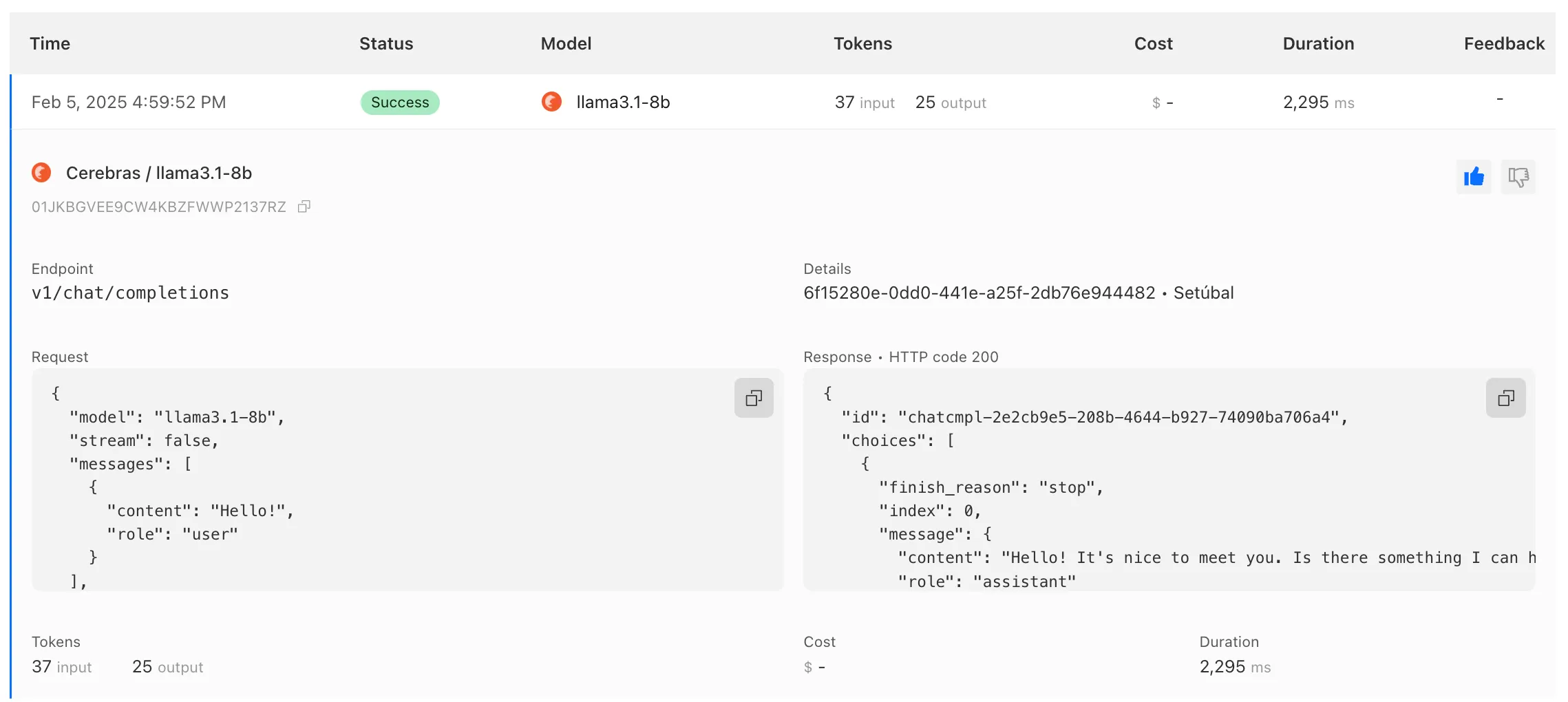
To get started with AI Gateway, just update the base URL. Here's how you can send a request to Cerebras using cURL:
Example fetch request curl -X POST https://gateway.ai.cloudflare.com/v1/ACCOUNT_TAG/GATEWAY/cerebras/chat/completions \--header 'content-type: application/json' \--header 'Authorization: Bearer CEREBRAS_TOKEN' \--data '{"model": "llama-3.3-70b","messages": [{"role": "user","content": "What is Cloudflare?"}]}'
We have released new Workers bindings API methods, allowing you to connect Workers applications to AI Gateway directly. These methods simplify how Workers calls AI services behind your AI Gateway configurations, removing the need to use the REST API and manually authenticate.
To add an AI binding to your Worker, include the following in your Wrangler configuration file:

With the new AI Gateway binding methods, you can now:
- Send feedback and update metadata with
patchLog. - Retrieve detailed log information using
getLog. - Execute universal requests to any AI Gateway provider with
run.
For example, to send feedback and update metadata using
patchLog: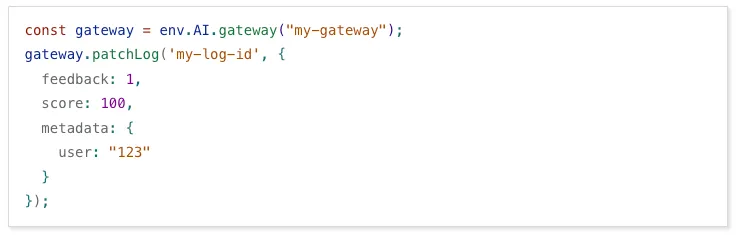
- Send feedback and update metadata with
Browser Rendering now supports 10 concurrent browser instances per account and 10 new instances per minute, up from the previous limits of 2.
This allows you to launch more browser tasks from Cloudflare Workers.
To manage concurrent browser sessions, you can use Queues or Workflows:
index.js export default {async queue(batch, env) {for (const message of batch.messages) {const browser = await puppeteer.launch(env.BROWSER);const page = await browser.newPage();try {await page.goto(message.url, {waitUntil: message.waitUntil,});// Process page...} finally {await browser.close();}}},};index.ts interface QueueMessage {url: string;waitUntil: number;}export interface Env {BROWSER_QUEUE: Queue<QueueMessage>;BROWSER: Fetcher;}export default {async queue(batch: MessageBatch<QueueMessage>, env: Env): Promise<void> {for (const message of batch.messages) {const browser = await puppeteer.launch(env.BROWSER);const page = await browser.newPage();try {await page.goto(message.url, {waitUntil: message.waitUntil});// Process page...} finally {await browser.close();}}}};
AI Gateway now supports DeepSeek, including their cutting-edge DeepSeek-V3 model. With this addition, you have even more flexibility to manage and optimize your AI workloads using AI Gateway. Whether you're leveraging DeepSeek or other providers, like OpenAI, Anthropic, or Workers AI, AI Gateway empowers you to:
- Monitor: Gain actionable insights with analytics and logs.
- Control: Implement caching, rate limiting, and fallbacks.
- Optimize: Improve performance with feedback and evaluations.

To get started, simply update the base URL of your DeepSeek API calls to route through AI Gateway. Here's how you can send a request using cURL:
Example fetch request curl https://gateway.ai.cloudflare.com/v1/{account_id}/{gateway_id}/deepseek/chat/completions \--header 'content-type: application/json' \--header 'Authorization: Bearer DEEPSEEK_TOKEN' \--data '{"model": "deepseek-chat","messages": [{"role": "user","content": "What is Cloudflare?"}]}'For detailed setup instructions, see our DeepSeek provider documentation.
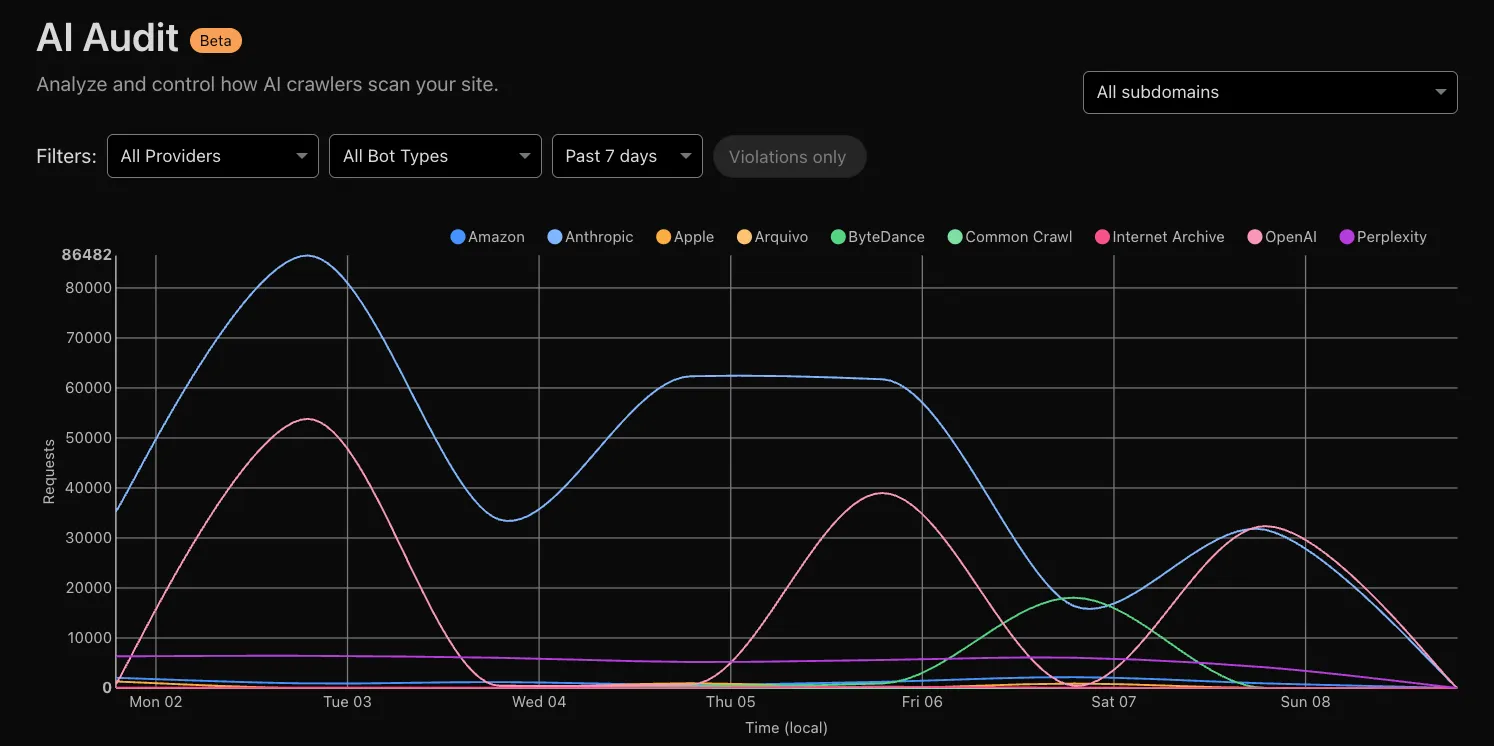
Every site on Cloudflare now has access to AI Audit, which summarizes the crawling behavior of popular and known AI services.
You can use this data to:
- Understand how and how often crawlers access your site (and which content is the most popular).
- Block specific AI bots accessing your site.
- Use Cloudflare to enforce your
robots.txtpolicy via an automatic WAF rule.
To get started, explore AI audit.